87 / EN
User Menu
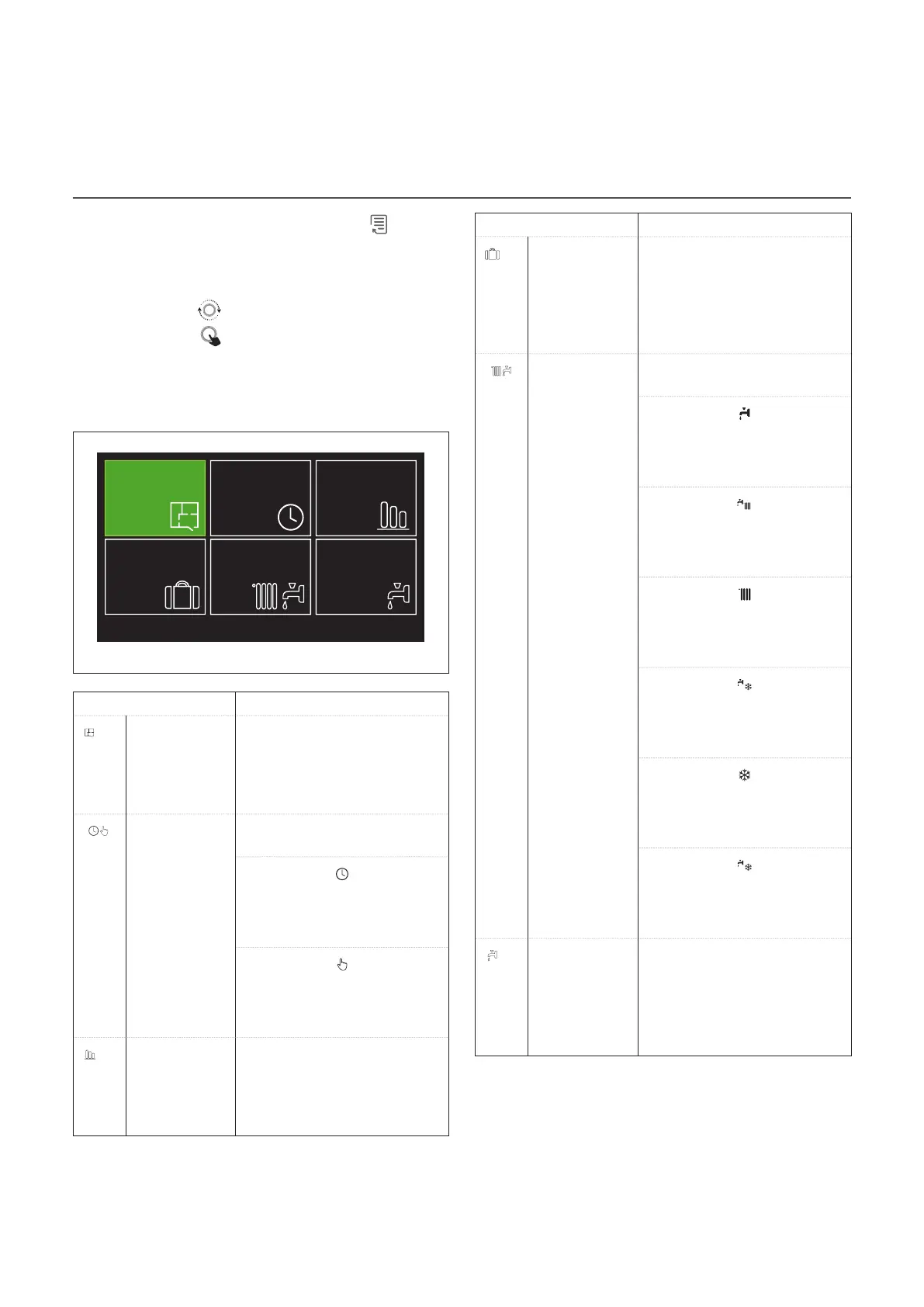
– On the home page press the “Menu” button to access
the user menu.
– The display will show the user menu consisting of two
pages.
– Turn the selector
to highlight the desired menu.
– Press the selector
to access the selected menu.
– To access the second page, turn the selector and scroll the
cursor past the last icon of the first page.
Page 1
1
Zones
management
Holiday function
Time program
System operation
modes
Consumptions
history
DHW settings
Fig. 15
SYMBOLS Description
Zone Allows you to check the main
information on the operating
status of the zones and to set
the operating mode of the
single zone.
Time program Allows you to choose the type
of operation:
SCHEDULED
the system will operate accord-
ing to the set schedule.
MANUAL
the system will operate in con-
tinuous mode
Energy Con-
sumption
Shows the estimated energy
consumption (gas and electric-
ity) and their performance over
time for the heating, cooling
and domestic hot water modes.
SYMBOLS Description
Holiday func-
tion
The holiday function disables
the heating during the holi-
day period and sets the room
heating and domestic hot water
system to anti-frost protection
until the set date.
Operation
mode
Can be used to select the oper-
ating mode:
SUMMER
domestic hot water production,
space heating off.
WINTER
domestic hot water production
and space heating on.
HEATING ONLY
indirect cylinder heating off
(where present).
COOLING AND DOMESTIC HOT
WATER
(if present).
COOLING ONLY
indirect cylinder heating off
(where present).
OFF
system off, anti-frost function
enabled.
Domestic hot
water settings
Can be used to select the de-
sired temperature, the operating
mode for domestic hot water
production and the thermal
sanitisation function of the DHW
storage tank (if present).


 To Next Page