DmPackagingGroup
s.r.l
StradadelCascinotto156,
10156,Torino(TO)-Italy
Tel:011.99.10.455
e-mail:
info@dmpackagingroup.com
CHAPTER 2 - INTRODUCTION
2.1 - GENERAL KNOWLEDGE
The software EFPLCAC0 allows programming and control of a horizontal flow-pack
machine
2.1.1 - KEYBOARD
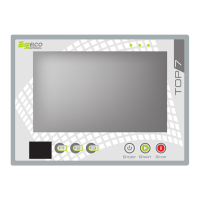
By using the TOP7 push buttons you can do the following:
START : start the work cycle
STOP: stop the work cycle , sto a possible homing in progress , a manual or
semi-automatic movement
STANDBY : start the homing procedure of the machine, the described push buttons are
managed in all operating environments of the software, or all those accessible without the
need to insert a password
2.1.2 - LED
The LEDs of the TOP 7 have the following meanings:
GREEN LED: always on. It indicates that the TOP7 is powered and running;
YELLOW LED: blinking yellow LED indicates a homing in progress. In all other cases, the
LED is off;
RED LED: the red LED can indicate three different states:
flashing at high frequency :indicates a state of emergency in progress. In this situation you
can not perform any movement operation of the machine;
flashing at low frequency: indicates the inability to start a working cycle due to the absence
of the programming conditions to make this possible. In the work environment is a
message in the status bar that describes the cause of this situation. In this state you can
still run the homing and manual movement of the axes;
OFF : it indicates that the machine is ready to perform an automatic cycle;
6


 To Next Page