ATS-5X User Manual Page 13 of 44
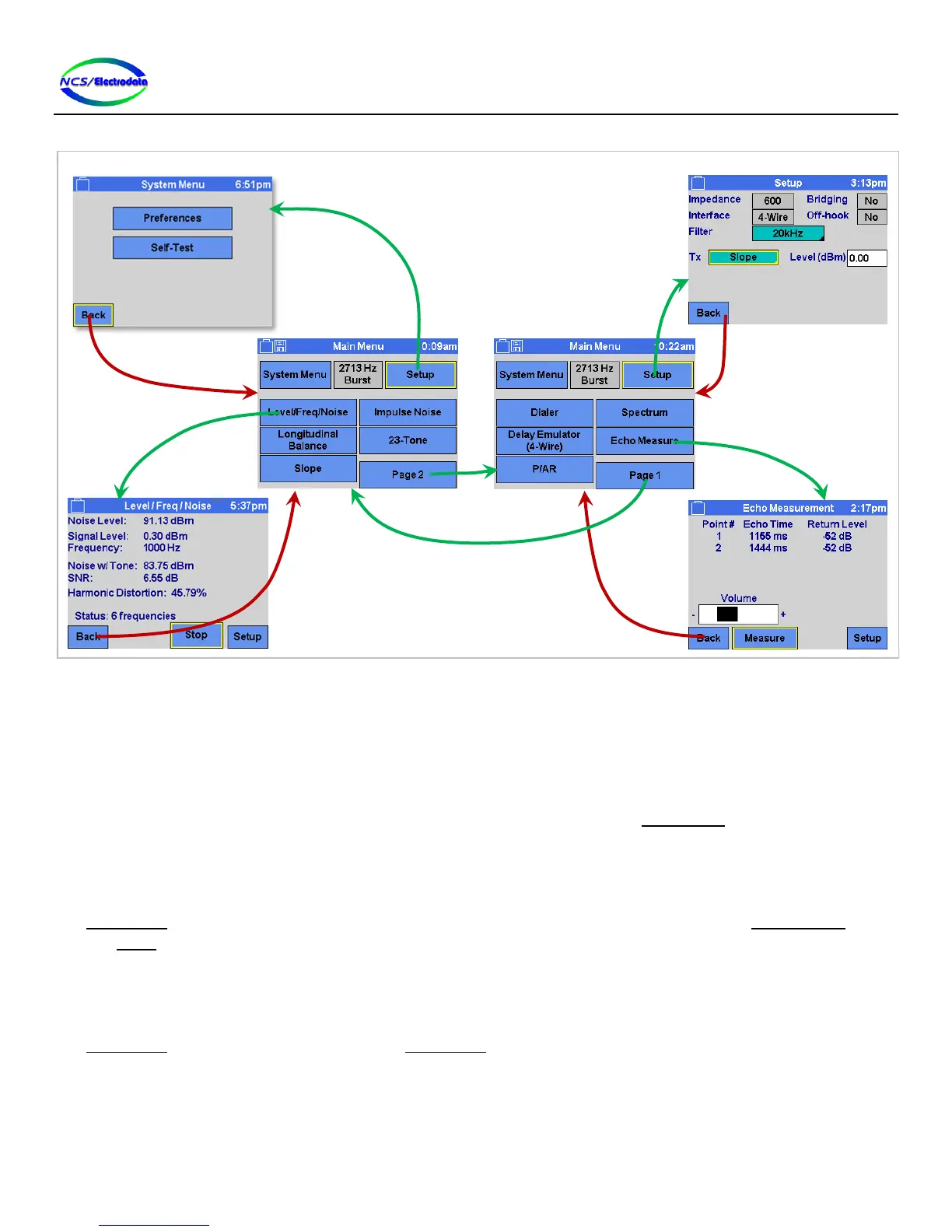
Figure 17 – Simplified Screen Navigation Diagram
2.5 Screens
2.5.1 Start-up Screen
After the ATS-5X is powered on, a splash screen is displayed while loading. This screen shows the results of the power-
on self test in the upper left-hand corner, the product serial number in the lower left-hand corner and the software
version in the lower right-hand corner. After the initialization is complete, the Main Menu screen is automatically
displayed. To allow the start-up screen to be displayed indefinitely, press the Freeze toggle control. Press it again to
continue to the main screen.
2.5.2 Main Menu
The Main Menu screen (see Figure 17) allows access to each of the measurement functions, to the System Menu screen
and the Setup screen. The 2713 Hz Burst momentary toggle control allows a momentary override of the transmitter
setup to transmit a 2713 Hz tone at 0 dBm. When the control is active, the tone is transmitted. Once the control is de-
activated, the transmitter is disabled.
2.5.3 Preferences
The Preferences screen can be accessed from the Main Menu screen by pressing the System Menu button and then the
Preferences button. This screen allows adjustment of ATS-5X parameters related to the user interface, as shown in
Figure 18 below.


 To Next Page