ATS-5X User Manual Page 18 of 44
the display is navigated to the Main Menu screen, the transmitter will be set to off and will remain off until it is set again
in the Setup screen.
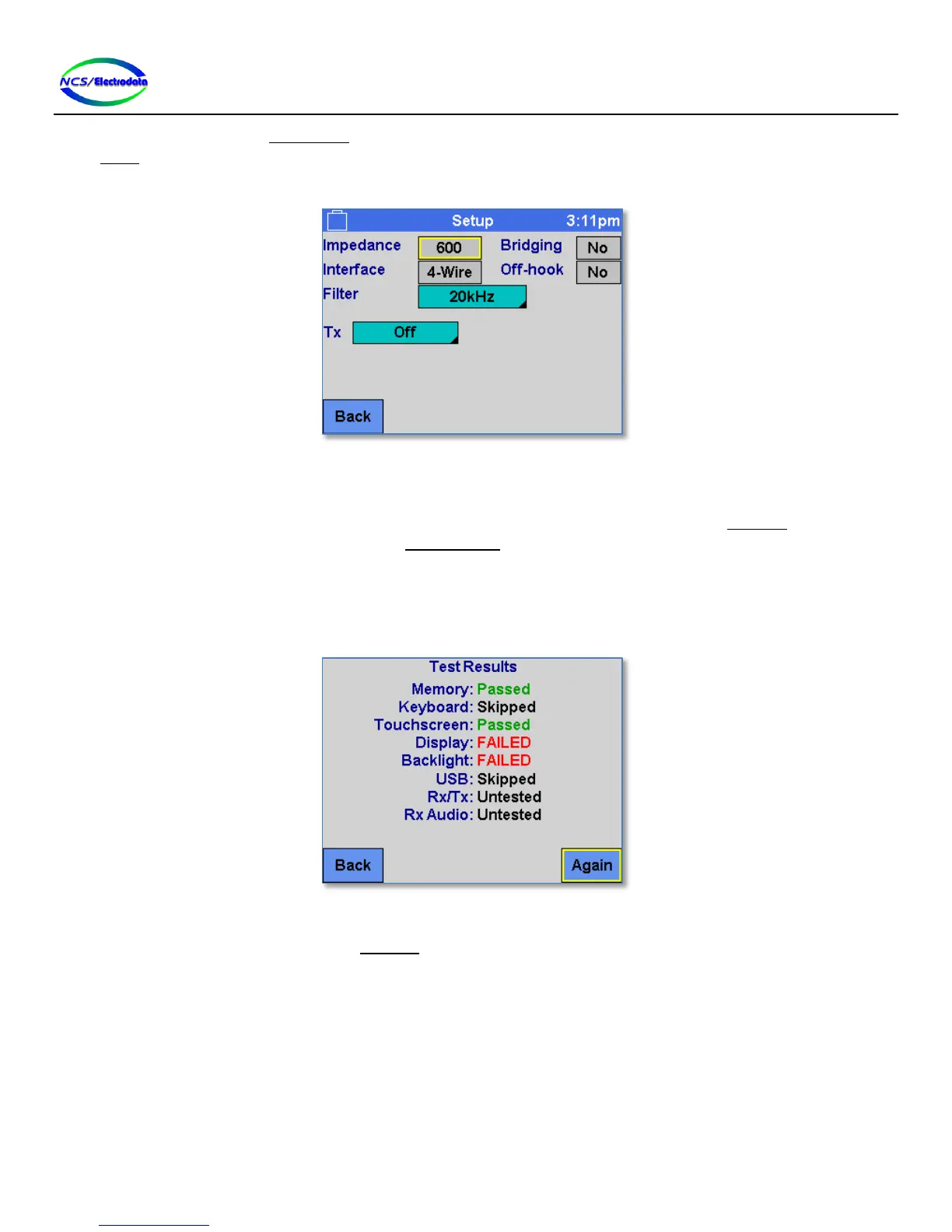
When finished with the setup, press the Back button to return to the previous screen.
Figure 22 – Setup Screen
2.5.6 Self-Test
The ATS-5X has a self-test functionality to allow the user to verify proper operation. The Self-Test screen can be
accessed by pressing the Self-Test button on the System Menu screen. This will begin a sequence of tests that require
user interaction. Tests may be skipped to check the operation of certain functions.
The instructions for each test will be displayed on the screen. Respond to each prompt within 1 minute, or the self-test
will be aborted. After completion of the self-test, a summary is displayed, showing the results for each of the tests, as
shown in Figure 23 below. If the self-test was aborted due to prolonged inactivity, the test result will be “Untested.”
Figure 23 – Self-Test Results
The following controls are displayed on the Self-Test screen at various points:
Back: Return to the previous screen
Yes: Affirmative answer to the prompt on the screen
No: Negative answer to the prompt on the screen
Retry: Repeat the test and discard the results of the last test.
Again: Repeat the entire self-test


 To Next Page