ATS-5X User Manual Page 15 of 44
2.5.5 Setup
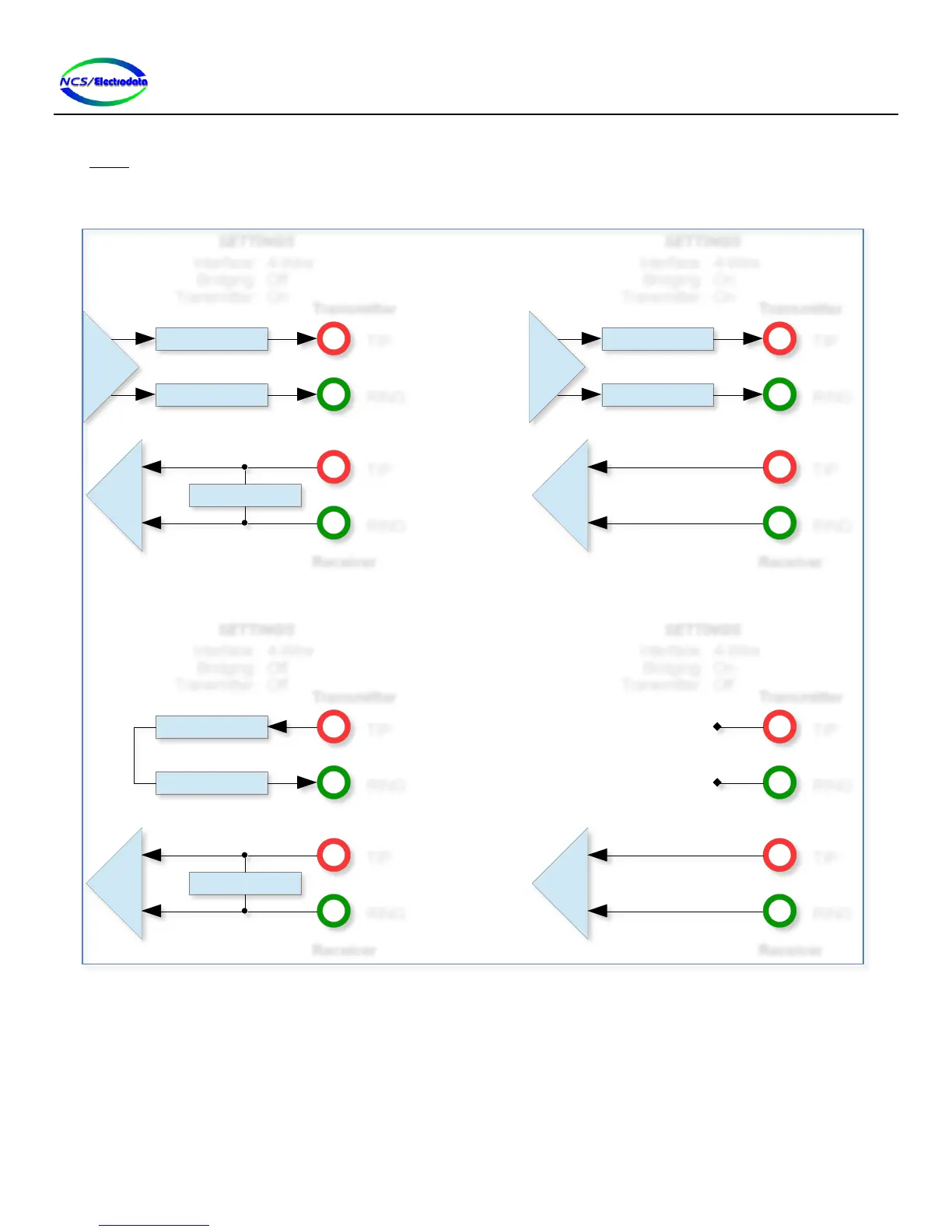
The Setup screen allows configuration of the ATS-5X line interface. Although Figure 22 shows one example of a
configuration, the content and available selections on the screen are dependent upon the measurement mode
previously selected. The ATS-5X line interface is influenced by the setup options as shown in Figure 20 and Figure 21.
Figure 20 – Line Interface Options (4-Wire Configuration)
Source Z / 2
Tx
Source Z / 2
Termination Z
Rx
TIP
RING
TIP
RING
Interface:
Bridging:
Transmitter:
4-Wire
Off
On
SETTINGS
Transmitter
Receiver
Source Z / 2
Tx
Source Z / 2
Tx
Rx
TIP
RING
TIP
RING
Interface:
Bridging:
Transmitter:
4-Wire
On
On
SETTINGS
Transmitter
Receiver
Source Z / 2
Source Z / 2
Termination Z
Rx
TIP
RING
TIP
RING
Interface:
Bridging:
Transmitter:
4-Wire
Off
Off
SETTINGS
Transmitter
Receiver
Rx
TIP
RING
TIP
RING
Interface:
Bridging:
Transmitter:
4-Wire
On
Off
SETTINGS
Transmitter
Receiver


 To Next Page