ATS-5X User Manual Page 7 of 44
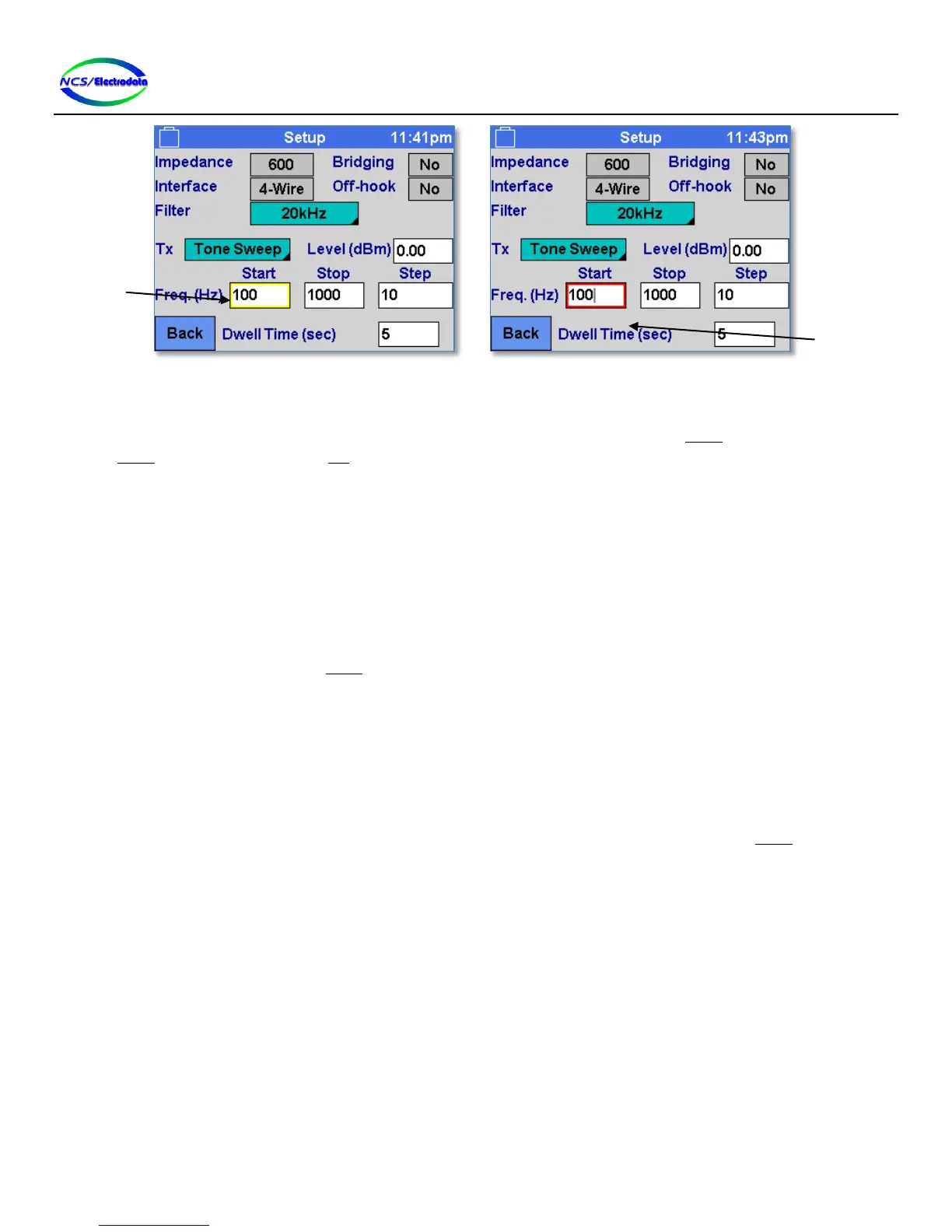
Figure 6 – Focused and Active Controls
Focus is shifted from one control to the next by using the directional arrow keys on the keypad or USB keyboard. Once a
control is focused (yellow perimeter) it can be activated (red perimeter) by pressing the ENTER key and de-activated by
pressing ENTER again or by pressing the ESC key.
Some controls cannot be focused and must be controlled by the touchscreen or USB mouse. Only number or text entry
fields need to be activated before they can be controlled by the keypad or USB keyboard.
2.4.3 Screen Elements
2.4.3.1 Button Control
The button control element (see Figure 5 below) behaves similar to a standard button on a computer. An action is
initiated by pressing and releasing (touchscreen or USB mouse) within the boundary of the button. The button action
can also be performed by pressing the ENTER key when the button is focused.
2.4.3.2 Toggle Control
The toggle control allows selecting one action or setting from a collection. Each time the toggle control is pressed in the
same manner as a button control, the display text changes and a different action is performed. Each of the different
items available on the control can be accessed by successive control presses. The toggle control is demonstrated in
Figure 7 below.
A momentary toggle control, such as the 2713 Hz Burst control on the main menu, requires a holding action on the
touchscreen to remain activated. These types of controls may be toggled on and off by pressing the ENTER key.


 To Next Page