ATS-5X User Manual Page 14 of 44
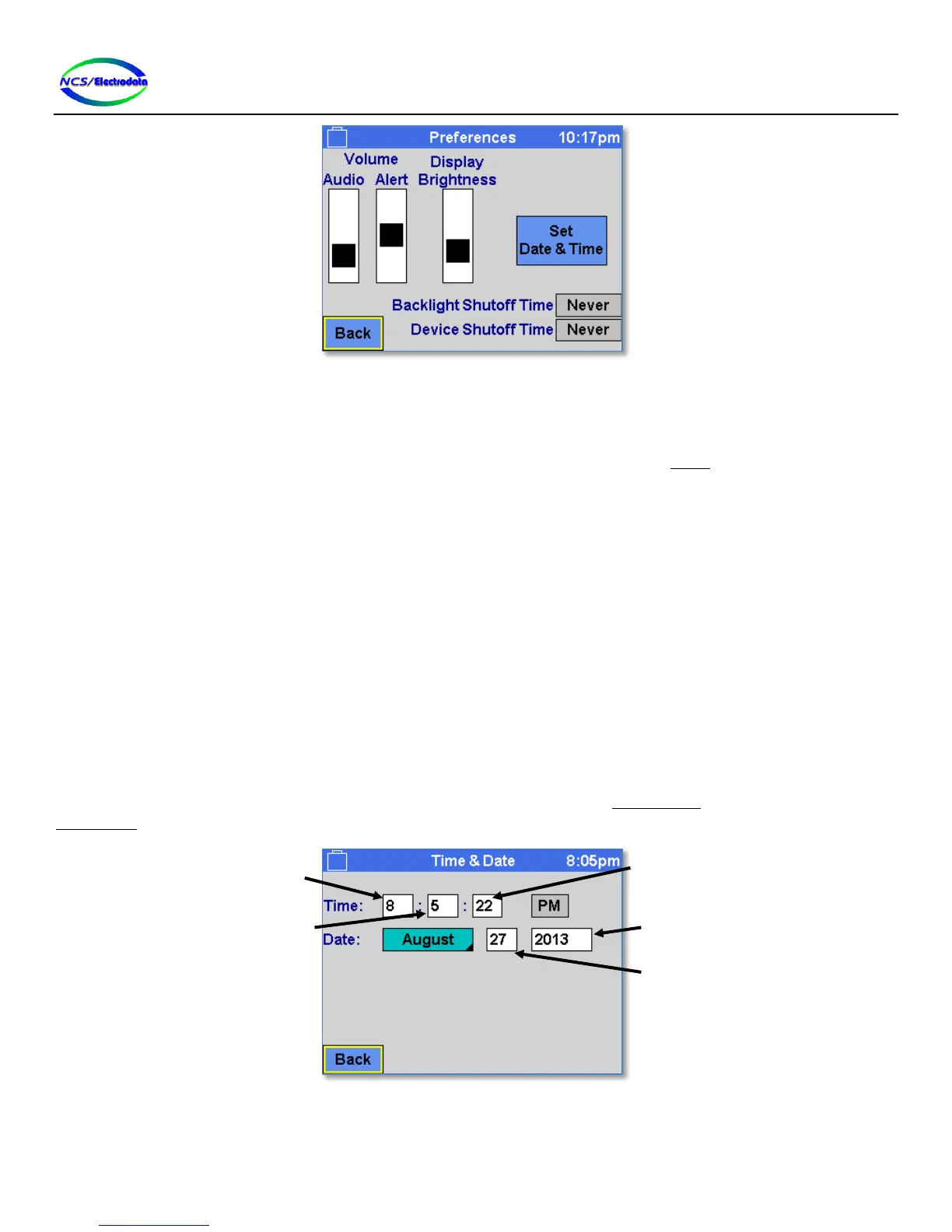
Figure 18 – Preferences Screen
The screen controls have the following function:
Audio Volume: Adjusts the volume of the ATS-5X receive signal, which may be the signal at the receive jack
or the transmit jack, depending on the configuration in the Setup screen. Moving the slider
towards the top of the screen will increase the volume.
Alert Volume: Adjusts the volume of the user interface alerts or “beeps.”
Display Brightness: Adjusts the intensity of the display backlight. Moving the slider toward the top of the screen
will increase the brightness.
Backlight Shutoff Time: Sets the inactivity duration before the display brightness level is reduced. User interface
operation will maintain the display brightness at the set level. However, after a period of
inactivity, the display brightness will be reduced. User interface operation will again restore
the brightness back to the set level. This setting may be used to assist in prolonging the
battery charge.
Device Shutoff Time: Sets the inactivity duration before the ATS-5X will power down. Unless there is user
interface activity within the specified duration, the device will shut itself down.
Set Date & Time: Displays the Date & Time screen to allow adjustment of the date and time.
2.5.4 Date & Time
The time and date that is maintained by the ATS-5X may be adjusted from the Date & Time screen, accessible from the
Preferences screen. Figure 19 below shows the date and time adjustment.
Figure 19 – Date & Time Screen


 To Next Page