ATS-5X User Manual Page 8 of 44
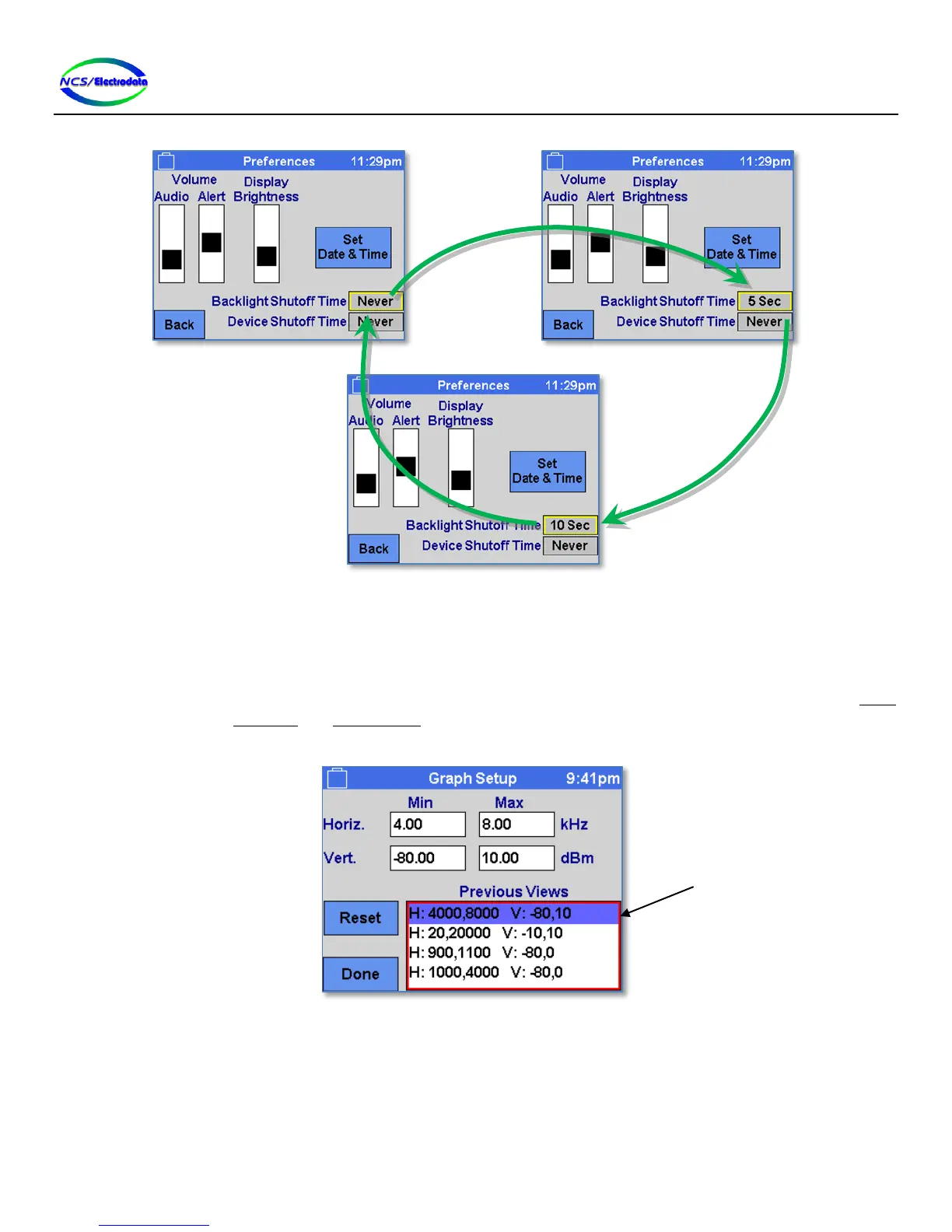
Figure 7 – Toggle Control Item Cycling
2.4.3.3 Selection List Control
The selection list control displays a vertical list of text items and allows selection of one or more items, depending on the
context. The text items can be selected by pressing with the touchscreen or USB mouse on the item. To select an item
with the keypad or USB keyboard, the control must first be activated by focusing the control and then pressing the ENTER
key. Once activated, the UP ARROW and DOWN ARROW keys can be used to change the selected item. The selected item in
a selection list control is marked with a colored row, as shown in Figure 8.
Figure 8 – Selection List Control
2.4.3.4 Drop Selection List Control
The drop selection list control is similar to a selection list control in that it allows selection of a single item out of a
vertical list; however, the list collapses to show only the selected item when the selection is complete. The drop
selection list can be distinguished from the button and toggle controls by the marker in the bottom right hand corner, as
shown in Figure 9.
“Pressing” the toggle
control selects a new
list item


 To Next Page