First Print
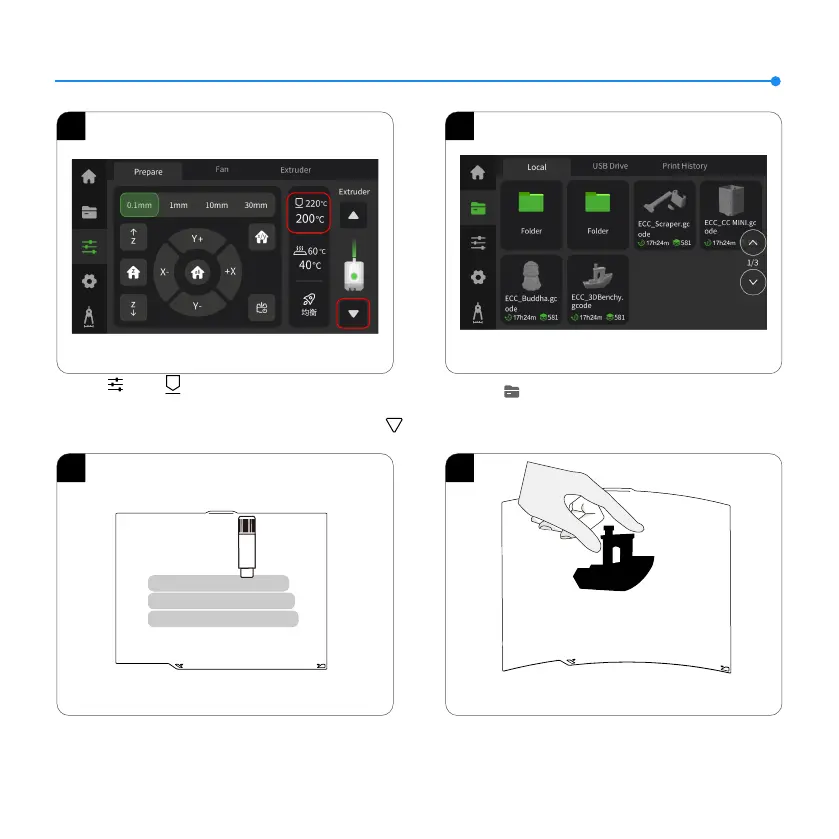
1. Click【 】- 【 】to set the nozzle temperature to
the suitable temperature for the lament (e.g., 220℃ for PLA).
Wait for the temperature to reach the set value, then click 【 】
repeatedly until the lament stas extruding from the nozzle.
2. Click 【 】 - 【Local】 to select a model for test printing.
(Tip: Long press to import print files from your USB drive to local
storage.)
1 2
11
3 4
4. After the printed model cools down, detach the flexible build
plate together with the model from the device. Bend the plate
slightly to separate the model from it (avoid overbending to
prevent deformation).
3. If the adhesion of the build plate decreases after prolonged
use, you can apply solid glue or use platform adhesive spray to
enhance the first-layer adhesion of the model, or replace the
build plate.













 To Next Page