10
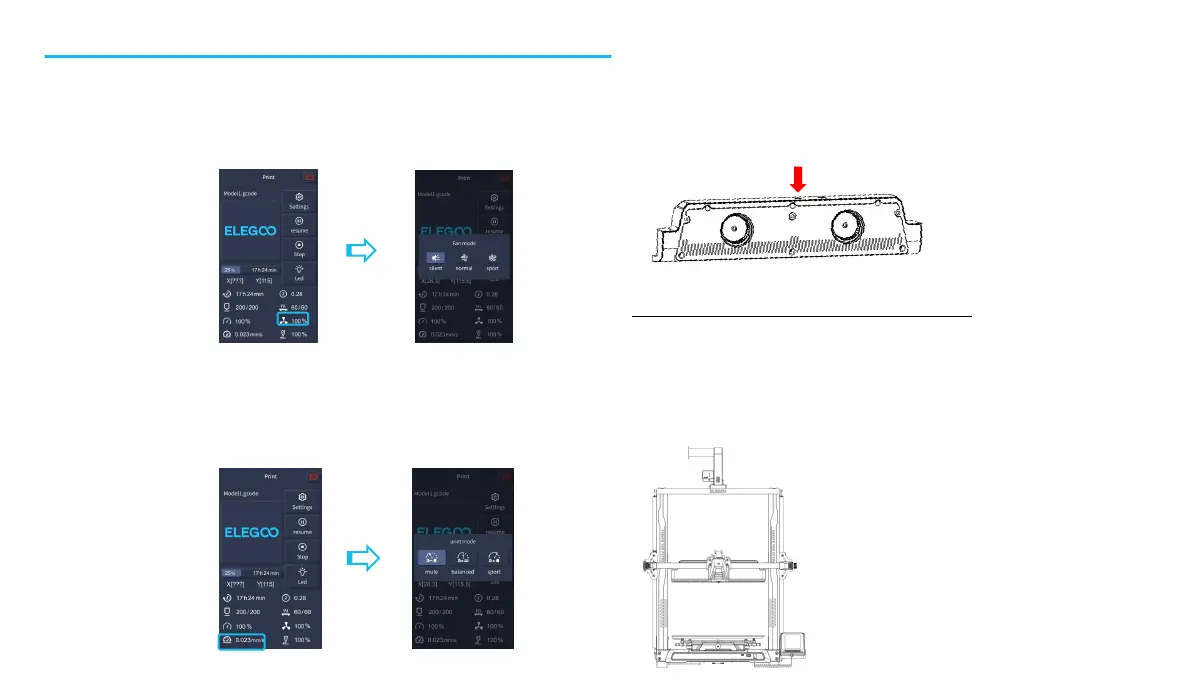
The Rear Cooling Fan is turned off when selecting the Silent mode
Operation Of The Rear Cooling Fan:
From the Home Screen, select the Print option. Next select the Fan Icon in order to adjust the cooling fan operational settings during the
printing process.
NOTE: The Rear Cooling Fan has three operational modes: Silent(60%), Normal(80%) & Sport(100%). Please select a mode appropriate to
your printing needs as shown in photos below.
Display Screen Operation Introduction
Print Mode Introduction
l During the printing process, users can adjust the printing mode by clicking the speed icon.
l The three modes correspond to three different speed values, acceleration values, drive mute thresholds, and percentages of fan speed
settings during printing.


 To Next Page