①
②
③
14
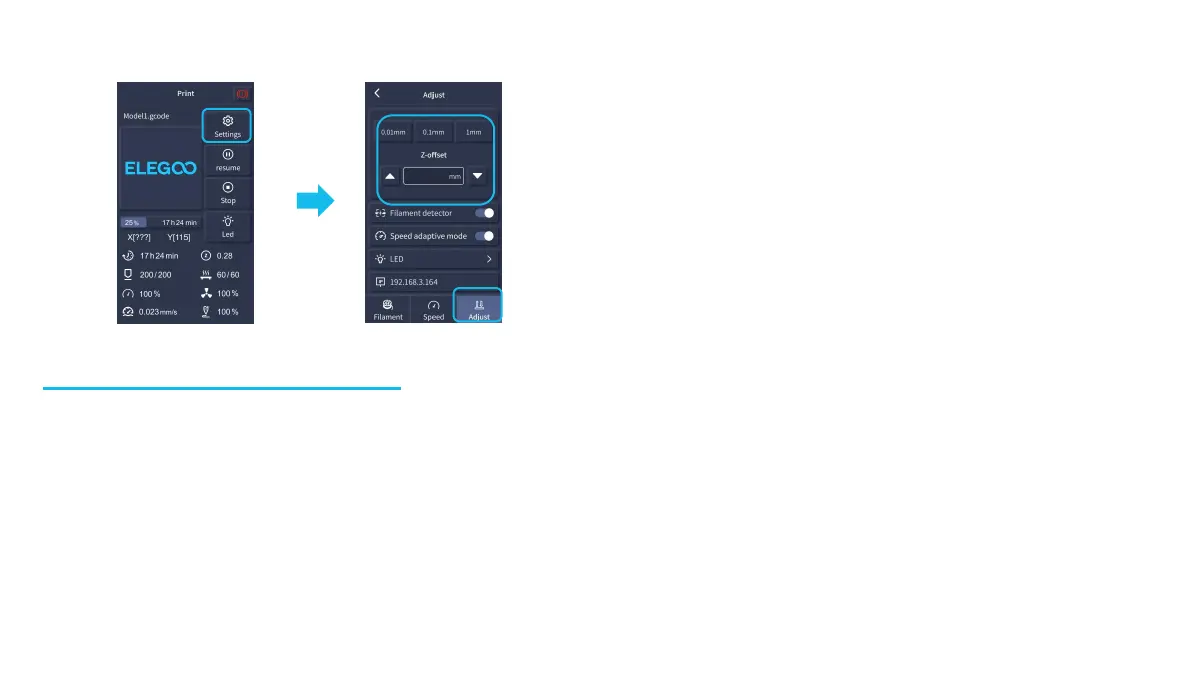
Adjustment of nozzle height while printing
NOTE: While printing and following this procedure for
fine-tuning the nozzle height, please ensure that you
switch the moving distance to the smaller increment
settings of 0.01mm or 0.1mm to prevent the nozzle from
potentially dragging excessively along the heated bed
platform (which can cause damage to the build plate) or
to keep filament from “hanging” in the air.
Resume Printing Function
Power Loss Recovery:
1. Your printer, has features to continue printing following a sudden interruption or loss of power (an outage) or any accidental
events (aka “switching-off” power), and this function does not need to be set manually.
2. Once power has been resumed to the printer, simply press the “Resume” option to continue printing.
NOTE: The PEI metal build plate has better overall adhesion when it is fully heated. If the power has been “Off” for too long, the
model may become easily dislodged or fall off the PEI plate very easily. In such event, the Resume Printing Function will not be able
to continue.
Filament Detection:
When the sensor detects that filament is not present, this function will inform you to replace the filament before continuing an
active print, in order to prevent a print failure due to insufficient filament material.











 To Next Page