Software Installation
The included “Slicer” Software program is a modified version of the Cura Open Source Slicer software that is publically available.
While you can always use any version of Cura, we strongly urge you to use the ELEGOO version of Cura in order to ensure
maximum tested compatibility with your specific ELEGOO printer.
TIP: We recommend copying the entire contents of the included USB Drive to your local computer for easier access to all of its files.
Software Installation Procedure:
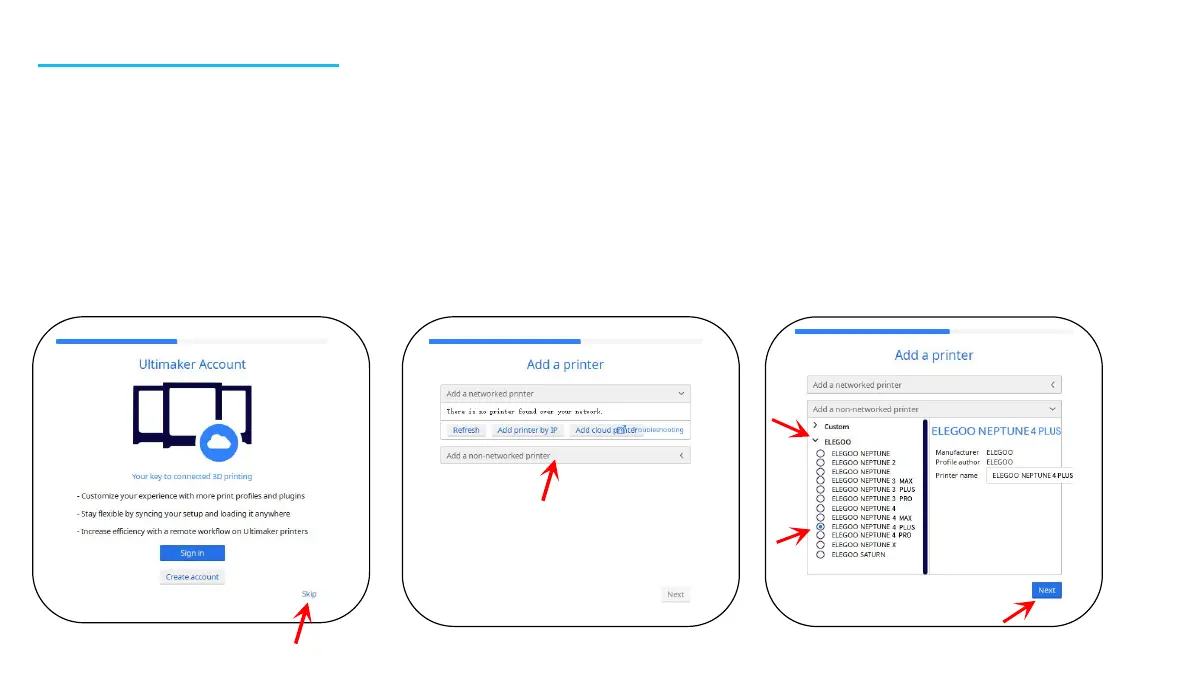
1. Open the attached USB Drive and navigate into the path: \Software and Software Drivers folder \ELEGOO
Software folder and “double-click on the ELEGOO Cura application to begin the installation process.
2. Continue by following the prompts in the installation process specific to your system.
3. Finally, select the corresponding ELEGOO printer model as shown below to complete the settings process.
15











 To Next Page