5 Installation and Commissioning
50
The device display and the visor for the optical head are protected from
scratching by a transparent protective foil. Remove the protective foils after
installation (they may impair the readability of the display and the
functionality of the optical head).
5.4.1 Mounting the Device on the Plate
Procedure:
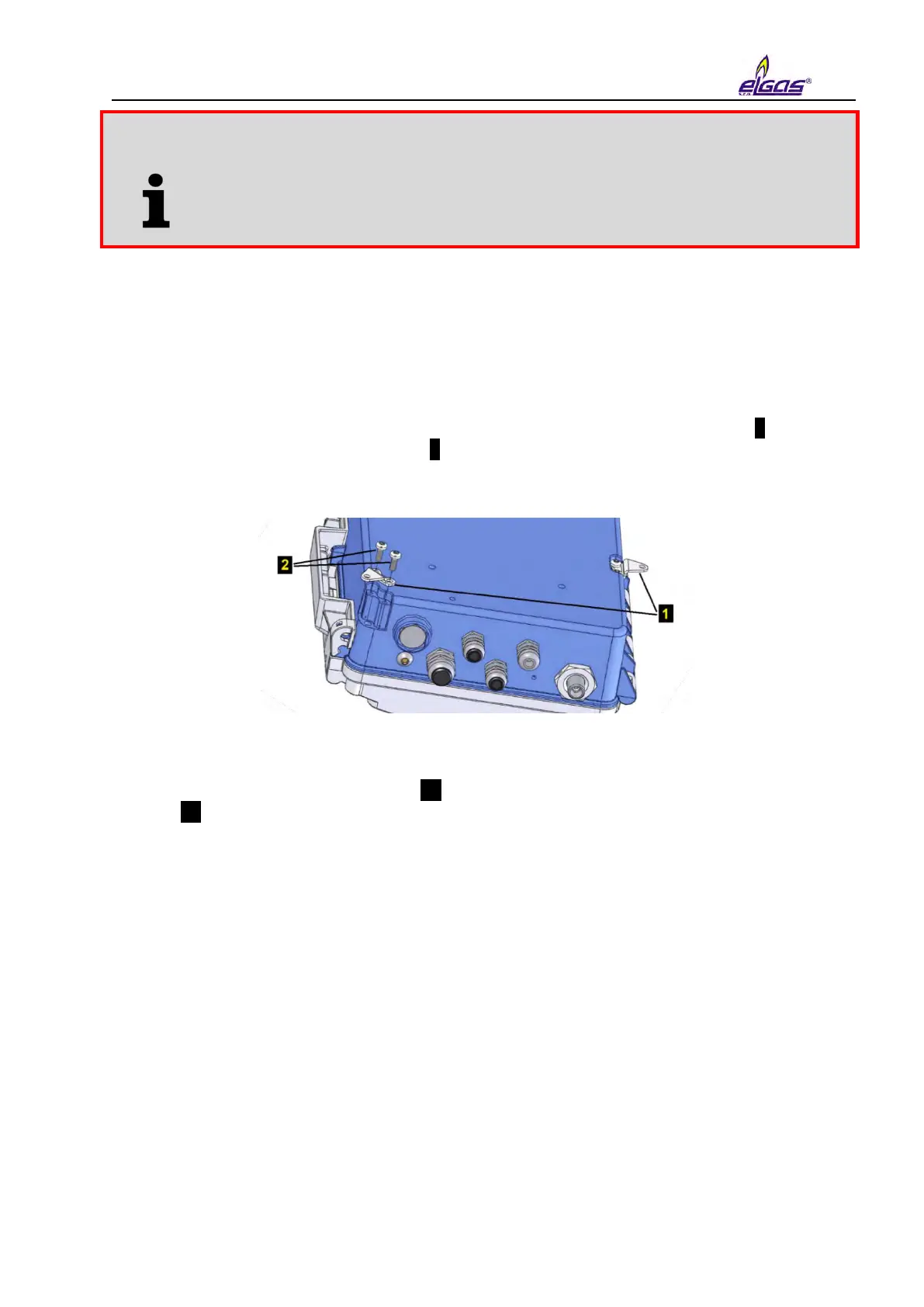
1. Before attaching the device to the mounting plate, first fit 3 pcs of brackets 1 using
3.5x12 self-tapping screws for plastic 2 supplied with the device (see Figure 8) onto the
bottom side of the device (see Fig. 8).
Fig. 8 Mounting the brackets on the device
2. Attach the device fitted with brackets 3 to the mounting plate using 3 screws M4x10 ISO
7045 4 (Fig. 9, Fig. 10). The M4 rivet nuts are pre-fitted on the mounting plate.


 To Next Page