6 Operating the Device
89
6.1 Keypad
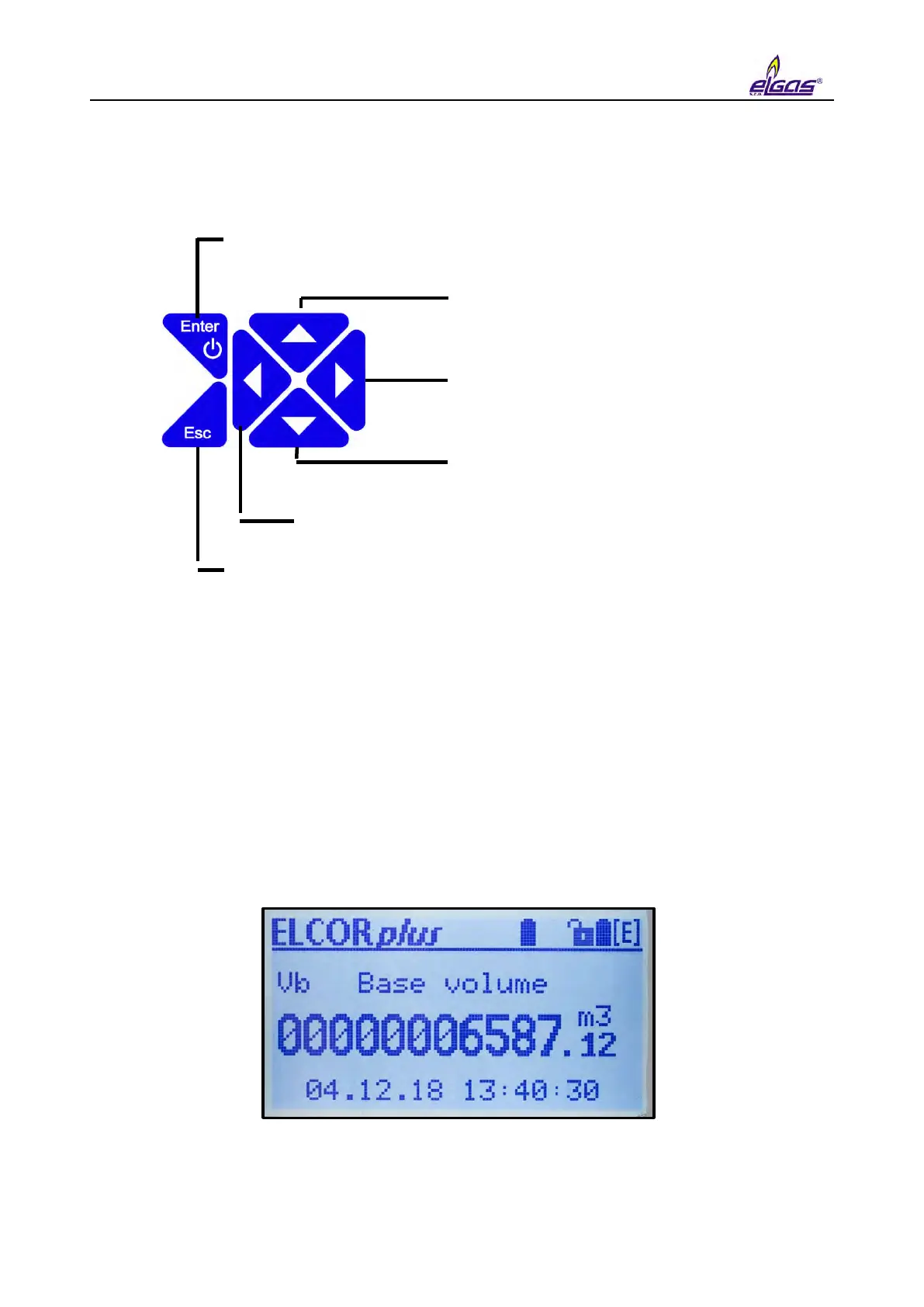
Pressing the Enter key for 2 seconds turns the display on
Moving from one menu item into lower level menu (submenu)
When displaying actual values, Enter will scroll through the
screen to display all the quantities one after another
Moving in time in the archives
towards older records
In the archive view, moving to the
next quantity in the same time
slot
Moving in time in the archives
towards newer records
In the archives, moving to the previous item in the
same time slot
Moving from a submenu item back to higher level menu
Fig. 45 Function of the keys
6.2 System Menu
The device is operated based on selecting items from the menu. For the purposes of further
interpretation, we call the basic menu items the highest items. By entering those items, navigate
to the lower menu levels (submenus).
If the display has been off for a longer time, the home screen with a volume Vb value is displayed.
Home Screen (Initial Display)
Icon position: 7 6 5 4 3 2 1
The first line in the top right corner displays icons indicating the basic status of the device.


 To Next Page