FC BASIC User Manual
12/24
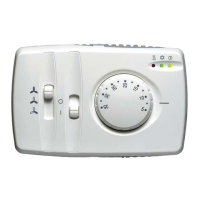
4.2 Fan control slider
Switches the phase sectioned by the fan relay on three motor windings to achieve three different fan speeds:
High/Medium/Low.
Low speed: Medium speed: High speed:
4.3 Operating mode slider
Depending on the model (refer to table of models), it is possible to select Heating/off/Cooling operating mode or on/off
(0 / I) operating mode.
Heating mode: Cooling mode: Off mode: On mode:
O I
4.4 Economy slider (optional)
Located at the top of the controller and used to operate the economy function.
4.5 LED’s
Three LED’s are used to indicate the actual mode:
On/economy LED: (YELLOW)
Stays on during normal operation; Blinks during economy operation
Cooling LED: (GREEN)
Illuminates during cooling demand (cool) and in the Dead zone.
Blinking: indicates that regulation algorithm has not been satisfied but consent, by the water sensor, is not being given to
start the fan.
Stays on: cooling is available(fan and valve active).
Heating LED: (RED)
Illuminates during heating demand (heat) and in the Dead zone.
Blinking: indicates that regulation algorithm has not been satisfied but consent, by the water sensor (2-pipe models only),
is not being given to start the fan. (refer to Hot Start)
Stays on: heating is available (fan, valve and/or electric heater are active)
All LED’s Blink for 3 seconds when the controller is turned onto the power supply.
Alarm indication
All LED’s continuously Blink to indicate an alarm status. An alarm will be generated if one of the sensors is damaged,
disconnected (some models mandatory need the water sensor), or short circuited, until the problem has been solved. This
will also appear when the window contact has been activated (contact closed).


 To Next Page
 Loading...