EasyManua.ls Logo

ELNA 6003 - Page 31

ELNA 6003
45 pages
Print Icon
To Next Page IconTo Next Page
To Previous Page IconTo Previous Page
Loading...
e
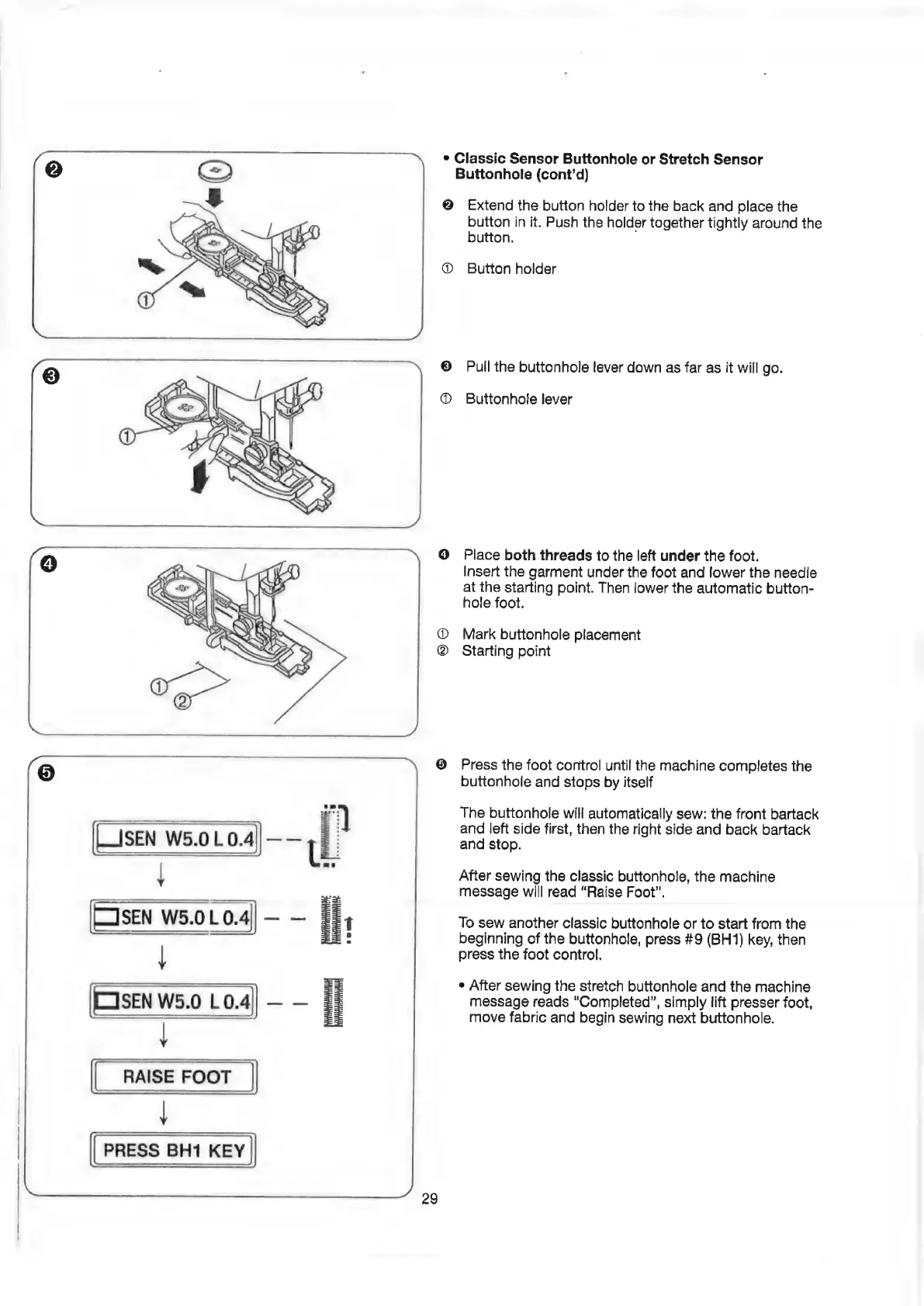
Classic
Sensor
Buttonhole
or
Stretch
Sensor
Buttonhole
(cont’d)
@
Extend
the
button
holder
to
the
back
and
place
the
button
in
it.
Push
the
holder
together
tightly
around
the
button.
@
Button
holder
Pull
the
buttonhole
lever
down
as
far
as
it
will
go.
Buttonhole
lever
Place
both
threads
to
the
left
under
the
foot.
Insert
the
garment
under
the
foot
and
lower
the
needle
at
the
starting
point.
Then
lower
the
automatic
button-
hole
foot.
Mark
buttonhole
placement
Starting
point
Press
the
foot
control
until
the
machine
completes
the
buttonhole
and
stops
by
itself
The
buttonhole
will
automatically
sew:
the
front
bartack
and
left
side
first,
then
the
right
side
and
back
bartack
and
stop.
After
sewing
the
classic
buttonhole,
the
machine
message
will
read
“Raise
Foot”.
To
sew
another
classic
buttonhole
or
to
start
from
the
beginning
of
the
buttonhole,
press
#9
(BH1)
key,
then
press
the
foot
control.
e
After
sewing
the
stretch
buttonhole
and
the
machine
message
reads
“Completed”,
simply
lift
presser
foot,
move
fabric
and
begin
sewing
next
buttonhole.

Related product manuals