17
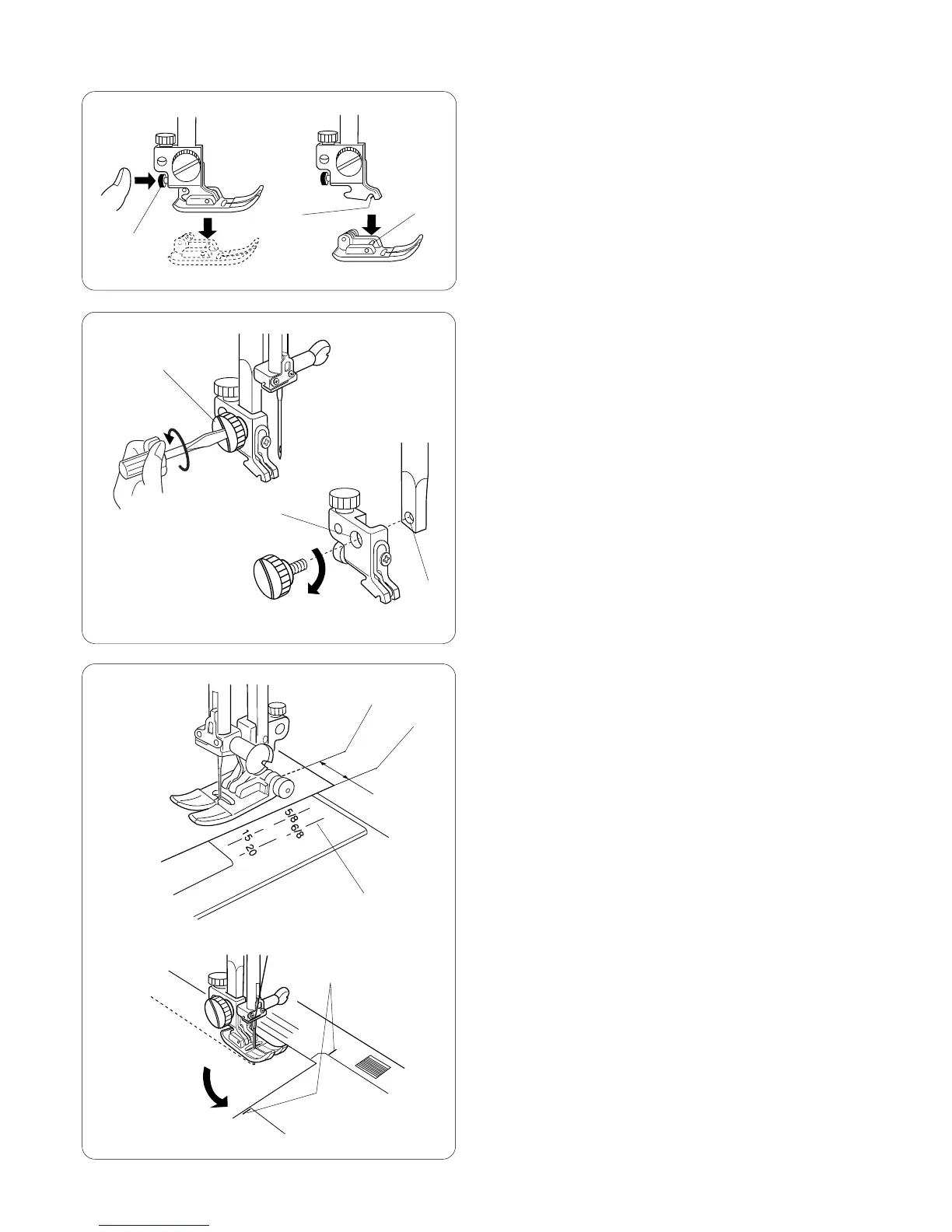
Attaching and Removing Presser Feet
Press the “Up/Down Needle” key until the needle is in
the raised position.
Turn OFF the power switch. Raise the presser foot and
press the red button q on back of the shank. The
presser foot will drop off.
Place the selected presser foot so the pin e on the foot
lies just under the groove w of the shank. Lower the
presser bar and attach the foot.
Attaching and Removing Shank
Turn OFF the power switch. Raise the presser bar.
Turn the thumbscrew q
counterclockwise with the
screwdriver to remove the shank.
To attach, match the hole in the shank w with the hole in
the presser bar e. Put thumbscrew in hole and turn
clockwise to tighten.
Seam Allowance Lines
The lines on the needle plate, machine bed and bobbin
cover plate help you measure seam width.
The number indicates the distance between the center
needle position (3.5) and the seam allowance line.
q Center needle position
w Edge of fabric
e Guidelines
r 90º pivot angle guideline for 5/8˝
q
w
e
q
w
e
q
w
e
r














 To Next Page