37
How to Preview the Combined Sequence
(Utility, Satin, Decorative or Letters)
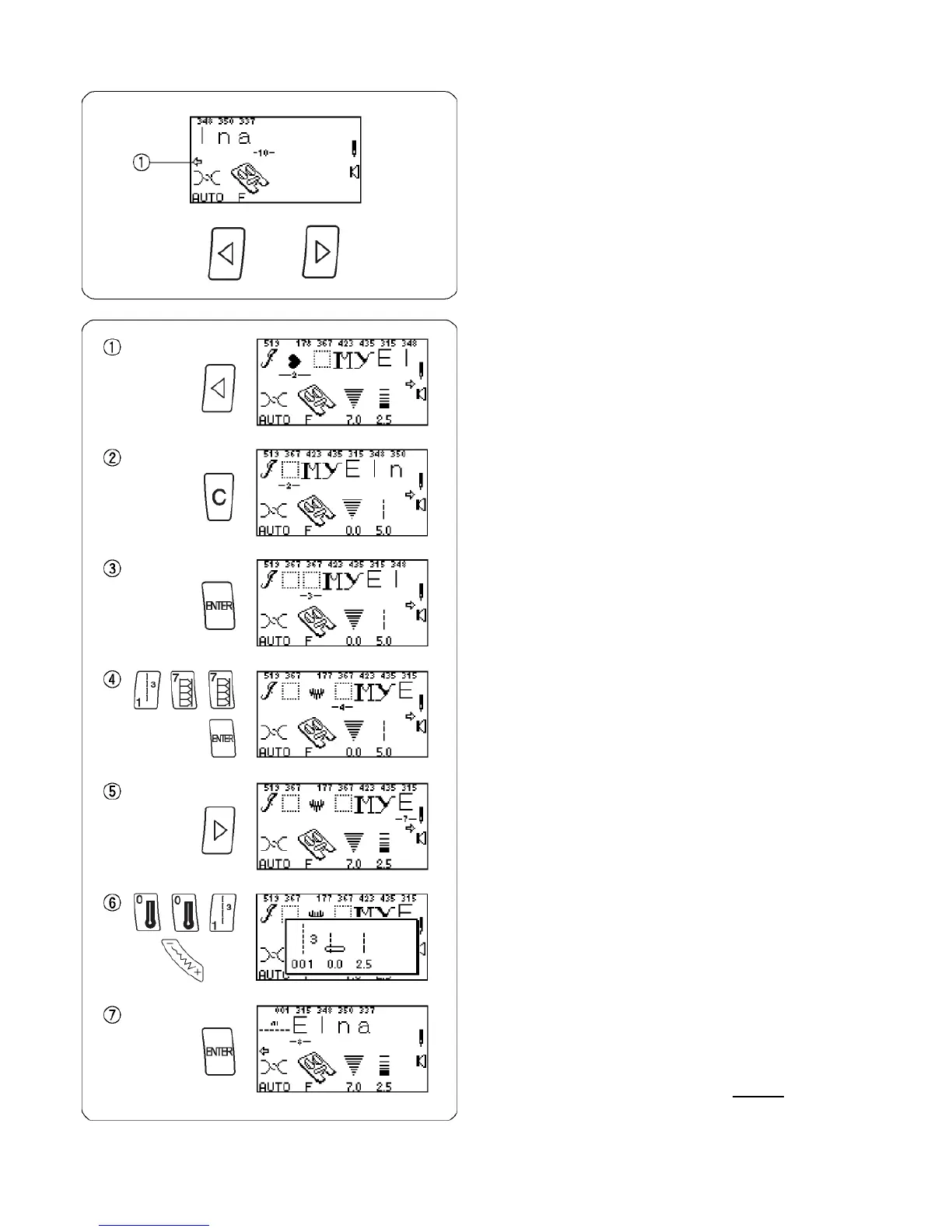
Program the following stitches using the “ENTER” key:
519, 178, 367, 423, 435, 315, 348, 350 and 337.
The LCD screen will show a maximum of 8 stitches at
one time. The ARROW symbol located under the
sequence indicates that there are more stitches off
screen in that direction.
Press “Review Memory Left” key (or “Review Memory
Right” key) to move blinking cursor and preview the
entire sequence.
Editing
How to Delete Stitches
The location of the blinking cursor determines which
stitch will be deleted.
Press “Review Memory Left” key or “Review Memory
Right” key to move cursor under stitch 178.
Press “C” key to delete the heart.
How to Add Stitches
The location of the blinking cursor determines where the
new stitch will be added. Blinking cursor should be under
stitch 367.
Press “ENTER” key.
Select 177. Press “ENTER” key.
Press “Review Memory Right” key to move cursor
under stitch 315.
Select 001. Press “Stitch Width/Needle Position” key
and change needle position to 0.0.
Press “ENTER” key.
NOTE: It is possible to edit after sewing out a sequence.
Before selecting new stitch, press one of the
“Review Memory” keys to have blinking cursor
appear.














 To Next Page