42
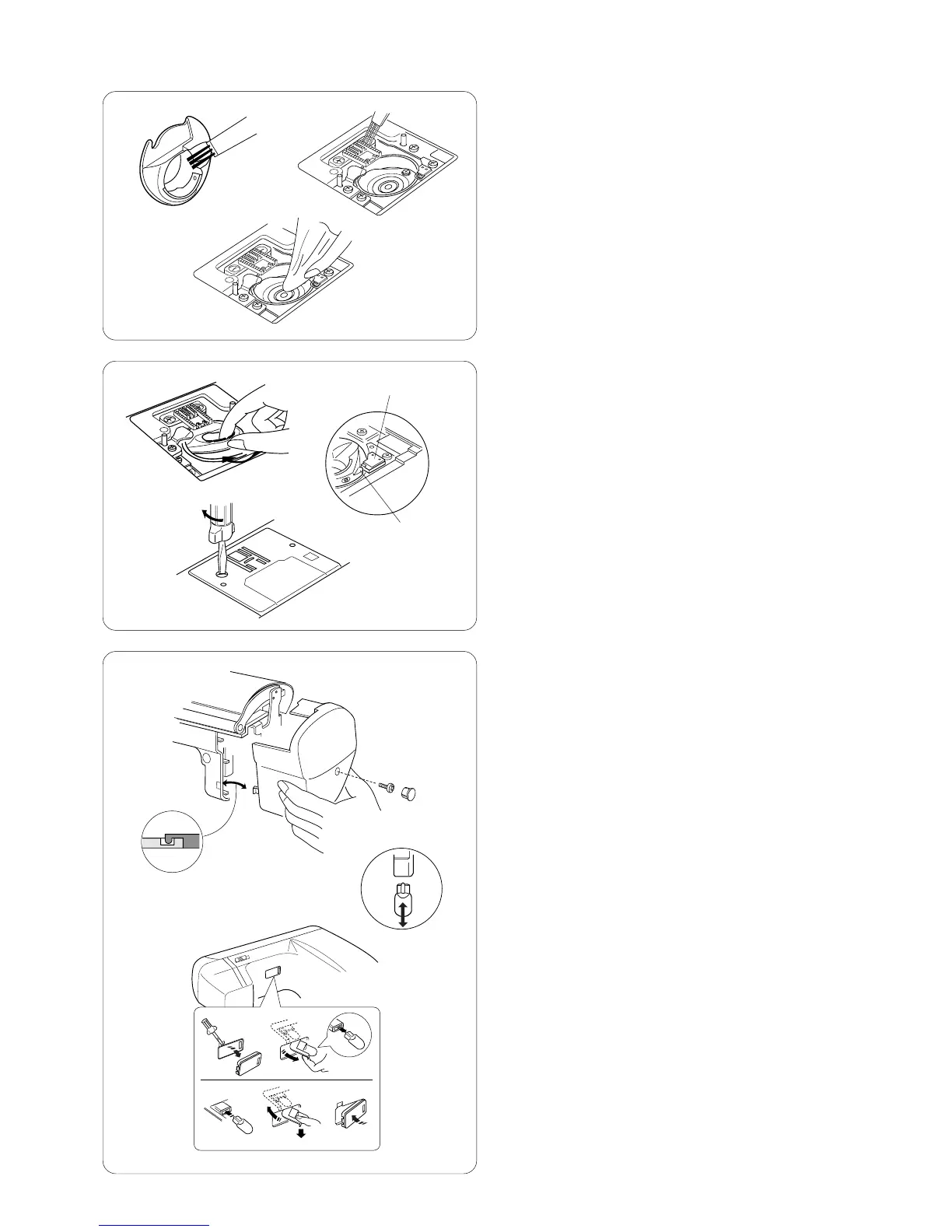
e Clean the feed dog and hook area with the lint brush.
Wipe out gently with soft, dry cloth. (You can also use
a small vacuum cleaner.)
Replacing the Bobbin Case
r Insert the bobbin case so the knob fits next to
the stopper in the hook area.
z Stopper
x Knob
t Replace the needle plate, inserting the two needle
plate guide pins into the holes in the needle plate.
Replace the screw.
After cleaning, be sure to replace the needle, presser
foot and bobbin.
Changing the Light Bulbs
One sewing light is located behind the face plate. Unplug
the machine. Remove screw button and screw. Pull away
face plate.
Pull out light socket. Pull out light bulb. Push in light bulb
with pins aligned to holes in light socket. Push in light
socket.
Replace face plate, screw and screw button.
The second sewing light is located over the sewing bed.
Unplug the machine. Tip machine back on tabletop.
Insert screw driver and pull away light cover. Pull out light
bulb. Push in light bulb with pins aligned to holes in light
socket.
Replace light cover.
NOTE: Only use same type light bulb rated 12 Volts,
5 watts.
e
r
t
z
x














 To Next Page