19
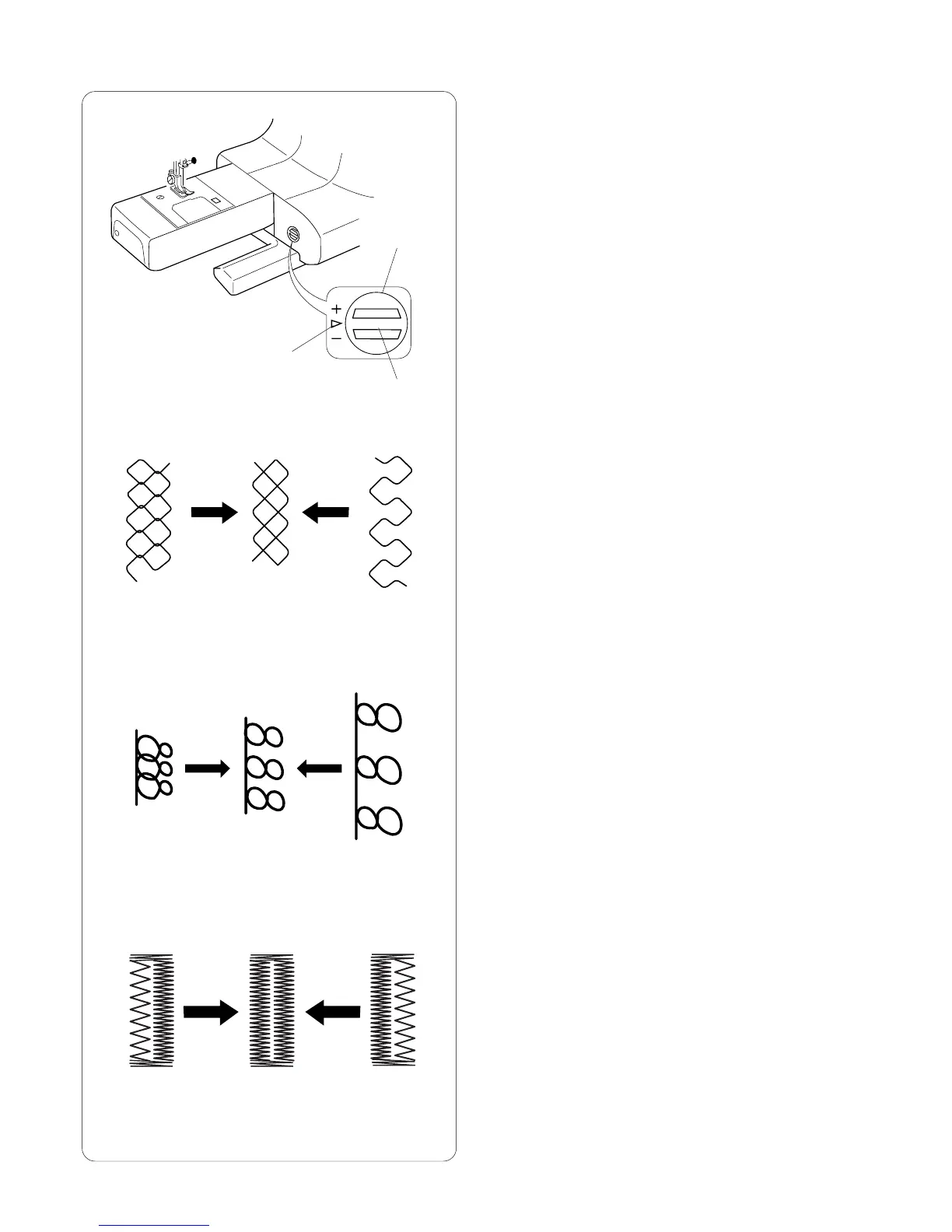
Using the Fine Adjustment Screw
Choice of fabrics and threads may affect the stitch
formation. The fine adjustment screw can be used to
either lengthen or shorten the stitch.
q Fine adjustment screw
w Standard mark
e Setting mark
To fine tune, use a screwdriver to move the setting mark.
• If stitches are too short r, correct by turning the
screw in the direction of “+”.
• If stitches are too long t, correct by turning the screw
in the direction of “–”.
• If letters/numbers are overlapped y, correct by
turning the screw in the direction of “+”.
• If letter/numbers are too spread out u, correct by
turning the screw in the direction of “–”.
For buttonholes, always make the adjustment according
to the left side.
• If left side of buttonhole is less dense (too open) i
compared to right side, correct by turning screw in
direction of “+”.
• If left side of buttonhole is more dense (too closed) o
compared to right side, correct by turning screw in
direction of “–”
q
w
e
r
t
y
u
i
o
(+)
(–)
(+) (–)
(+)
(–)














 To Next Page