905U Wireless I/O Module User Manual
105S Serial I/O Module
Page 50 © January 2011
PI1 of the -2 and -4
modules normally
count up to 100Hz (as
for the other PI’s),
however can be
configured to count up
to 1000Hz. This
configuration actually
divides the input count
by 10 - each count in
the PI1 register is then
equivalent to 10 input
pulses. If PI1 is
mapped to a PO, then
the maximum output
pulse rate is 100Hz, however each output pulse is equivalent to 10 input pulses.
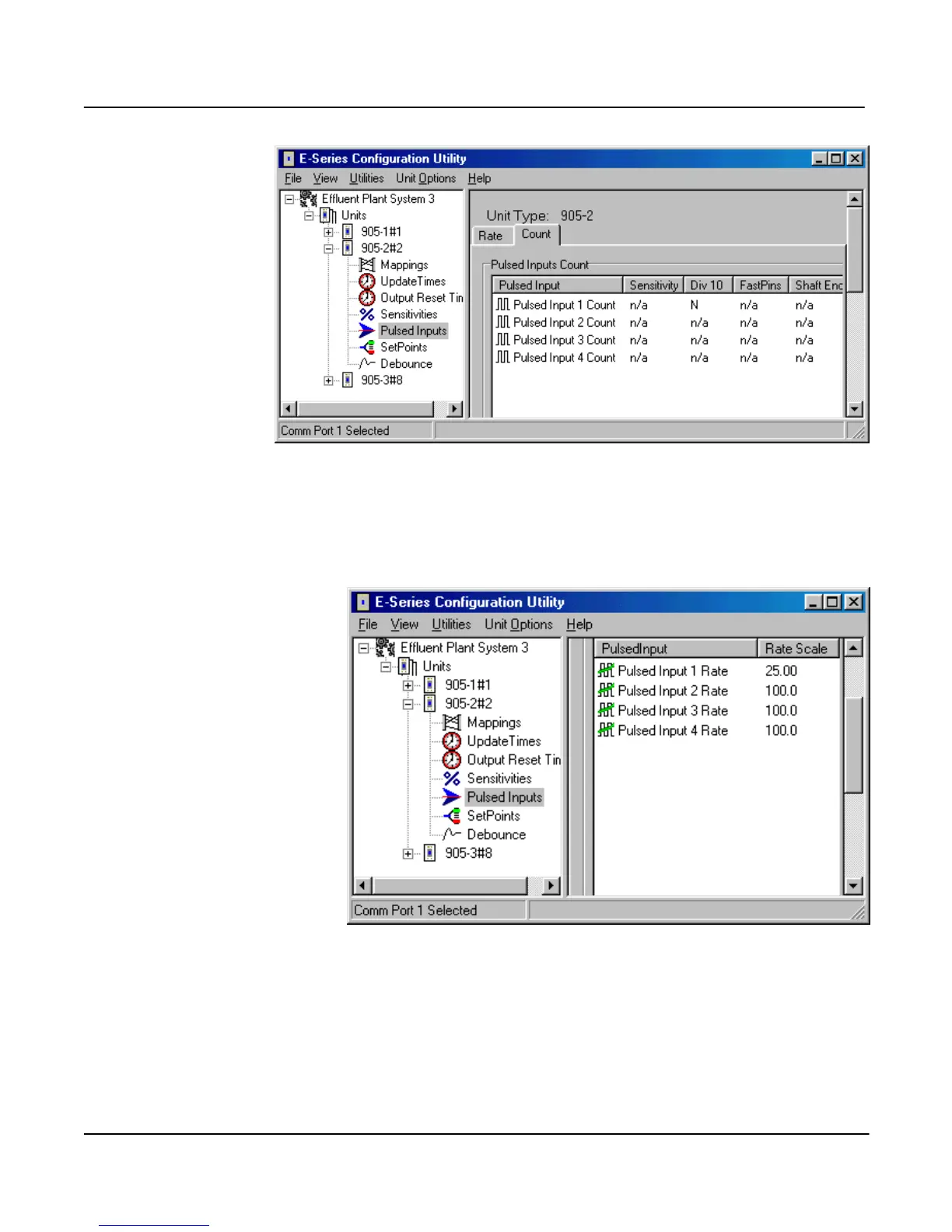
To configure the “divide by 10” feature, select “Pulse Inputs” on the left-hand menu and select the
“Count” page - double-click “Pulse Input 1 Count” and enable “divide by 10” counting.
Pulse Input Rate Scale Configuration
When a pulse rate is mapped to
an analog output, the rate must
be scaled to the 4-20mA output.
The pulse rate scale is the rate
(in Hz) corresponding 20 mA.
To configure the pulse rate
scale, select “Pulse Inputs” on
the left-hand menu and select
the “Rate” page - double-click
the pulse input rate and enter the
scale value.



 To Next Page