EM Test CWS500 N2
User manual V 3.00 10 / 38
Front Panel Operation
Basic Operations
The simulator CWS 500 N2 is operated by an easy menu control system.
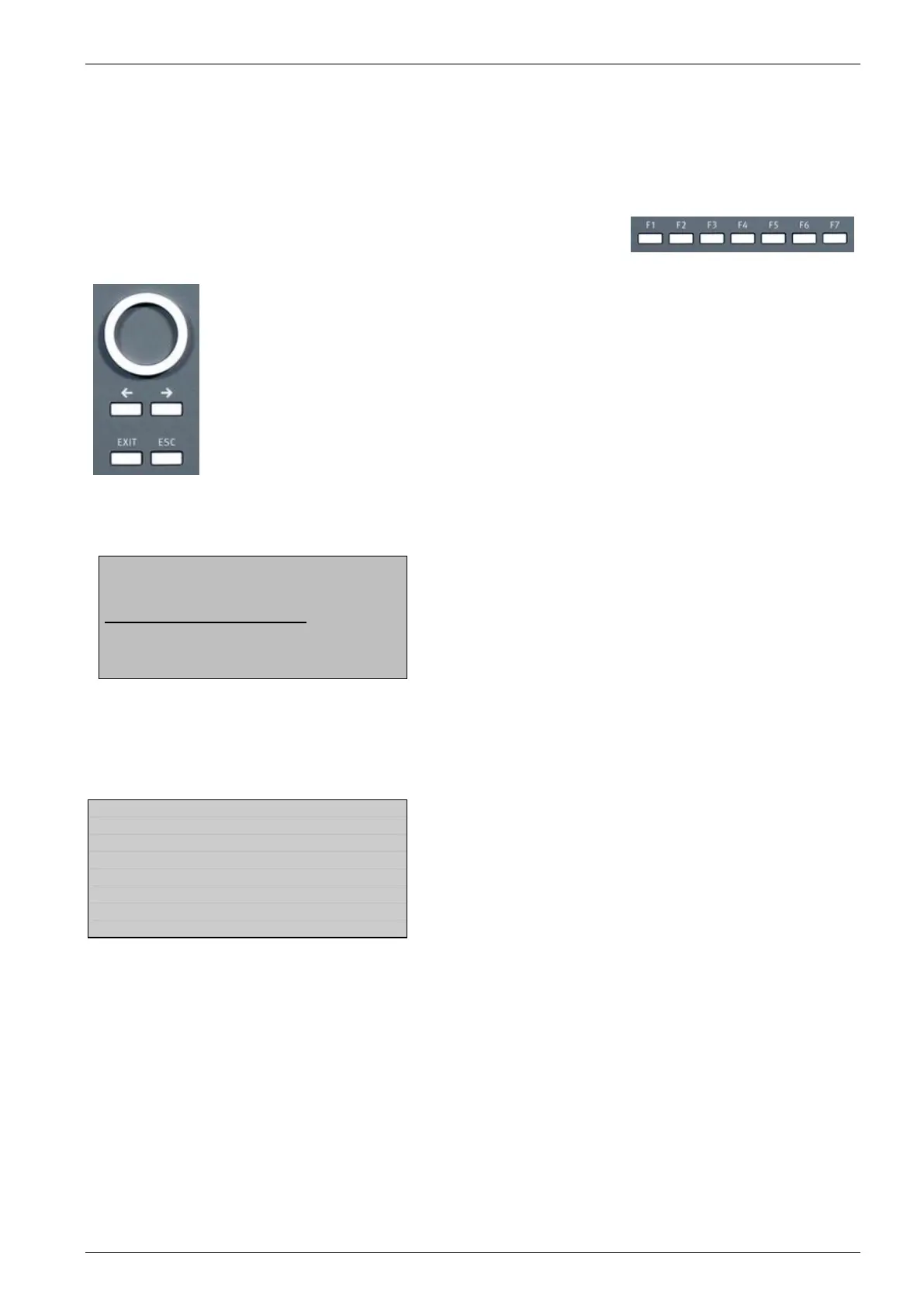
Seven function keys are available to select parameters and functions. All
functions are indicated on the display; max. 8 lines and 40 characters.
The selected parameter is blinking and can be changed by turning the knob (incr./decr.).
: The digit to be changed can be selected with the cursor ( ).
- Setted values are direct indicated on the screen.
- Status on the bottom lines shows thedesired status after pressing the function
key.
ESC : ESC will take you back to the previous level in the menu and set the displayed
values. The latest settings are stored automatically and will be recalled when the
menu is selected again.
EXIT : The firmware will reset to the main screen.
Start-up display
EM TEST
C W S 5 0 0N2
RF 9kHz – 1 GHz
V 3.21a03 SWN: 002234
Generator Model
Frequency Range
The version number and the software number SWN are used for tracing purposes. These numbers are listed in
the test reports and calibration certificates. These numbers are also listed within the test reports generated by
the software report generator.
Page 1 (Main Menu)
F1 Quickstart
Manual operation by entering the attenuation, frequency and modulation
F7 Service
Setup can be selected and displayed


 To Next Page