Listening to Music
Turning on and playing
1. Make sure that the battery is enough and the earphone is connected correctly.
2. Press and hold the [ ] button to turn on the player. The DISPLAY lights up. The MP3 player enters
Main menu with Music option selected by default.
3. Press the [ ] button to enter the Music mode. By default the player will be in STOP mode.
4. Press the [ ] button to start playing the music.
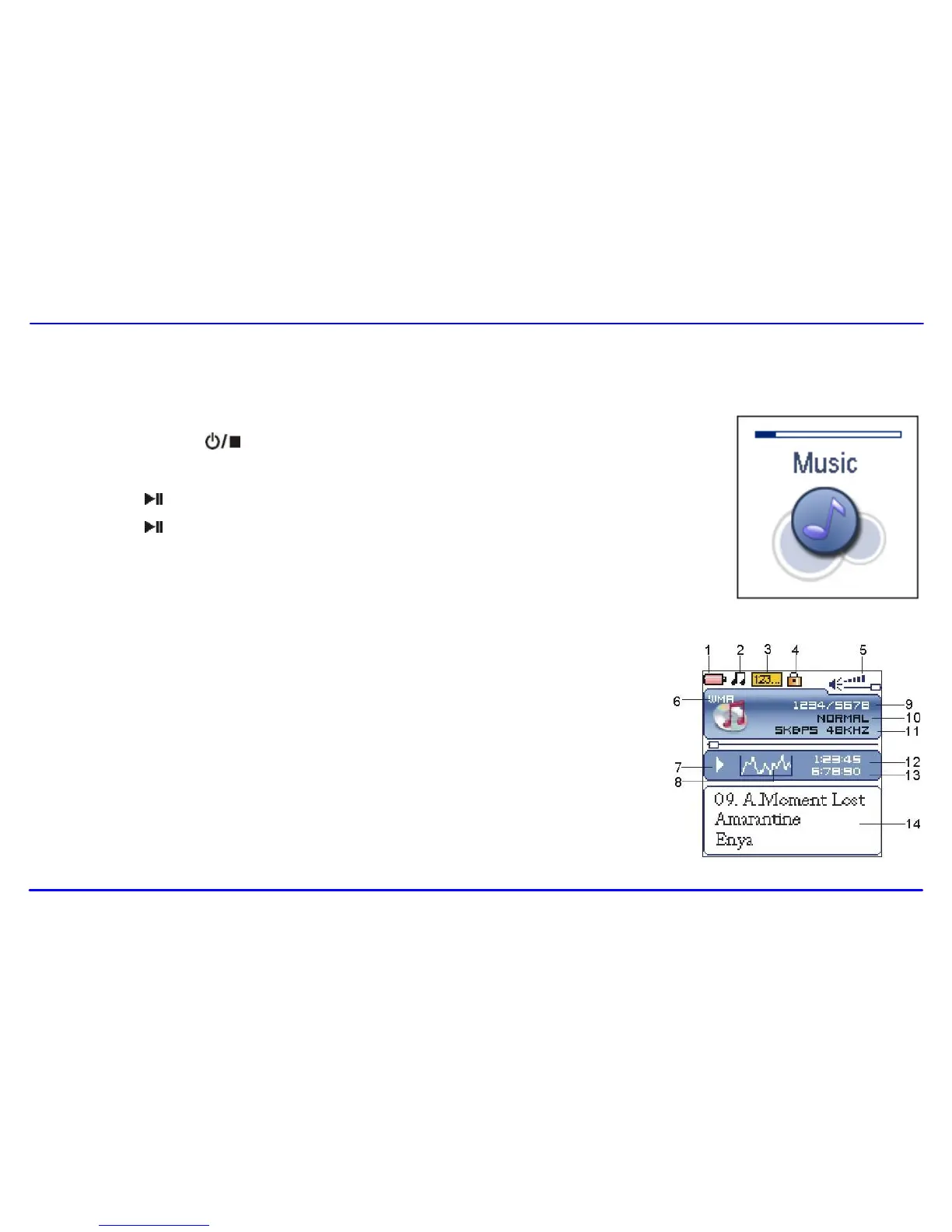
1. Remaining battery power indicator
2. Music indicator
3. Repeat mode indicator
4. Key locked indicator
5. Volume indicator
6. Music format
7. Play/Pause/Stop/Fast forward/backward
8. Audio frequency
9. Current track / Total track number
10. EQ mode indicator
11. Sample rate
12. Elapsed time of current track
13. Total time of current track
14. Music name/ID3 tag/lyrics



 To Next Page