SSRDriverandDigitalOutput
Module(EMO-410,EMO-420)
SSRDriverandDigitalOutput
Module(EMO-410,EMO-420)
RelayOutput
Module(EMO-400)
RelayOutput
Module(EMO-400)
0/4...20mA CurrentOutput
Module(EMO-430)
Z 0/4...20mA Current
OutputModule(EMO-430)
Z
AnalogueInputModule
(EMI-410,EMI-430,EMI-440
orEMI-450)
DigitalInputModule
(EMI-400)
DigitalInputModule
(EMI-400)
Thereisnomodulein
Module-1socket
Thereisnomodulein
Module-2socket
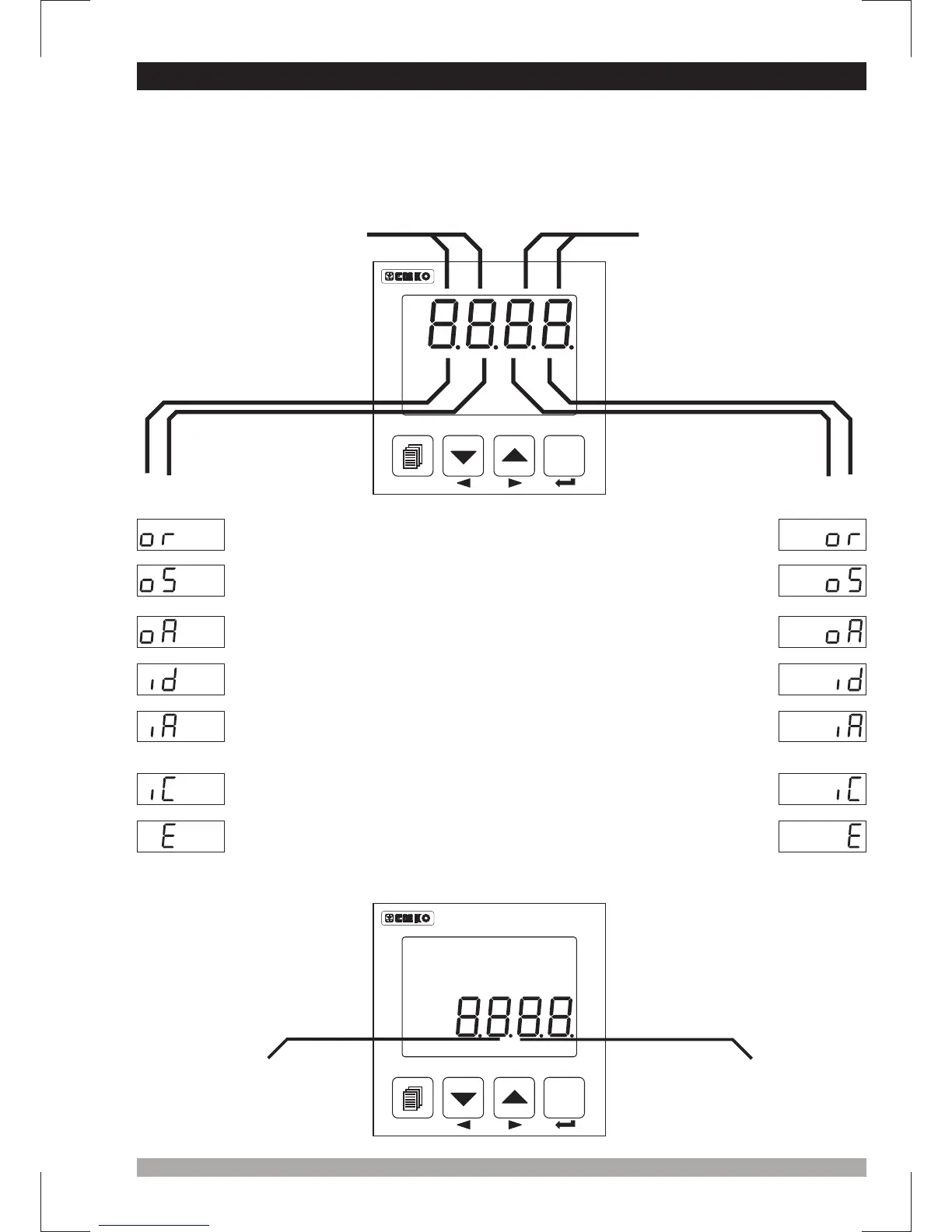
There are two sockets for plugging optional modules to the device. These modules are
recognized by the device automatically.
Module definiton codes and how to observe these codes of optional modules in
Module-1 and Module-2 socket are explained below :
When the power is applied to the device all led indicators
and display segments are momentarily illuminated for testing. Software revision number of the
controller on the bottom display and module definition codes on the top display are momentarily
illuminated.
OptionalInput/Output
modulecodeforModule-1
OptionalInput/Output
modulecodeforModule-2
ESM-4450
ProcessController
SET
°C
O1 SV
°F
O2
O3 AT
REMOTE RAMP MAN AUTO
7.2ObservationofOptionalModulesandSoftwareRevisionontheDisplays
ESM-4450
ProcessController
SET
°C
O1 SV
°F
O2
O3 AT
REMOTE RAMP MAN AUTO
“rU” RevisionÞ
Revisionnumber
41
AnalogueInputModule
(EMI-410,EMI-430,EMI-440
orEMI-450)
0...5 A CTInput
Module(EMI-420)
V 0...5 A CTInput
Module(EMI-420)
V


 To Next Page