7.6 Adjustmentof AlarmSetValues
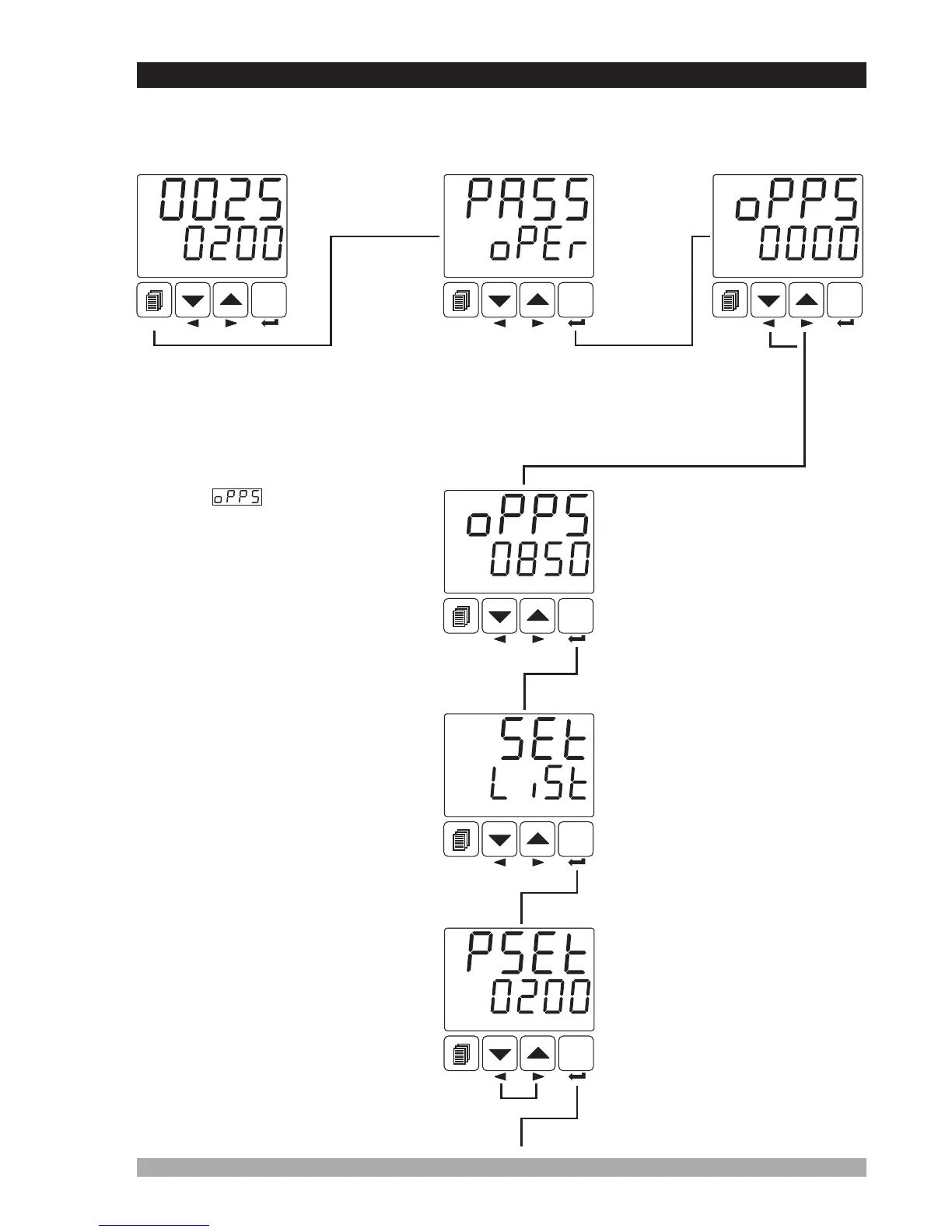
If standard output ( Output-3 ), Module-1 or Module-2 is configured as an alarm output, alarm set
values of these outputs are in “SEt LýSt” menu. User can access to “SEt LýSt” menu both from
operator and technician menus.
Enter
passwordwith
incrementand
decrement
buttons.
PressEnterbuttontoconfirm
password
PressEnterbuttonforaccessing
SEtLýStmenu
ProcessSetValue
Operation
Screen
SET
°C
O1 SV
AUTO
SET
°C
O1 SV
AUTO
SET
°C
O1 SV
AUTO
SET
°C
O1 SV
AUTO
SET
°C
O1 SV
AUTO
PressEnterbuttontoconfirmthe
changedvalueandaccesstothe
followingparameter.
OperatorPassword
50
SET
°C
O1 SV
AUTO
Operatorandtechnician can
changetheparameterwith
incrementanddecrementbuttons
SETLISTMenu
Processandalarmsetvalues
areinSEtLýStmenu.
Whenmenubuttonis
pressed,OperatorMenu
Enteringscreenisshown
Operator
Menu
Entering
Screen
OperatorPasswordEntering
screenisaccessedbypressing
SET button.
Whenscreenisshown,
operatorparameterscanbeseenby
pressingSET buttonwithout
enteringoperatorpassword.But
operatorcannotchangethe
parameters.PleaserefertoSection
8.2.8(Operatorand Technician
Passwords)
If Operator password is not 0,
operator password entering
screen is shown


 To Next Page