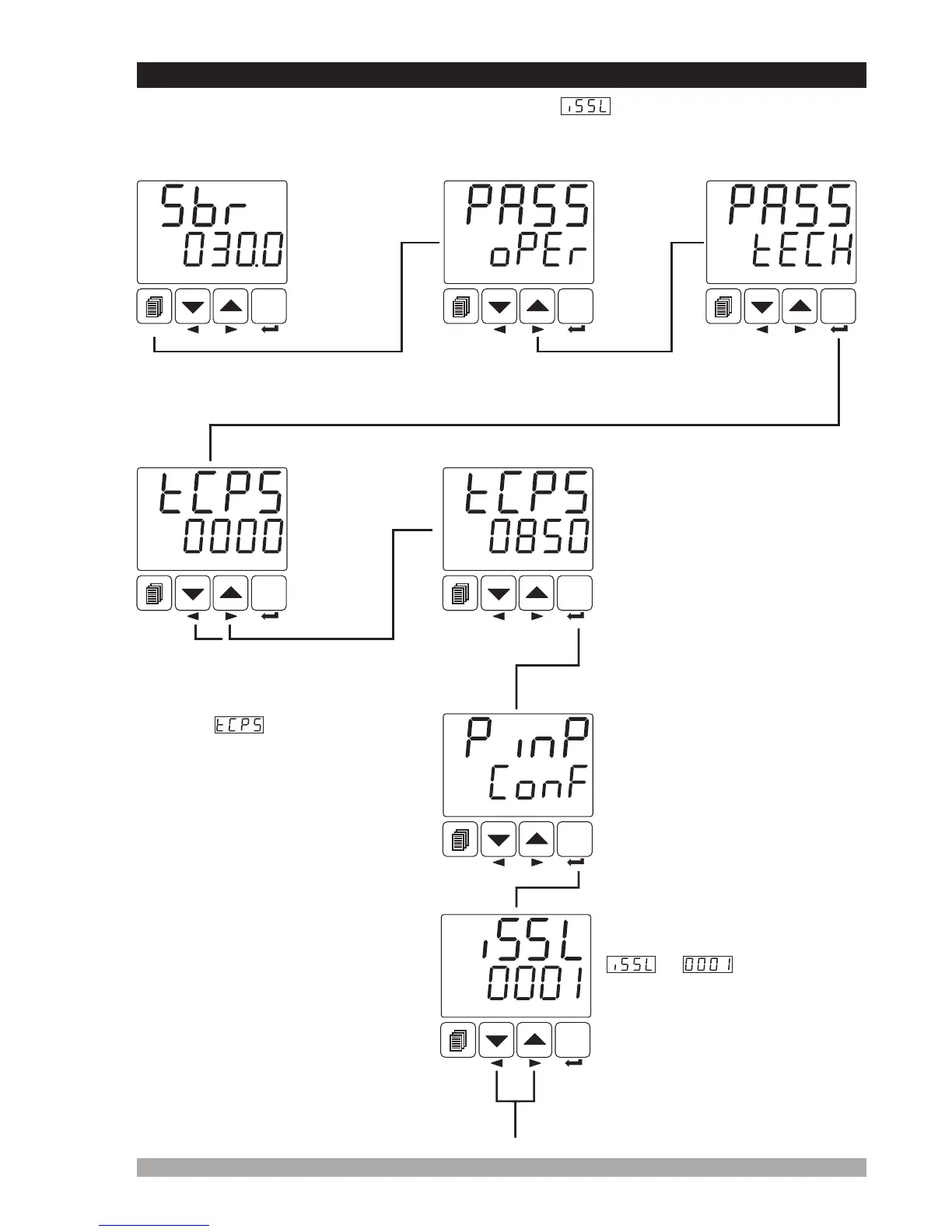
Enterpasswordwithincrement
anddecrementbuttons
PressEnterbuttontoconfirm
password
Operation
Screen
SET
°C
O1 SV
AUTO
SET
°C
O1 SV
AUTO
SET
°C
O1 SV
AUTO
SET
°C
O1 SV
AUTO
SET
°C
O1 SV
AUTO
PressEnterbuttontoaccessto
PýnP ConFmenu
SET
°C
O1 SV
AUTO
SET
°C
O1 SV
AUTO
Parametercanbechangedwith
incrementanddecrement
buttons
TechnicianPassword
PINP CONFMenu
52
Operatorcannotaccesstothis
menu
Operatorcannotaccesstothis
parameter
7.7 Changing and Saving Parameter Values
Example-1 : “To change Process Input Type parameter in PýnP Conf” menu, user must
access to PýnP ConF menu firstly.
SelectionofProcessInput
Type
ismeans,input
typeisRTD.
Operator
Menu
Entering
Screen
Whenchangingmenunextbuttonis
pressed TechnicianMenuEntering
screenisshown.
Technician
MenuEntering
Screen
TechnicianPasswordEnteringscreenisaccessedbypressingSET button.
Whenmenubuttonis
pressed,OperatorMenu
Enteringscreenisshown.
Whenscreenisshown,
technicianparameterscanbeseen
bypressingSET buttonwithout
enteringpassword.Buttechnician
cannotchangetheparameters.
PleaserefertoSection8.2.8
(Operatorand Technician
Passwords)
Iftechnician
passwordis
not0,
technician
password
entering
screenis
shown


 To Next Page