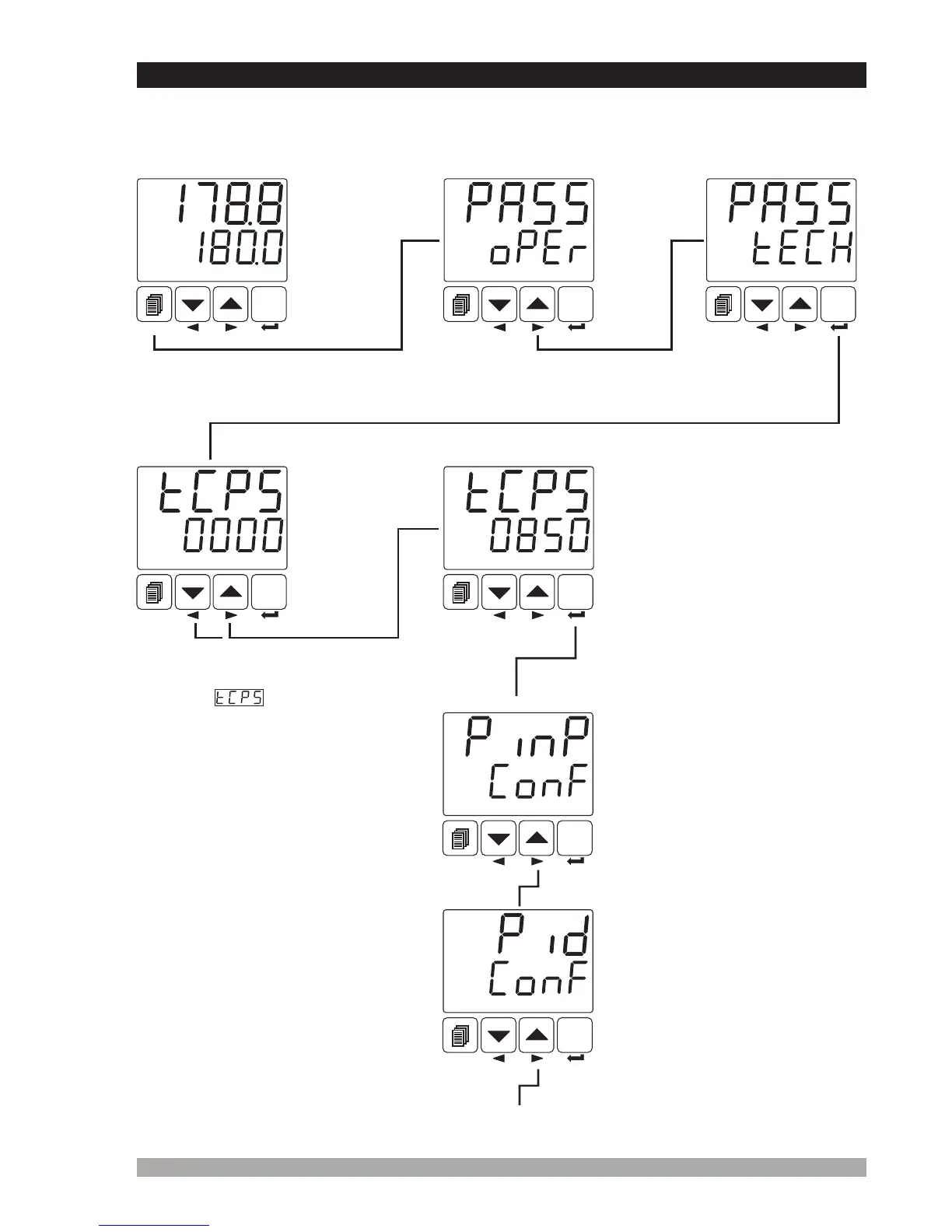
7.5 AccessingtotheTechnicianMenu
Enterpasswordwithincrement
anddecrementbuttons
PresstheEnterbuttontoconfirm
password.
Operation
Screen
SET
°C
O1 SV
AUTO
SET
°C
O1 SV
AUTO
SET
°C
O1 SV
AUTO
SET
°C
O1 SV
AUTO
SET
°C
O1 SV
AUTO
Techniciancanaccesstothe
followingmenubypressingmenu
changingnextbutton.
PINP CONFMenu
Configurationparametersof
processinput.
PIDCONFMenu
ParametersaboutPIDalgorithm.
Techniciancanaccesstothe
followingmenubypressingmenu
changingnextbutton.
SET
°C
O1 SV
AUTO
SET
°C
O1 SV
AUTO
TechnicianPassword
46
Operatorcannotaccesstothis
menu.
Operatorcannotaccesstothis
menu.
Technician canaccesstotheformer
menubypressingchangingmenu
backbutton.
Whenscreenisshown,
technicianparameterscanbeseen
bypressingSET buttonwithout
enteringpassword.Butparameters
cannotbechanged.Pleasereferto
Section 8.2.8.(Operatorand
TechnicianPasswords)
Whenchangingmenunextbuttonis
pressed TechnicianMenuEntering
screenisshown.
Technician
MenuEntering
Screen
TechnicianPasswordEnteringscreenisaccessedbypressingSET button.
Whenmenubuttonis
pressed,OperatorMenu
Enteringscreenisshown.
Operator
Menu
Entering
Screen
The parameters have been divided into groups according to their functions. Every group has a
title and firstly user must determine the title (menu) for accessing to the parameters. Refer to the
parameters section for detailed information about parameters.
Iftechnician
passwordis
not0,
technician
password
entering
screenis
shown


 To Next Page