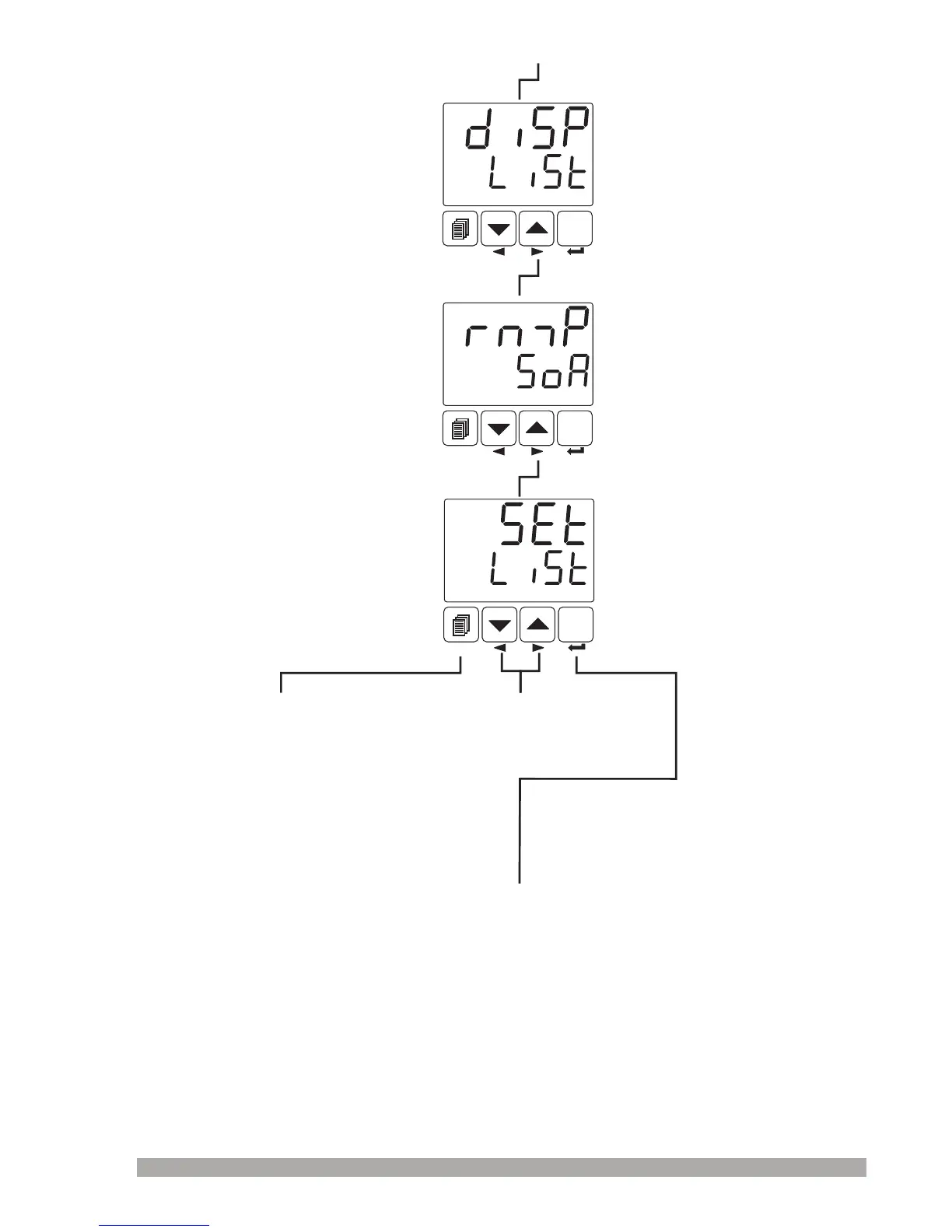
Operatorortechnician can
accesstothefollowingmenuby
pressingmenuchangingnext
button.
DÝSPLAY LISTMenu
Thismenudetermineswhich
parameterisshownintopand
bottomdisplay.
RAMP&SOAKMenu
ConfigurationofRamp/Soak
functionandstepsetvalue
parametersareinthismenu.
SET
°C
O1 SV
AUTO
SET
°C
O1 SV
AUTO
SETLISTMenu
SET LIST menuexistsafter
RAMP/SOAKmenu.
Pressmenubuttonto
exitfromMENUlist
andturntooperation
screen.
SET
°C
O1 SV
AUTO
45
Operatorandtechniciancanaccess
tothismenu
Operatorortechniciancanaccessto
theformermenubypressingmenu
changingbackbutton
Operatorandtechniciancanaccess
tothismenu
Operatorandtechniciancanaccess
tothismenu
Operatorortechniciancanaccessto
theformermenubypressingmenu
changingbackbutton
Operatorortechniciancanaccessto
theformermenubypressingmenu
changingbackbutton
Operatorortechniciancan
accesstothefollowingmenuby
pressingmenuchangingnext
button.
Continuetopressmenu
changingnextandback
buttonstochangethemenu
page
BypressingENTERbutton,usercanaccesstothemenupageandtoallparametersinthis
menupage.


 To Next Page