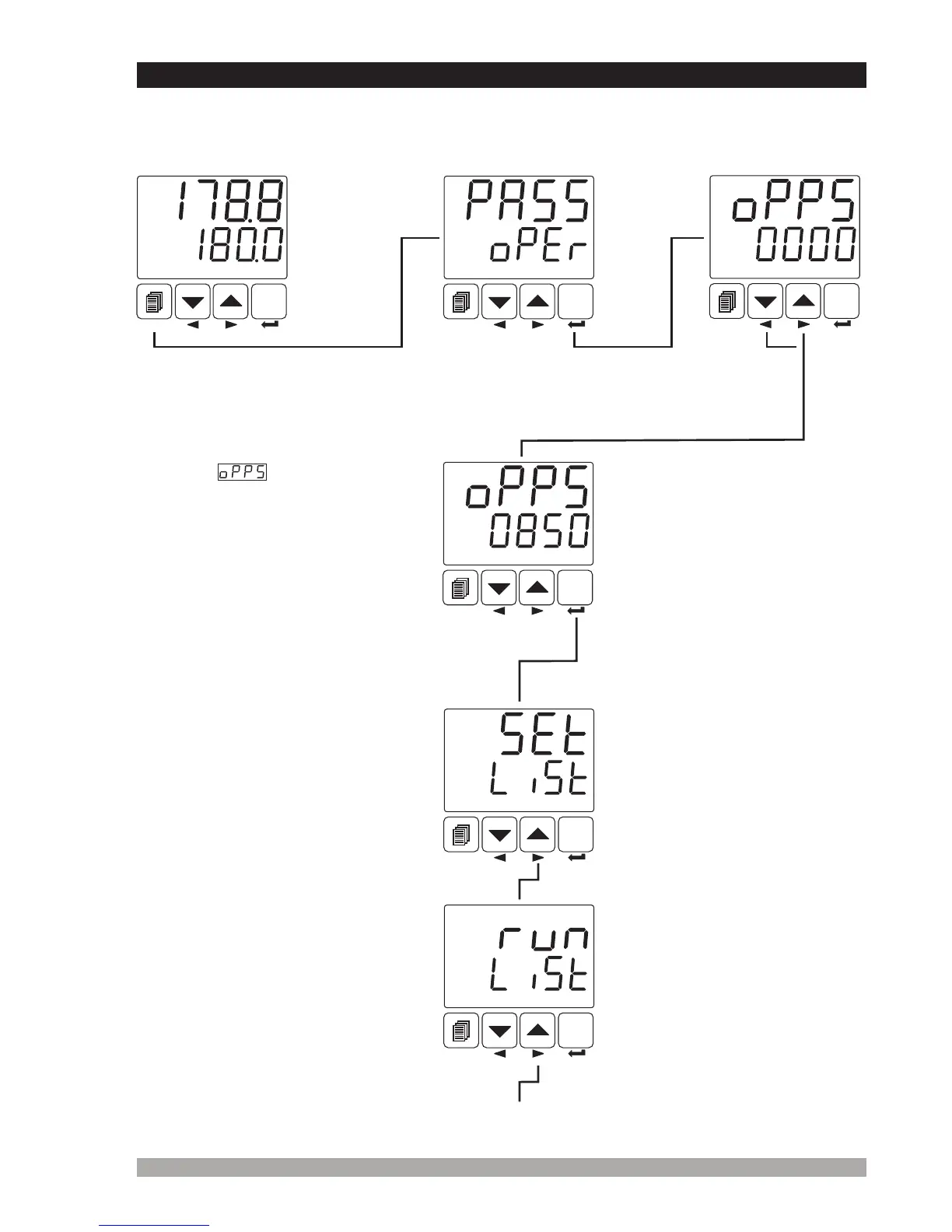
7.4 AcessingtotheOperatorMenu
The parameters have been divided into groups according to their functions. Every group has a
title and firstly user must determine the title (menu) for accessing to the parameters. Refer to the
parameters section for detailed information about parameters.
OperatorPasswordEntering
ScreenisshownbypressingSET
button.
Enterpassword
withincrement
anddecrement
buttons.
PresstheEnterbuttonto
confirmpassword
Operatorortechnician can
accesstothefollowingmenuby
pressingmenuchangingnext
button
Operation
Screen
SET
°C
O1 SV
AUTO
SET
°C
O1 SV
AUTO
SET
°C
O1 SV
AUTO
SET
°C
O1 SV
AUTO
SET
°C
O1 SV
AUTO
SET
°C
O1 SV
AUTO
Operatorandtechniciancanaccess
tothismenu.
SETLISTMenu
Processandalarmsetvaluesare
inSEtLýStmenu
RUNLISTMenu
Operatingformselection
parametersareinrunLýStmenu.
OperatorPassword
44
Operatorortechnician canaccessto
theformermenubypressingmenu
changingbackbutton
Whenscreenisshown,
operatorparameterscanbeseenby
pressingSET buttonwithoutentering
operatorpassword.Butparameters
cannotbechanged.Pleasereferto
Section 8.2.8.(Operatorand
TechnicianPasswords)
Operator
Menu
Entering
Screen
Whenmenubuttonis
pressed,OperatorMenu
Enteringscreenisshown.
Operatorortechnician can
accesstothefollowingmenuby
pressingmenuchangingnext
button
Operatorandtechniciancanaccess
tothismenu.
If Operator password is not 0,
operator password entering
screen is shown


 To Next Page