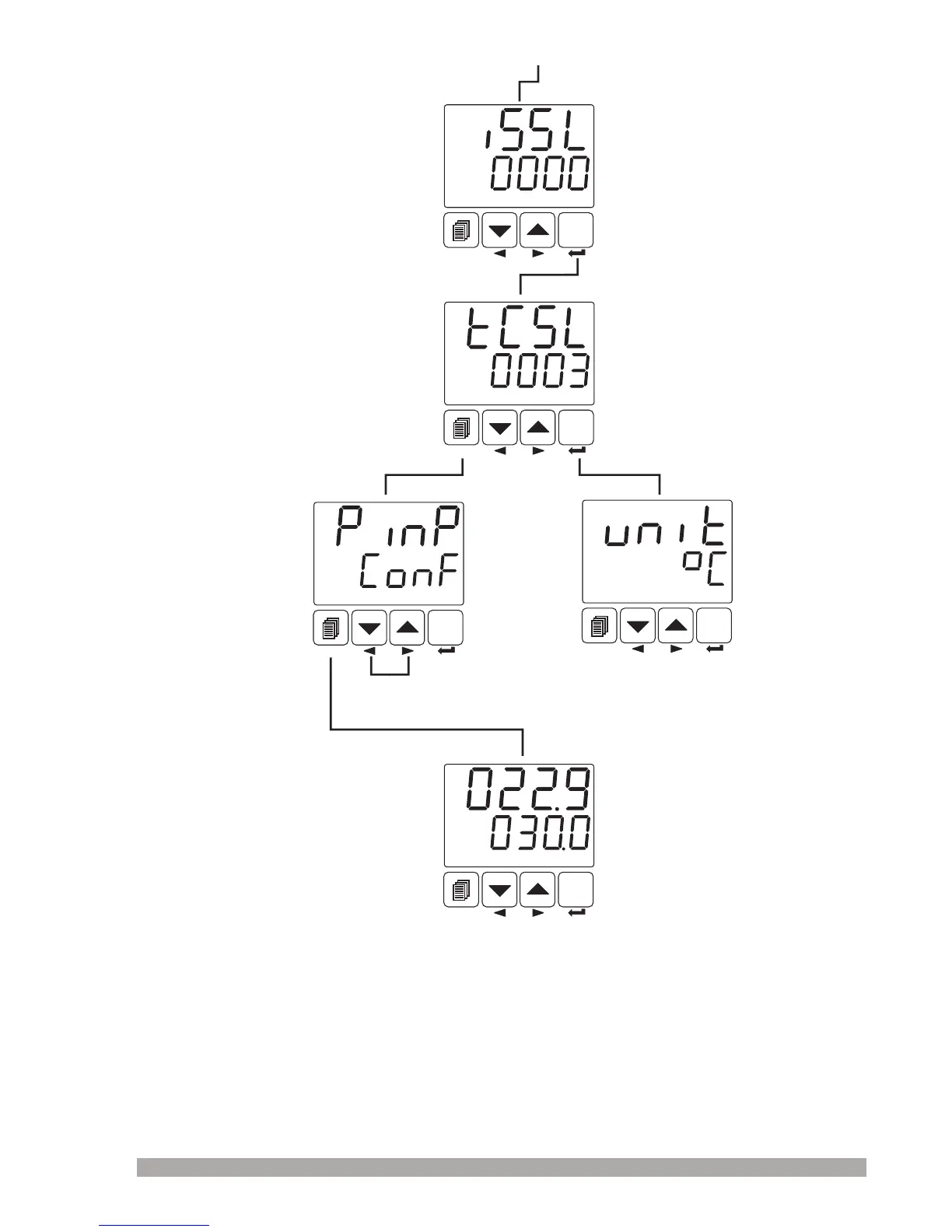
Press Enter button to confirm
the changed value and
access to the following
parameter.
Technician canaccesstothe
followingmenubypressing
Enterbutton
PINP CONFMenu
WhenMenubuttonis
pressed,menupagecanbe
accessed.
If Menu button is
p r e s s e d a g a i n ,
operation screen is
shown.
OperationScreen
SET
°C
O1 SV
AUTO
SET
°C
O1 SV
AUTO
SET
°C
O1 SV
AUTO
SET
°C
O1 SV
AUTO
SET
°C
O1 SV
AUTO
SelectionofProcessInput
Type
TCinputtypeisselected
SelectionofTCInputType
Unitselection
53
Operatorcannotaccesstothis
parameter
Operatorcannotaccesstothis
parameter
Continuetopressmenuchangingnextandbackbuttonsto
changethemenupage.


 To Next Page