26
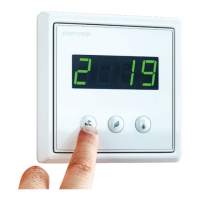
Control system, eWind operating panel
1. Mode (in basic display) 2. Temperature (in basic display) 3. Mode button
4. Eco button 5. Temperature button 6. Cable connector
3
5
4
1
2
6
Important to know about control
system
Factory settings are suitable for most installations.
The fan speed settings for dierent operating modes
are installation specic and must be specied and
set separately for each installation. Otherwise, do not
change the factory setting, unless otherwise specied
in the ventilation system plan.
Make sure that you have all the necessary information
at hand before starting the setup.
Setting up fan speeds
The fan speed settings for each operating mode must
be specied and set separately for the installation. Refer
to the parameter table for settings
To set up:
1. Press the Eco and Temperature buttons
simultaneously three times.
2. Use the Mode and Eco buttons to select
parameters c1-c 32.
• Refer to "Parameter list" on page 27 for
meaning of each parameter.
3. Press the Temperature button for 3 seconds select
the parameter to adjust.
4. Use the Mode and Eco buttons to change the
parameter value.
5. Press the Temperature button to conrm the
value and return to selection of parameters
c1 - c32.
6. Press the Eco and Temperature buttons
simultaneously once to exit the setup.



 To Next Page
 Loading...