4 Configuration
4.3.0.3. Upload the software to C2C
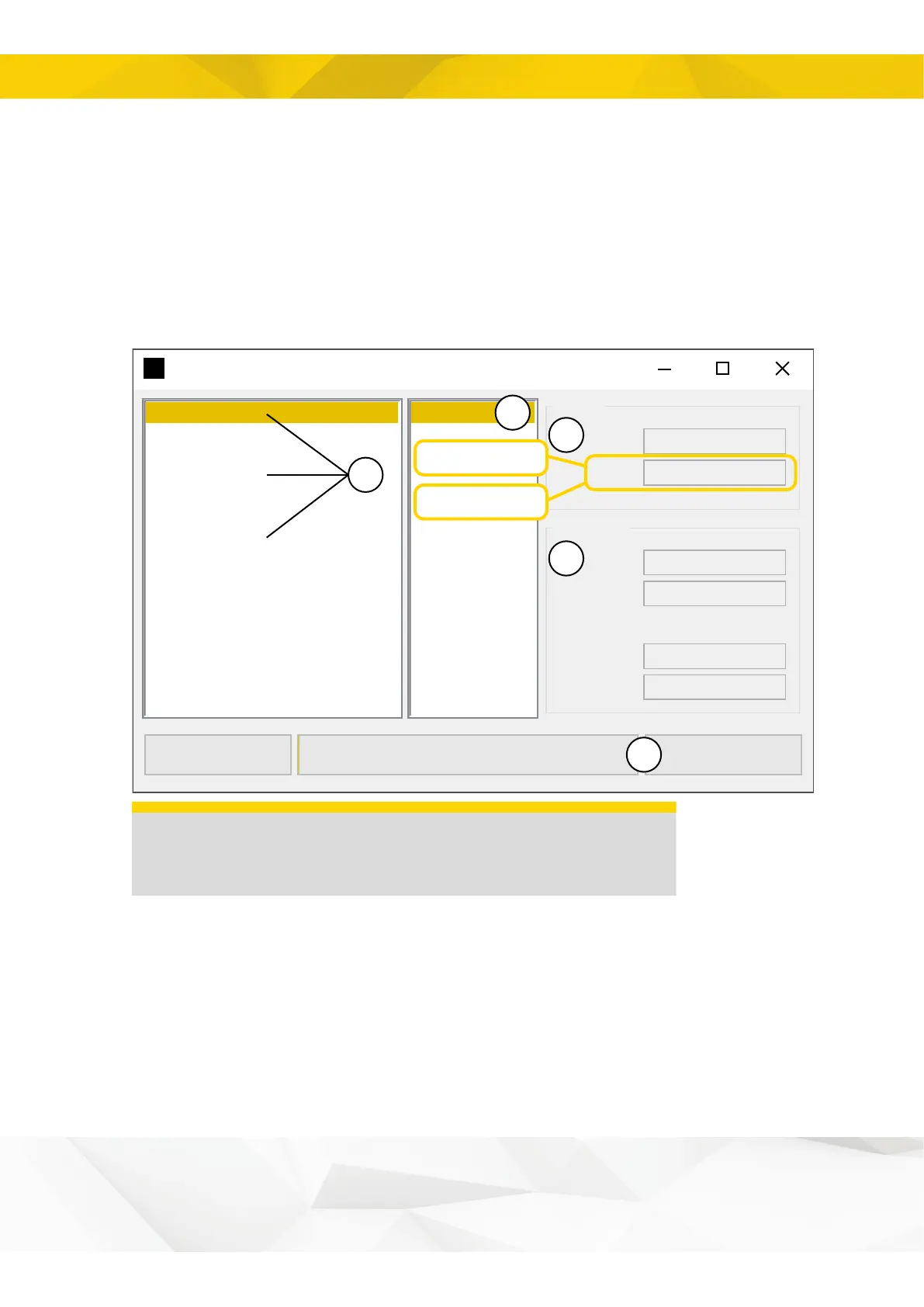
1. Select C2C; the software version is the difference between the different options.
2. Select CAN2CAN.
3. Check that you have selected the right software version.
4. If you are properly connected to the C2C unit, the current software version and C2C
serial number will be shown in this box. If this data is not displayed, check the USB
connection to the cabin module.
5. Click “Upload firmware”.
Module Software Updater 3.0.4
Version
Serial nr
State
Bootloader
Module info
File info
Name
Version
Load from server
e
Upload firmware
0%
x.x.x.x
1234
Application
CAN2CAN
x.x.x.x
CAN2CAN2022-09-27 C2C
2021-04-26 QSC
2021-04-26 AGW Volvo
2020-10-23 C2C
2018-06-01 QSC
2018-01-25 SS9
2017-03-14 C2C
2017-03-14 SS9
1
2
4
3
5
ePS v1 = 1.x.x.x
ePS v2 = 2.x.x.x
REMARKS
Do not switch off the MSU or disconnect the USB cable during
the update.
13


 To Next Page