4 Configuration
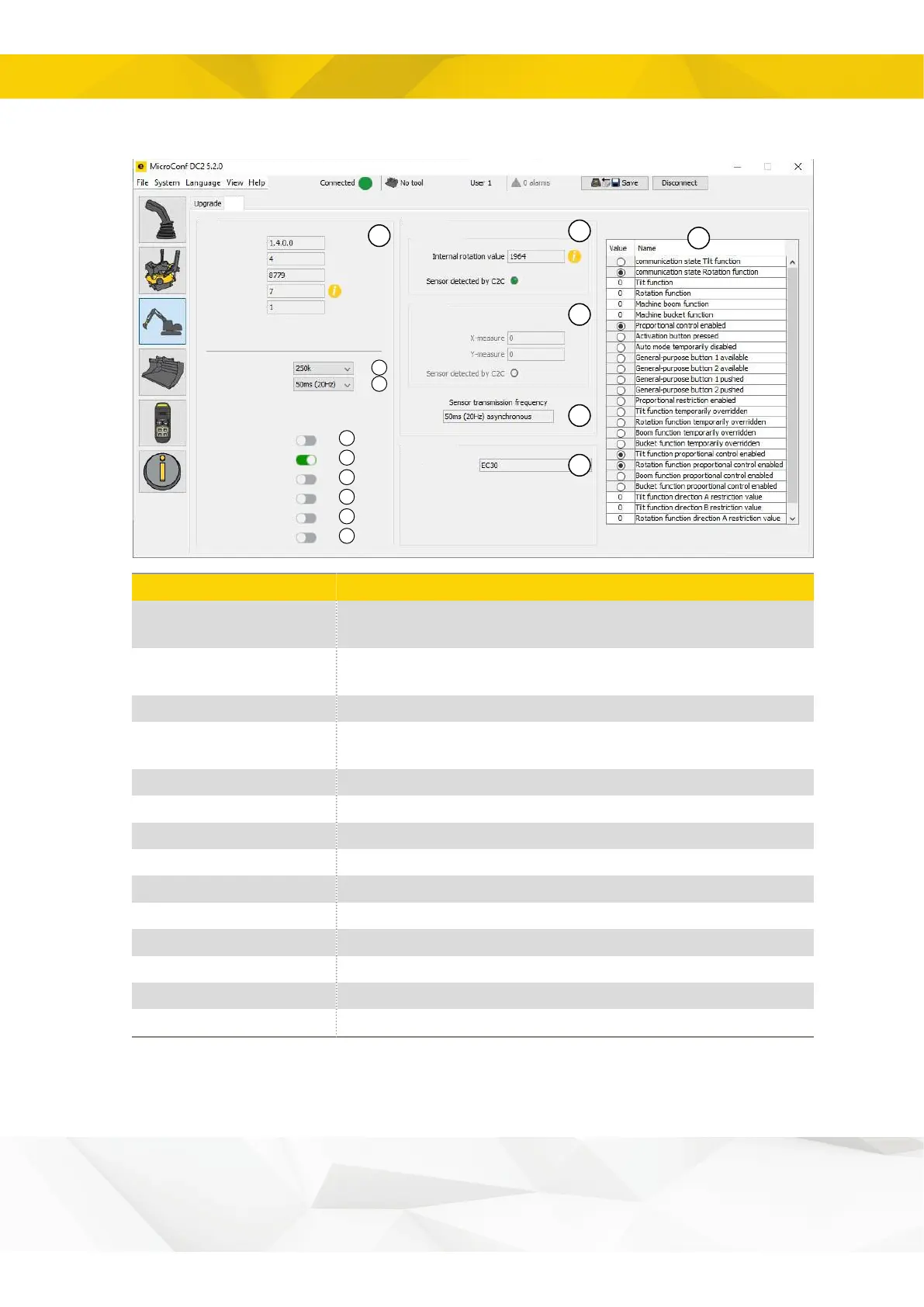
4.4.2. Overview - ePS v1
1
10
11
12
13
14
4
5
2
3
6
7
8
9
Software version
Hardware revision
Serial Number
Error code
ePS version
External Bus Baus rate
Transmission rate
Synchronous sensor mode
Rotation sensor enabled
Tilt sensor enabled
Invert tilt x angle
Invert tilt y angle
Invert tilt orientation
C2C
Sensor Data
Rotation sensor
Tilt sensor
Sensor Settings
Tiltrotator model
ePS
C2C module information: SW/HW versions, serial number and error code
(see trouble shooting section)
Select X1 J1939 communication bit rate (click Save and restart C2C for the
change to be completed)
Select the Transmission repetition rate (up to 100Hz).
Select Asynchronous mode or fixed frequency (simultaneously or not
simultaneously)
Activation/deactivation of rotation sensor
Activation/deactivation of tilt sensor
Inverting X-axis rotation direction, X-axis rotation value
Inverting Y-axis rotation direction, Y-axis rotation value
Rotation sensor information: rotation data, CAN status and C2C status.
Tilt sensor information: tilt data, CAN status and C2C status.
Information regarding sensor update frequency
DC2 control system settings.
16


 To Next Page