further explained below. After 5 seconds, the screen changes to main operating screen. During that 5 seconds, both LED
indicators are continuously on.
2-b Main Operating Screen
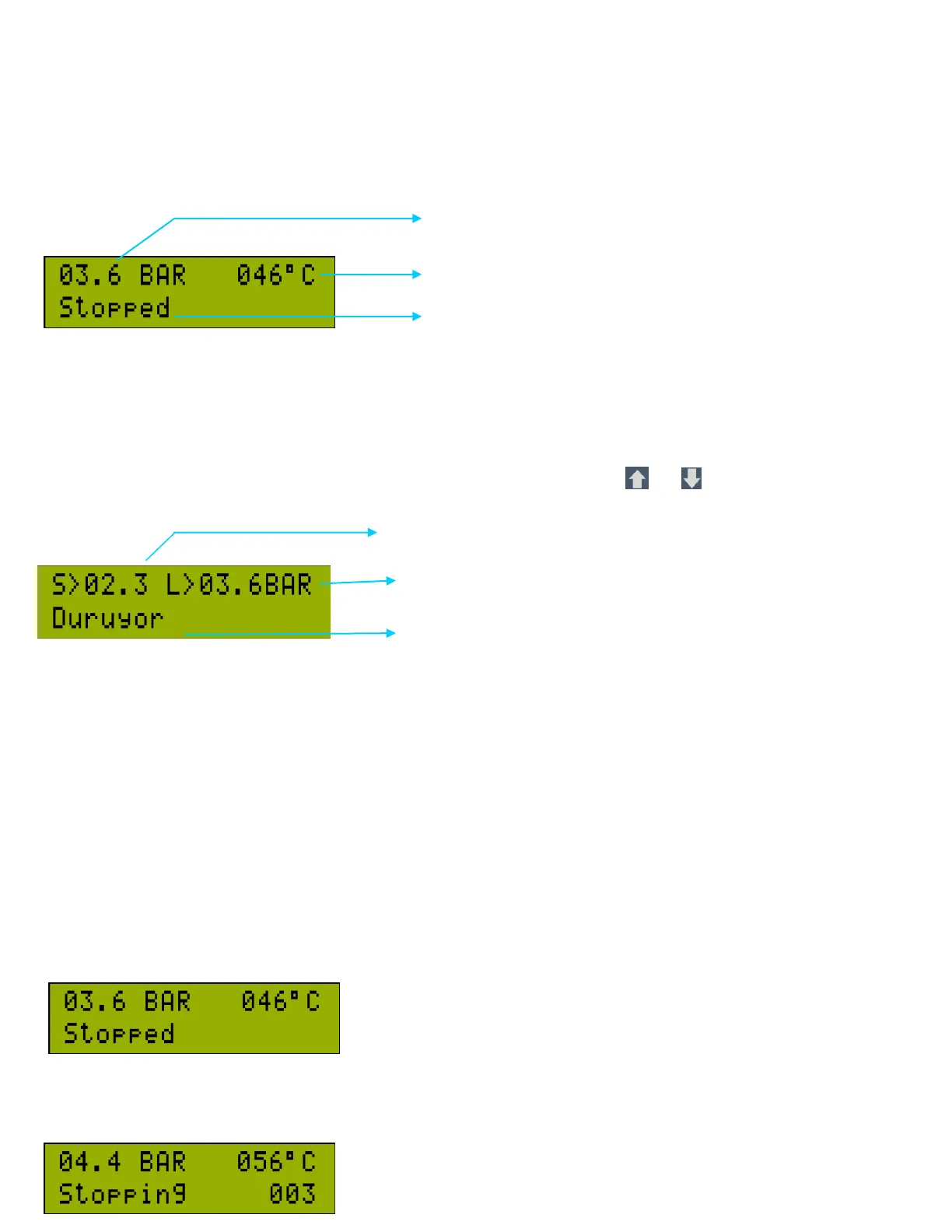
There are 2 main operating screens in the CCS 3000. The first page displays the Line Air Pressure and Airend Temperature
on the top line, the current status of the compressor on the bottom line. The pressure and temperature units may be indicated
in Bar/PSI and Celsius/Fahrenheit respectively.
The units may be changed in parameters “P3.6 Pressure Unit” and “P3.7 Temperature Unit”
The operator may cycle between the 2 pages in the Main Operating Screen using the and buttons.
The second page in the main operating screen indicates the Line
The current operational status of the compressor is displayed on the lower row. The statuses are:
• STOPPED
• STOPPING
• STARTING
• MOTOR DRIVING
• WORKING ON UNLOAD
• WORKING ON LOAD
• ON AUTOWAITING
• WAITING ACKNOWLEDGEMENT
2.b.1 STOPPED :
The compressor main motor stopped. Green LED is off.
2.b.2 STOPPING :



 To Next Page