The TIG Brush is an electrochemical surface finishing system designed, developed, and manufactured by Ensitech in Australia. It utilizes a combination of electric current, heat, and chemistry to achieve rapid metal finishing. While renowned for its ability to remove heat tint from stainless steel TIG and MIG welds, the TIG Brush also offers additional functionalities such as metal polishing, indelible logo printing, text marking, and engraving/etching.
Function Description:
The TIG Brush system operates by applying an electric current through a brush saturated with specialized fluids to the metal surface. This electrochemical process effectively cleans, polishes, and marks various metals. The system is versatile, offering different power levels and operating modes to suit a range of applications and metal types.
Important Technical Specifications:
The TIG Brush is available in several models, including the 440, 550, and 700, which offer varying power levels to handle tasks from light work on thin metals to removing deep heat tint from large metalwork.
The control unit features rotary switches for power and mode settings.
Power settings include:
- STAND BY: No power is transmitted to the brush. This setting should always be used when connecting the clamp or changing the brush.
- SINGLE BRUSH: Optimized for use with single brush Classic Wand & Flexi Handle.
- PROPEL / WIDE BRUSH: Optimized for use with PROPEL Torch, Dual & Quad brush accessories & Branding.
Mode settings include:
- CLEAN: Provides the fastest cleaning at each power setting. Prolonged use may cause the surface to appear milky, which can be rectified using POLISH / ENGRAVE mode.
- POLISH / ENGRAVE: Offers metal polishing (using TB-21 or TB-25 fluids) and engraving (using TB-95 fluid with Branding Kit accessories).
- PRINT: Enables surface printing when used with TB-90 fluid and Branding Kit accessories.
The system is designed to operate on 120V AC/230V AC single phase power (240V for TBX models). It is designed to withstand up to 150 volts, though connecting it to a welding machine with higher open-circuit voltage can cause damage.
Usage Features:
The TIG Brush system includes various tools to facilitate different operations:
- Classic Kit: Comprises the TIG Brush Control Unit, Black Ground Cable, Red Handle Cable, Handle, Classic Wand, Insulating Shrouds (short and long), Standard single Brush (replaceable with Dual or Quad brush Adaptors and Shrouds), and Power Cord. The long shroud is used with new brushes, and the short shroud as the brush wears down.
- Flexi Handle Kit: Similar to the Classic Kit but features a Flexi Handle for improved access to difficult areas.
- PROPEL Kit: Includes the PROPEL Torch, PROPEL Torch Insulating Shroud, and PROPEL Torch Brush, designed for more sophisticated users and specific applications. The PROPEL Torch brush adjustment handle should rotate smoothly.
Preparation and Assembly:
- Inspection: Before use, inspect the TIG Brush Control Unit for damage and exposed wires. Ensure the unit is dry.
- Environment: Operate in a well-ventilated area, away from combustible substances.
- Cables: Ensure cables do not present a trip hazard.
- Water Access: Have ready access to clean water and a suitable washing area.
- Post-Cleaning: After cleaning/polishing, wash the area with clean water, spray with recommended Ensitech neutralizer, and rinse again to remove acidic residue.
- PPE: Wear suitable personal protective equipment as recommended in the Safety Data Sheet (SDS), including gloves and safety glasses to prevent fluid splashes. Where inhalation risk exists, wear a type B (Inorganic gases & vapours) respirator.
- Assembly (Classic Kit):
- Attach Handle Cable plug to the red socket of the Control Unit.
- Screw Classic Wand into the handle.
- Place long Shroud on the Standard brush and screw into the Classic Wand.
- Attach Ground Cable plug to the black Ground Cable Socket of the Control Unit.
- Set POWER switch on the back of the machine to OFF.
- Attach Power Cord to the Power Socket and plug into mains power.
- Attach the Ground Clamp to the workpiece.
- Assembly (Flexi Handle Kit): Follow similar steps as the Classic Kit, attaching the Flexi Handle plug to the red socket.
- Assembly (PROPEL Kit):
- Attach PROPEL Torch plug to the red socket.
- Rotate Drive Sleeve clockwise until it stops (do not overwind).
- Insert the brass end of the PROPEL Torch brush into the nose of the Shroud until it seats in the Collet.
- Turn the Drive Sleeve anti-clockwise half a turn to secure the brush.
- Retract the brush into the Shroud by turning the Drive Sleeve anti-clockwise, leaving approximately 12-15mm (3/8"- 5/8") of the brush exposed.
- Fluid: Pour a small quantity of Weld Cleaning Fluid into a fluid jar, placed close to the work for regular brush dipping.
Operation:
- Set POWER control to STAND BY when connecting the clamp or changing the brush.
- Ensure Power Cord is connected to a suitable 110V or 240V AC power outlet and the TIG Brush Power Socket.
- Push the Power Button on the back of the Control Unit to turn ON (switch should illuminate).
- Ensure the brush has its insulating shroud and the insulation on the wand is undamaged.
- Confirm TIG Brush is switched on and all equipment is correctly connected.
- Select power level and operating mode using rotary switches.
- Dip brush in cleaning fluid and apply brush tip to the weld area. Use only recommended cleaning fluids.
- Keep brush and work area wet with fluid during cleaning.
- Apply brush only as long as necessary to remove discolouration; prolonged application may affect surface quality.
- Light sparking where the brush tip contacts the workpiece is normal, especially at higher power settings. Excessive sparking can cause surface pitting.
- Once the desired surface finish is achieved, turn the TIG Brush Power Control to STAND BY.
- The brush can become very hot during and after use; place it on a non-flammable surface, out of contact with the workpiece.
- The workpiece may also be hot.
- Rinse thoroughly with clean water to remove all traces of cleaning fluid. Use recommended Ensitech neutralising fluid to remove acidic residue and prevent 'white frosting' from recrystallized salts.
Maintenance Features:
- Off Switch: When not in use, ensure the On/Off switch is OFF (LEDs on the switch and front panel Standby LED should not be illuminated).
- Post-Shift Cleaning:
- Unscrew the brush from the Classic Wand or Flexi Handle.
- Remove the brush from the insulating Shroud.
- Rinse the brush, Shroud, and any part of the Classic Wand or Flexi Handle that contacted fluid with clean water to remove cleaning solution.
- Spray with neutralizing fluid (TB-42 for TB-25 or TB-21ND weld cleaning fluid; TB-41 for TB-30ND weld cleaning fluid), then re-rinse.
- Allow to dry before reassembling.
- PROPEL Torch Maintenance:
- Remove the Brush and Shroud and rinse with clean water.
- Rinse the Collet Assembly and any part of the PROPEL Torch that contacted cleaning fluid.
- Spray with neutralising fluid.
- Allow to dry before reassembling. Refer to the PROPEL Torch Instruction Manual for detailed instructions.
- Clamp Cleaning: Rinse the clamp with water to remove solution and prevent corrosion.
- Unit Cleaning: Use a wet cloth to wipe fluid splashes off the TIG Brush Control Unit to prevent accumulation and difficult-to-remove marks.
- Brush Replacement: Replace the brush when bristles reach approximately 12mm (3/8") in length due to wear.
- Insulating Shroud Replacement: Replace if damaged or heat-affected.
- PROPEL Torch Collets: These are consumable items, typically lasting for approximately 20 brushes. Replacement Collets are supplied with a Spring, which should also be replaced with the Collet.
- Troubleshooting: The manual provides a troubleshooting guide for common issues such as power button malfunction, non-illuminating front panel LEDs, humming/buzzing noises, or reduced cleaning performance. Regular cleaning, maintenance, and replacement of worn/damaged parts are recommended to prevent downtime and further damage or injury.
Consumables:
Ensitech offers a range of proprietary fluids and accessories:
- Pre-Weld Cleaning Fluid: Removes surface contaminants before welding.
- Weld Cleaning Fluids: For cleaning, passivating, and optionally polishing (biodegradable and pH neutral options available).
- Neutralising Fluids: Ensures removal of cleaning fluid residue, balances pH, and prevents white frosting.
- Finishing Fluid: Provides a clean, bright, and fingerprint-resistant finish.
- Printing Fluid: Used with custom or single-use stencils for printing on stainless steel.
- Engraving Fluid: Used with custom or single-use stencils for deep engraving on stainless steel.
- Brushes: Standard, Dual, Quad, and PROPEL Torch brushes.
- Insulating Shrouds: Short and long.
- PROPEL Torch Collets: With springs.
Ensitech fluids are NSF certified, conforming to the requirements of the NSF Non-Food Compounds Registration Programme, ensuring quality and safety.

 Need help?
 General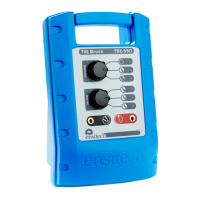

 To Next Page