17
TIG Brush™ Instruction Manual
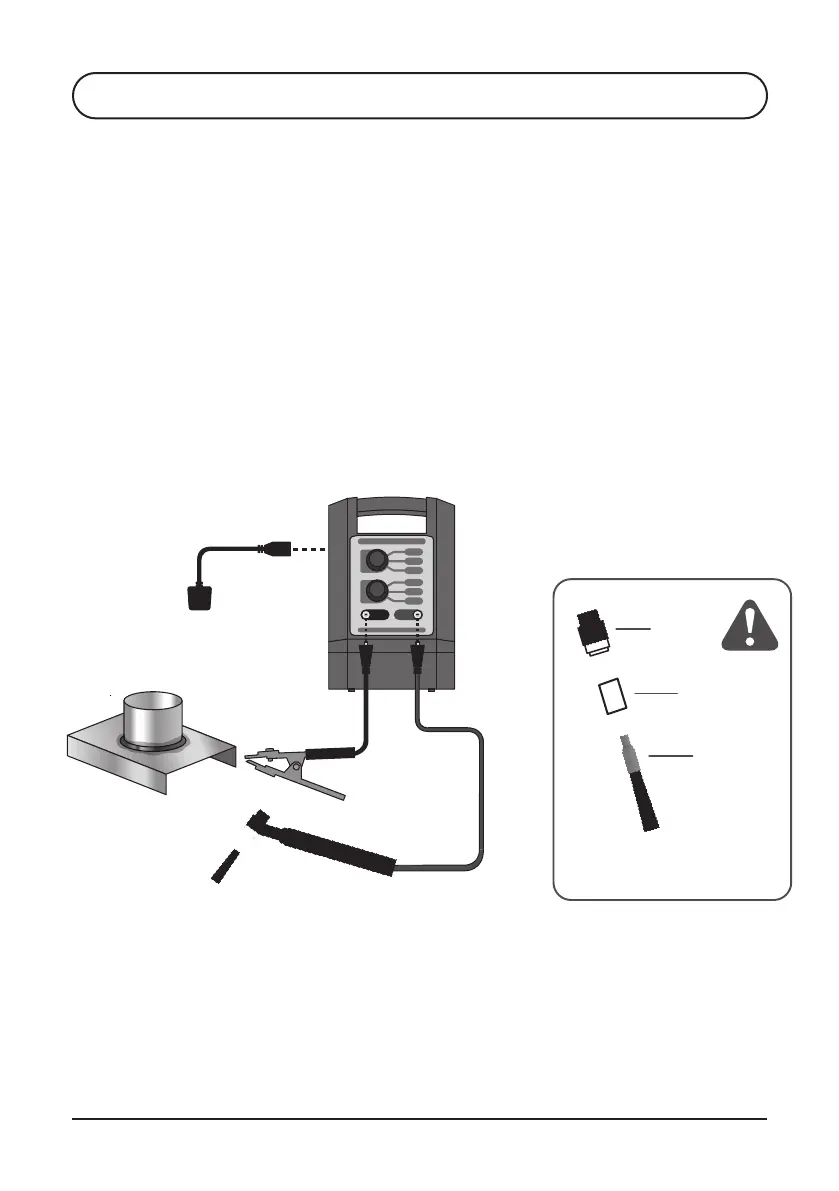
Refer to illustration on page 16.
1. Attach Handle Cable plug to the red socket of the TIG Brush Control Unit
2. Screw Classic Wand into handle of the Handle Cable
3. Place long Shroud on Standard brush and screw into the Classic Wand
FLEXI HANDLE KIT4.2.2
Refer to illustration above.
1. Attach Flexi Handle plug to the red socket of the TIG Brush Control Unit
2. Place long Shroud on Standard brush and screw into the Flexi Handle
3. Attach Ground Cable plug to black Ground Cable Socket of the
TIG Brush Control Unit
4. Attach Ground Cable plug to black Ground Cable Socket of the
TIG Brush Control Unit
5. Set POWER switch on the back of the machine to OFF
6. Attach Power Cord to the Power Socket on the back of the TIG Brush
Control Unit and plug into mains power
7. Attach the Ground Clamp to workpiece
120V AC/230V AC*
Single phase
INSULATING SHROUD
MUST BE USED!
Flexi
Handle
Shroud
Brush
*240V TBX models
S4 OPERATION


 To Next Page