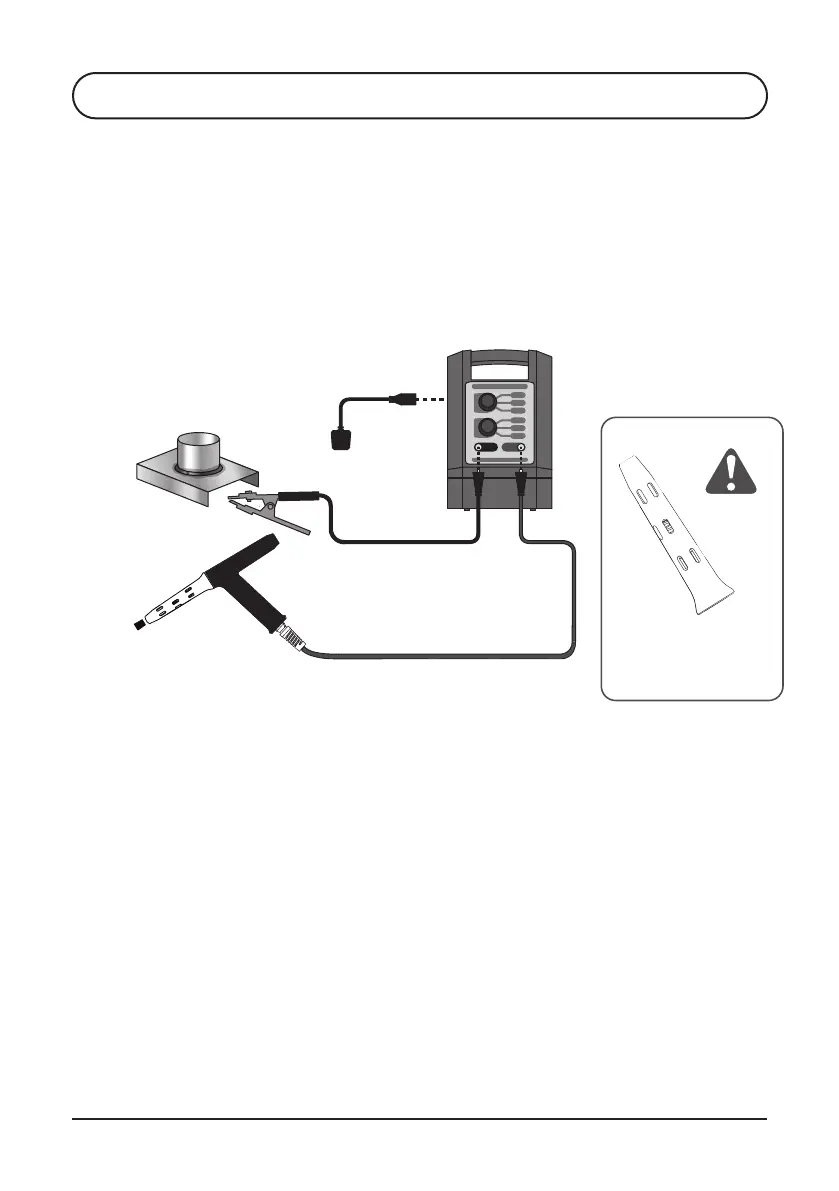
4. Set POWER switch on the back of the machine to OFF
6. Attach the Ground Clamp to workpiece
5. Attach Power Cord to the Power Socket on the back of the TIG Brush
Control Unit and plug into mains power
PROPEL KIT4.2.3
Refer to illustration above.
1. Attach PROPEL Torch plug to the red socket of the TIG Brush Control Unit
2. Rotate Drive Sleeve clockwise until it stops. Do NOT overwind the
Drive Sleeve!
3. Insert the brass end of the PROPEL Torch brush into the nose of the
Shroud until it is seated in the Collet. The brush should slide into the
Collet with minimal resistance
4. Once the brush is seated in the Collet, turn the Drive Sleeve anti-clockwise
half a turn, and lightly pull the brush to ensure it is securely seated
5. Retract the brush back into the Shroud by turning the Drive Sleeve
anti-clockwise, until it leaves approximately 12-15mm (3/8”- 5/8”)
of the brush exposed
18
TIG Brush™ Instruction Manual
Ensitech Pty Ltd
PROPEL Torch insulating
shroud must be used when
operating the PROPEL Torch
Work piece
120V AC/230V AC*
Single phase
*240V TBX models
S4 OPERATION


 To Next Page