S5 POWER AND MODE SETTINGS
MODE SETTINGS5.2
POWER SETTINGS5.1
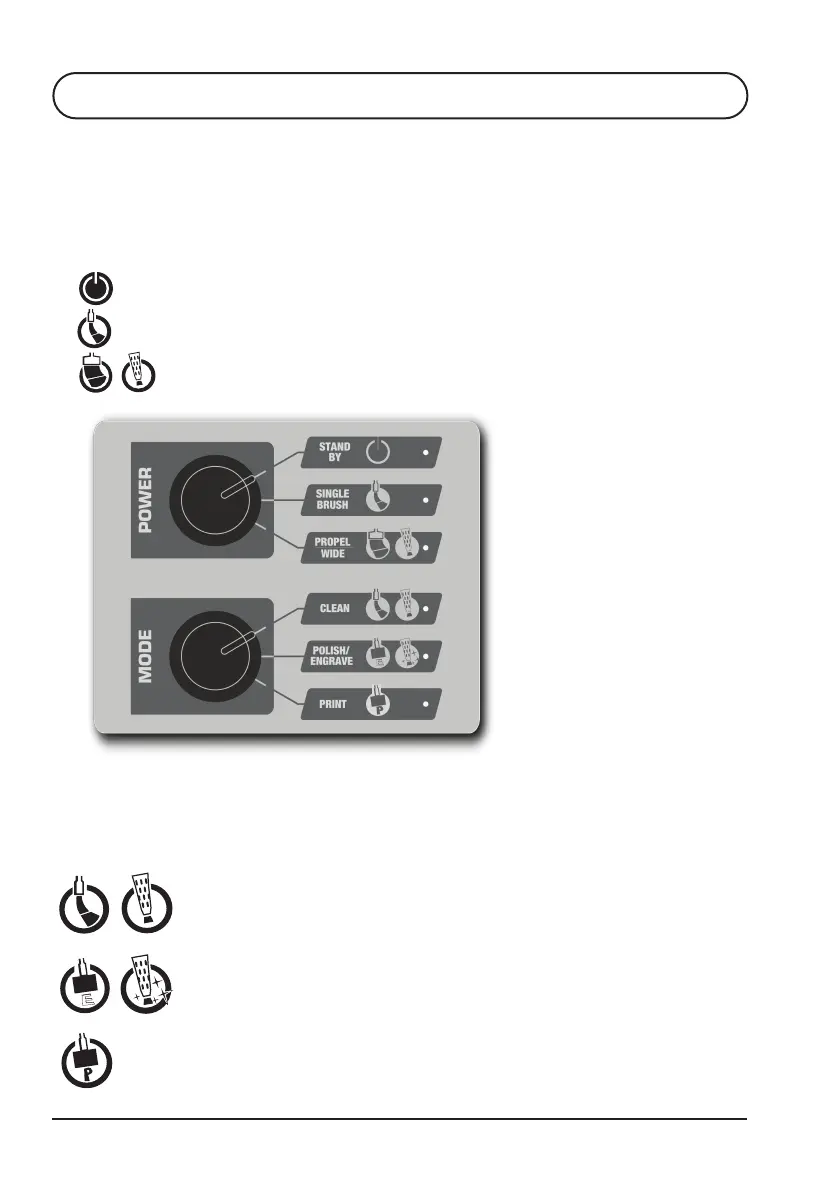
Choose the cleaning intensity required by selecting the
appropriate setting using the Power Control.
STAND BY - Power is not transmitted to the brush.
SINGLE BRUSH - Optimised for use with single brush Classic Wand & Flexi Handle.
PROPEL / WIDE BRUSH - Optimised for use with PROPEL Torch, Dual &
Quad brush accessories & Branding
Choose the action to be performed by selecting the applicable mode with the MODE
switch.
CLEAN
- This mode provides the fastest cleaning at each power setting,
but with prolonged use, may cause the surface to appear milky. Use
POLISH / ENGRAVE mode to rectify.
POLISH / ENGRAVE
- This mode provides metal polishing as well as engraving.
For metal polishing use TB-21 or TB-25. For engraving use TB-95 with the
Branding Kit accessories.
PRINT - This mode provides surface printing when used with TB-90 and the
Branding Kit accessories.
22
TIG Brush™ Instruction Manual


 To Next Page