OPERATION
Blanket Warmer ▪ Oper a tor’s Ma nu al ▪ M N- 46 4 2 7 ▪ Rev 1 ▪ 6/19
26
How to Use the Timer (if equipped)
Before you begin The warmer must be turned on (screen is on).
Background The timer feature allows the user to program the controller to automatically turn
on and off during a 24 hour period. This allows the warmer to turn off at night to
save energy, then turn on automatically in the morning.
Adjusting the
settings
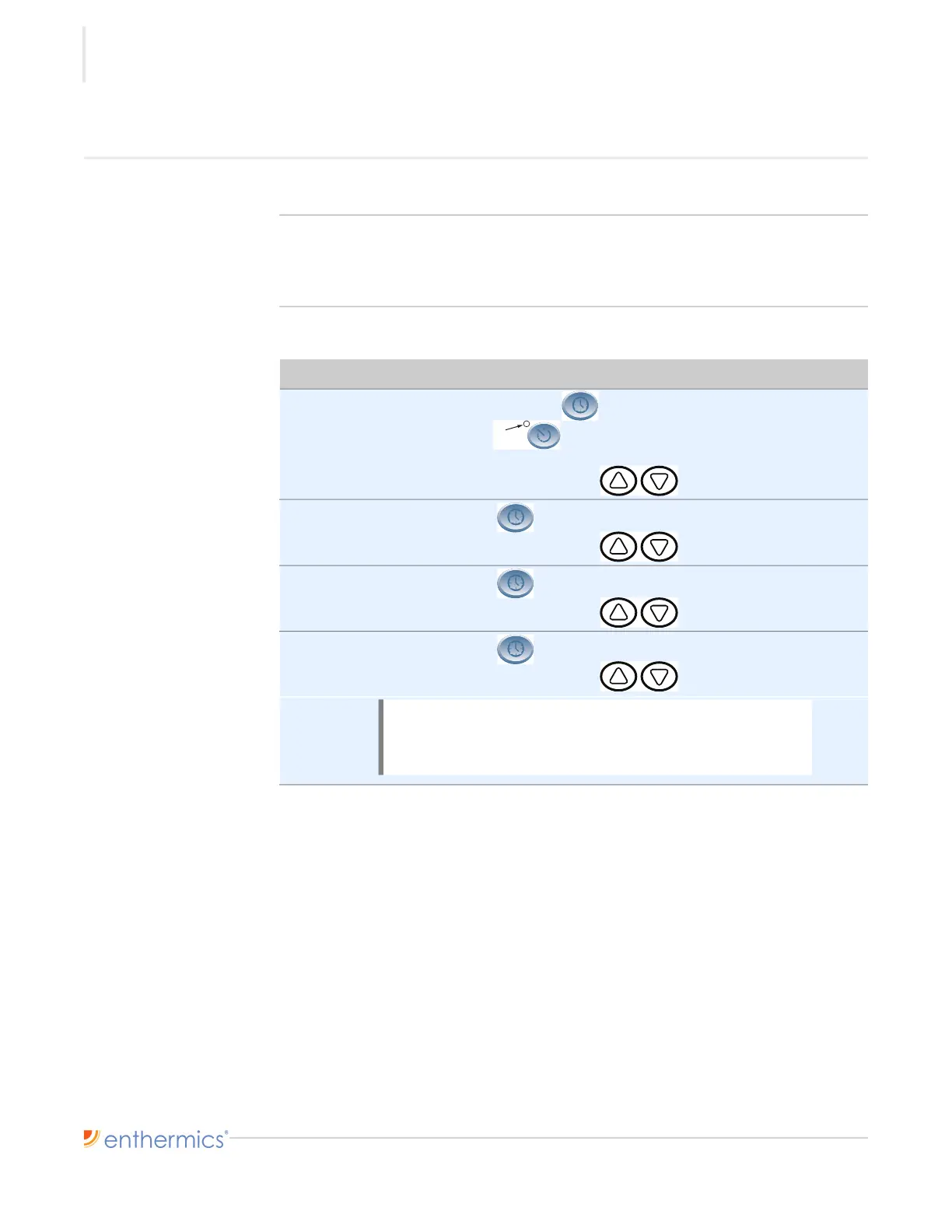
To adjust the timer settings, do the following.
Step Action
1. Press and hold the Time button for four (4) seconds.
The ON/OFF indicator flashes. The screen displays the current
set time.
Press the up and down arrow buttons to change the set time.
2. Press the Time button again to view or set the year.
Press the up and down arrow buttons to change the year.
3. Press the Time button again to view or set the date.
Press the up and down arrow buttons to change the date.
4. Press the Time button again to set the day code (d1–d7).
Press the up and down arrow buttons to change the day code.
Continued on next page
NOTE: Setting the day code is optional unless the user
configures the auto-timer to start or stop at a different
time for each day of the week. Monday=d1, Tuesday=d2,
etc.
ON/OFF
Indicator



 To Next Page