14
ENTR® Dead Bolt User Manual
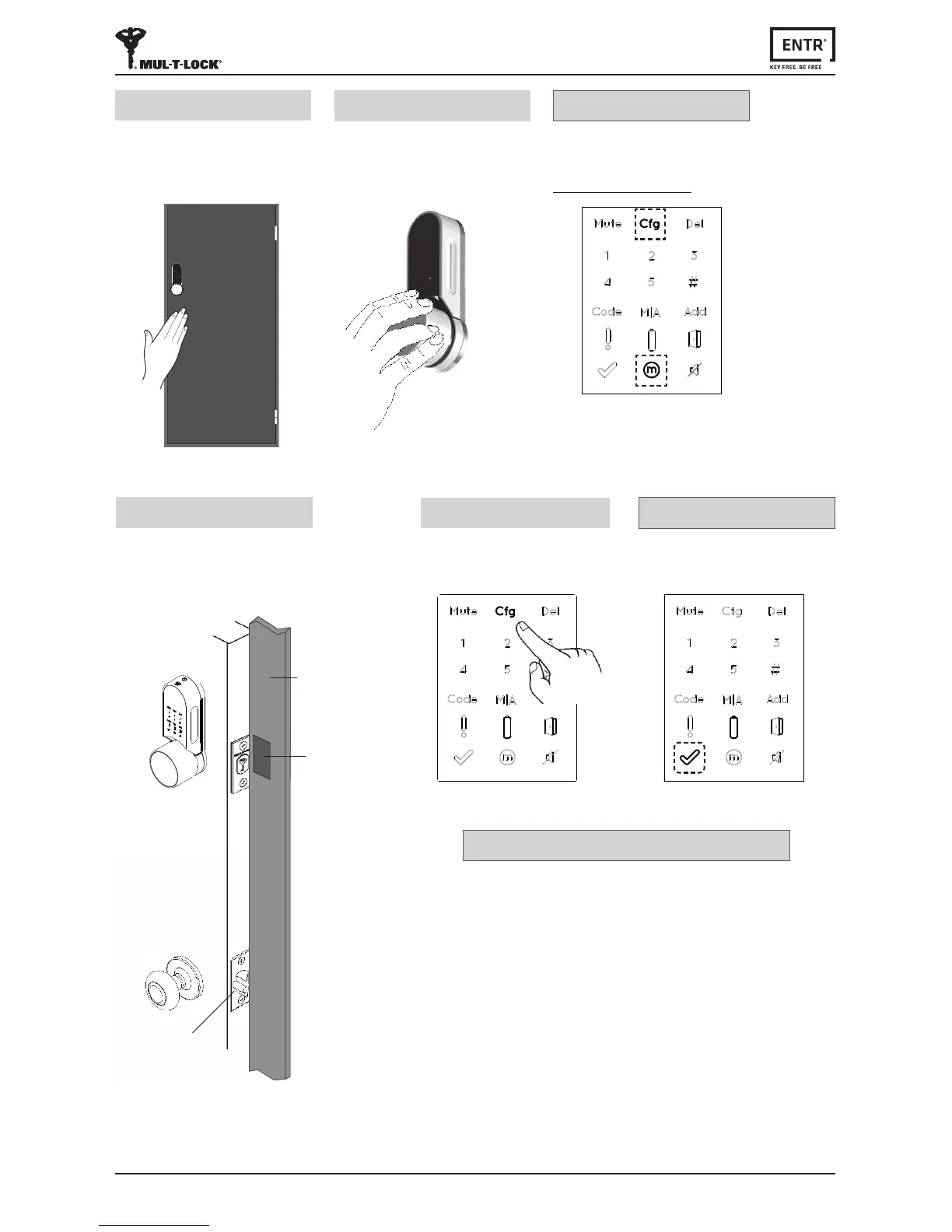
Lock conguraon failed
1. Remove the mechanical key from the lock.
2. Checkthatthedoorwasclosedproperlyorif
lockoperaonwasinterfered.
Troubleshoong #1
Press [Cfg]
The lock will carry out the
conguraonprocess.
8
[OK] Indicaonblinksonce.
2shortbeepsemied,
Illuminatedbuonsturno.
Conguraon OK
[Manual] indicaonilluminated.
[Cfg] indicaonblinks.
Note:Iftheconguraonfails
refertotroubleshoong#1
Conguraon OK
Hold the door shut to avoid opening.
The lock will carry out the
conguraonprocess.
Ittake's15-20secondstocomplete.
6
Openthedoorusingthehandle.
Bringthelatchascloseaspossibleto
thedoormolding.
Note: Do not shut the door.
7
Door
moldings
Latch
Magnet
[Cfg] indicaonblinks.
Turn the knob manually to unlock
posionandkeepthedoorclosed.
Push on [Cfg]
7



 To Next Page