27
ENTR® Dead Bolt User Manual
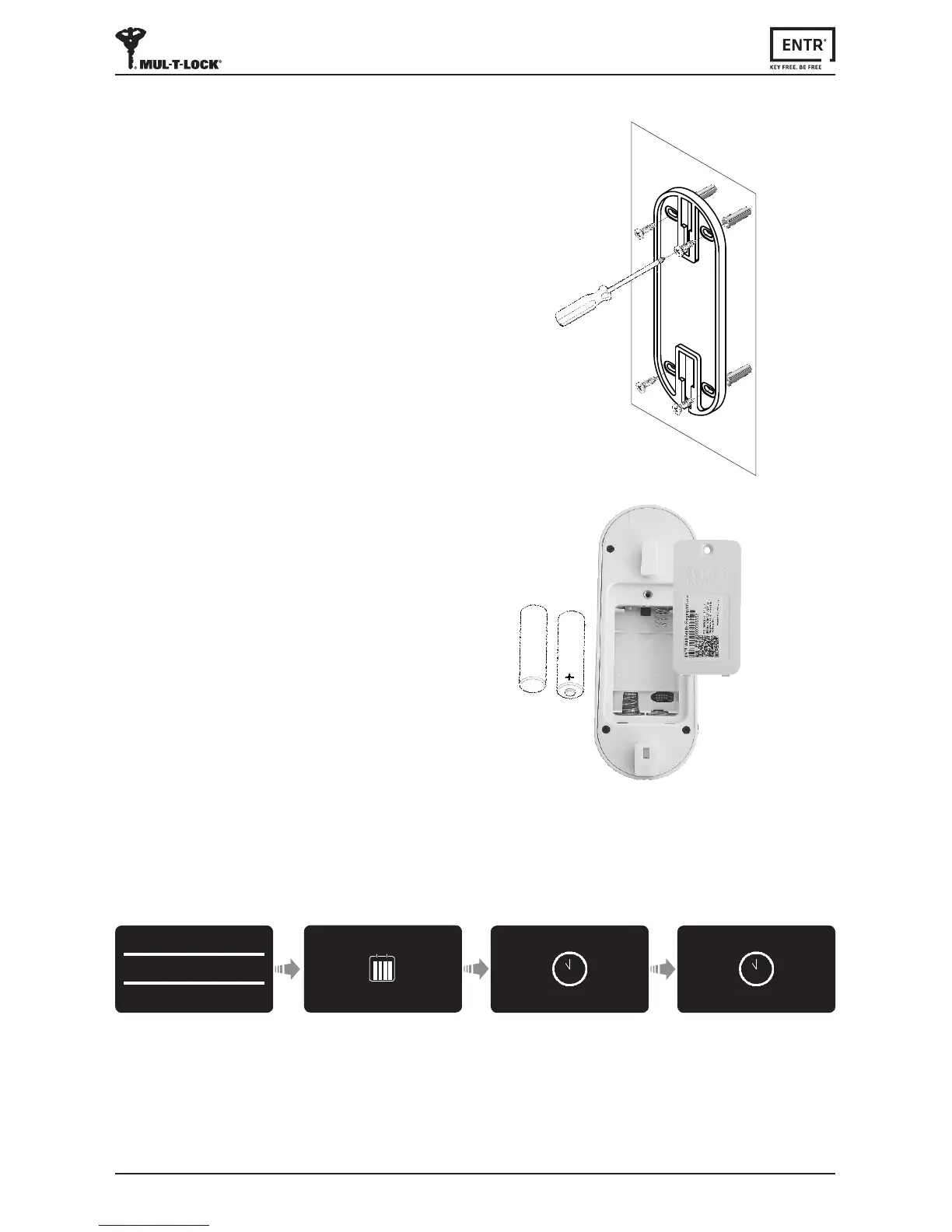
6.1 Mounng the Fingerprint Reader
Priortostarng,selectthelocaonwhere
theFingerprintReaderistobemounted.
Avoiddirectsunlighttothefrontpanel.
• AachtheFingerprintReaderbaseplate
to the wall.
• Use 4 screws and screw anchors or
doublesidedgluedtape.
6.2 Baery Replacement
1. Usinga2mmAllenkeyreleasethelid
screw and open the lid.
2. Insertbaeries(2xAA)accordingtothe
"+""-"signs.GreenLEDwillilluminate
for 2 seconds.
3. Closethelidandghtenthescrew.
4. Press [#] for 5 seconds.
6. Fingerprint Reader
Thereaderwillselfcalibrate,whichwillbefollowed
byaseriesofbeepsandblinkingLEDs.
DEVICE
DATE/TIME
--/--
hh:mm
39
6
12
1
2
4
57
8
10
11
Enter Time
Press [OK]
Enter Date
Press [OK]
--/--/--
DD/MM/YY
15/03/15
11:00
39
6
12
1
2
4
57
8
10
11
Press [OK]
6.3 Adjust Date & Time



 To Next Page