6
ENTR® Dead Bolt User Manual
1.3 Prior to Installaon
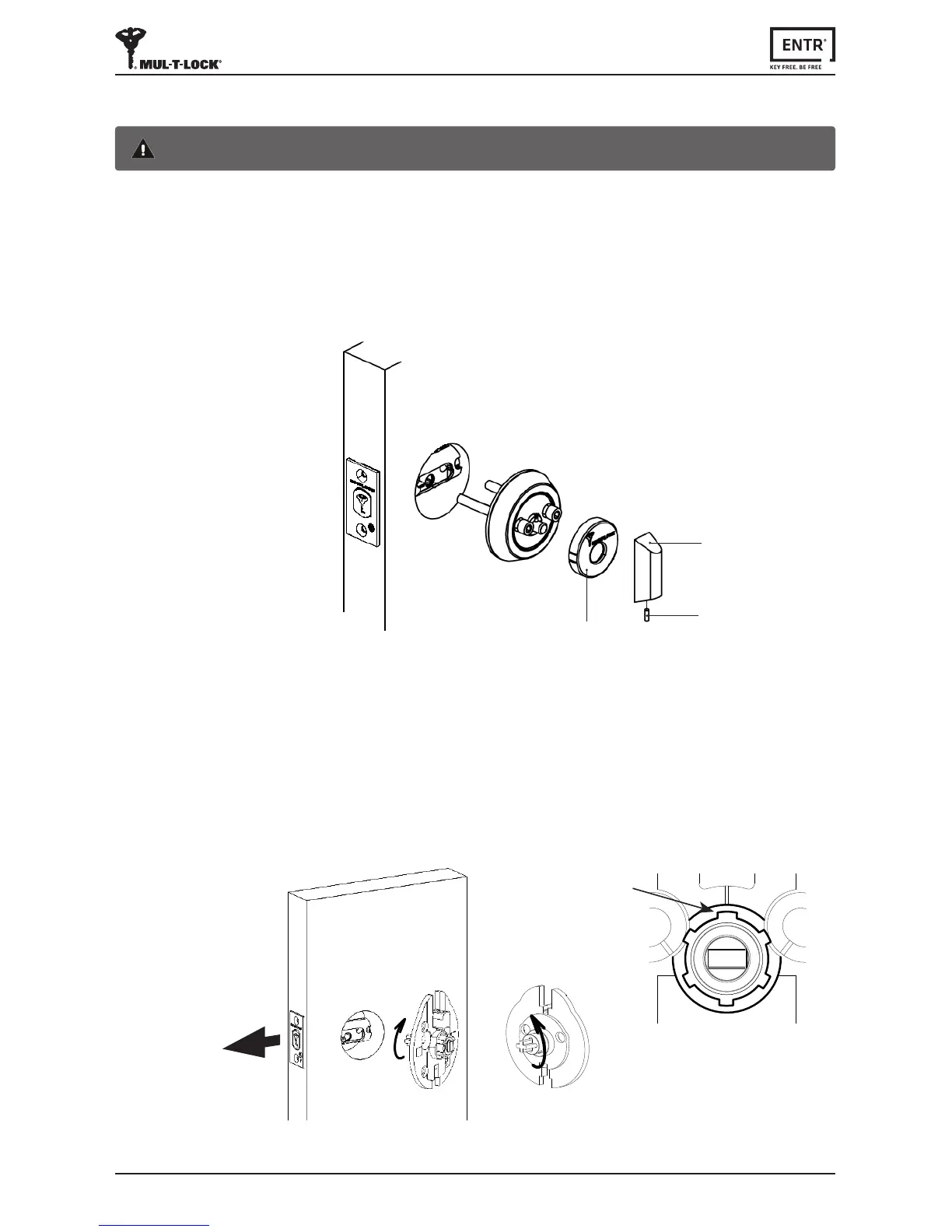
• Priortoinstallaoncheckboltlockingdirecon.
• Verifythattheboltisinopenposion(boltinsidethedoor,unlocked).
• Rotateadaptertail-pieceoppositetotheboltlockingdireconunlstopped(see
belowdrawing#1).
• Verifythatthewideteethispoinngup.Ifnotrotatetheexternalringunlthe
wideteethwillpointup(seebelowdrawing#2).
1.4 Unit Installaon
Warning:Donotaempttooperatetheunitunlassembledintothedoor
• Removeknobscrewusing1/16"Allenkeyandtaketheknobout.
• Useaatscrewdrivertoremovethecover.
• RemovebothAllenscrewsenrelyandremoveinternalmechanism.
Note:Whileremovingtheinternalmechanismsecuretheoutsidecylinderfrom
falling.Considerusingmaskingtapeorsimilar.
Knob
Knob screw
Cover
Boltlockingdirecon
Rotate adapter tail piece opposite
totheboltlockingdirecon
Wide teeth
Drawing#1
Drawing#2



 To Next Page