36
ENTR® Dead Bolt User Manual
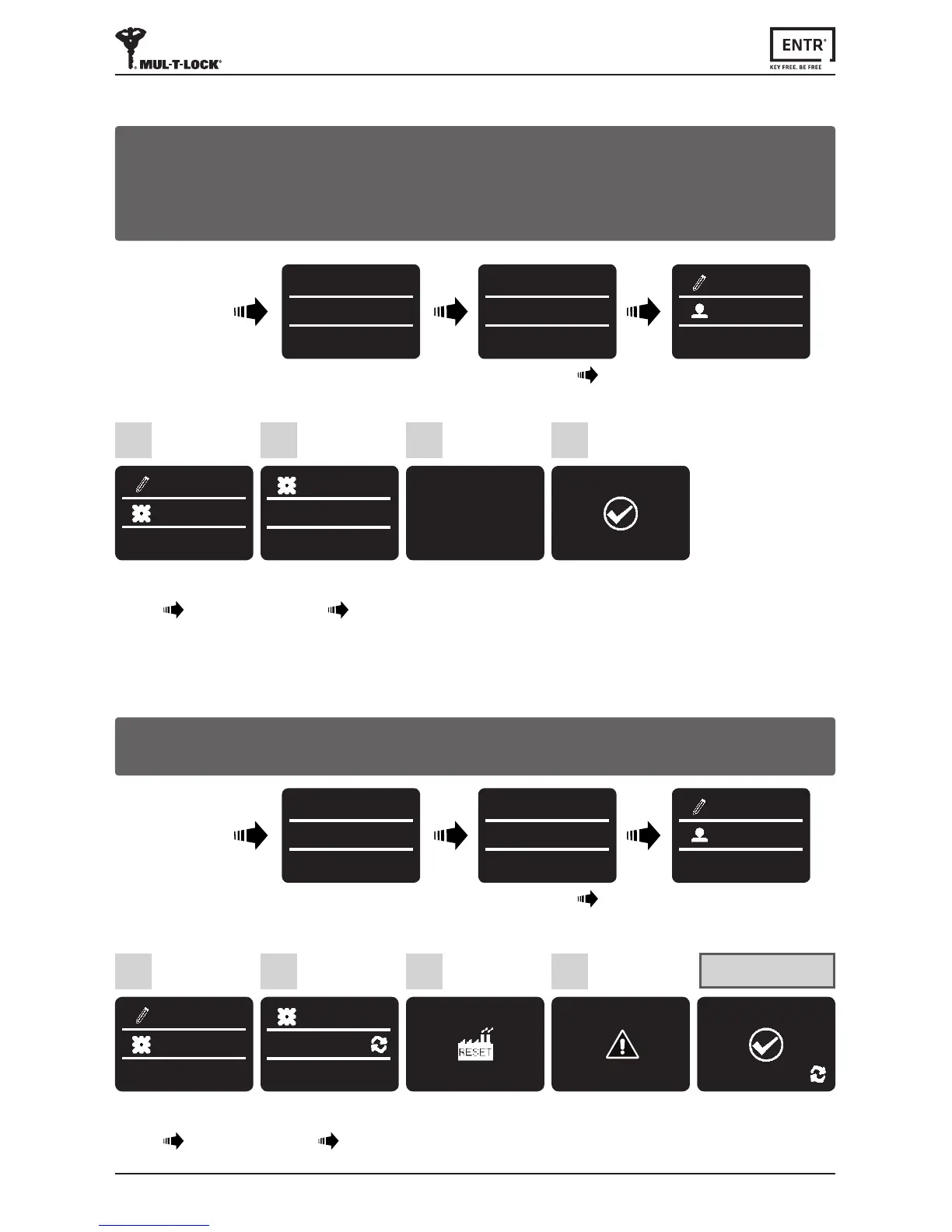
6.17 Factory Reset
Press [OK]
4
SURE?
*-NO OK-YES
Use [8
▼
] or [2
▲
] to
select:
[DEVICE] [OK]
1
SETTING
DEVICE
Use [8
▼
]
or [2
▲
] to
select:
[FACTORY] [OK]
2
DEVICE
FACTORY
Press [OK]
3
RESET?
*-NO OK-YES
Twobeepsemied.
GreenLEDilluminates.
Factory reset
SUCCESS
FACTORY
Warning: A factory reset acon will delete all informaon stored in the memory,
including users and paired locks.
Touch screen
USER CODE
23:49 03/01
MASTER CODE
******
23:49 03/01
SETTING
USERS
Press [
*
]
Enter [Master PIN Code] [OK] or
swipengeroverngerprintscanner.
6.16 Double Security
4
Use [8
▼
] or [2
▲
] to
select:
[DEVICE] [OK]
1
SETTING
DEVICE
Use [8
▼
]
or [2
▲
] to
select:
[2
x
Security] [OK]
2
DEVICE
2
x
Security
Press [OK]
3
ENABLE?
*-NO OK-YES
Twobeepsemied.
GreenLEDilluminates.
2
x
Security
ON
Aeracvangthedoublesecurityoponusebothmethods-swipingangerprint
andinserngaPINcodetounlockthedoor.
Note:Usersetupwithonlyoneofthesengs(ngerprintorPINcode)willnotbe
able to unlock the door.
Touch screen
USER CODE
23:49 03/01
MASTER CODE
******
23:49 03/01
SETTING
USERS
Press [
*
]
Enter [Master PIN Code] [OK] or
swipengeroverngerprintscanner.



 To Next Page