39
IP2045EN - 2014-09-22
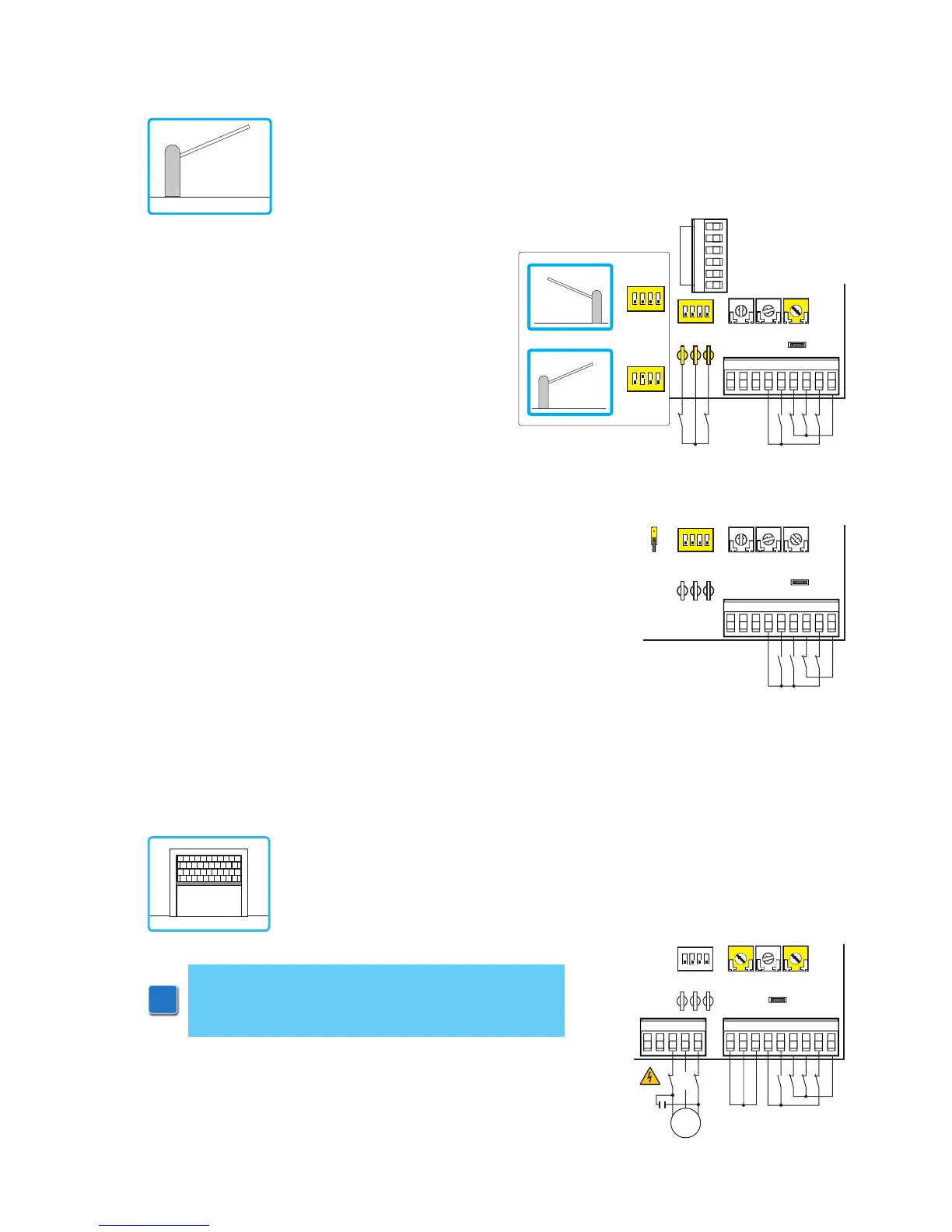
When the control panel is used in applications for rolling shutters:
- set JR6=ON
- connect the N.C. limit switches in succession to the motor phases
- make a jumper with the terminals 0-11-12.
13. Application example for rolling shutters
(Example 1). Connect opening and closing limit
switches N.C. contacts to plug 12-0-11.
(Example 2). Control N.C. 1-6 (safety stop) can
be changed into control N.O. 1-4 (closing) setting
6→4=OFF.
To have the barrier close again soon after transit
between the photocells (or other safeties con-
nected to 1-8), set DIP3=OFF.
NOTE: if the control panel is used in the hold to
run mode, disconnect terminal 9 (see example 1
in Section 14).
12. Application example for barriers
R1
TC TM
JR6
12
12 011
11 01568941
1
ON
234
Limit switch
NCUWV
com
M1
1~
When control panel is used for barriers operations:
- set RF=CT-5 (MAX);
- set TM=MAX;
- set JR6=ON;
- select the proper opening direction by means of DIP2.
R1
RF=CT-5
MAX
TC TM
12
12 011
11 01568941
1
ON
234
Limit switch
Limit switch
DIP2=OFF
DIP2=ON
1
ON
234
1
ON
234
JR6
CT
1
2
3
4
5
R1


 To Next Page