31
IP2045EN - 2014-09-22
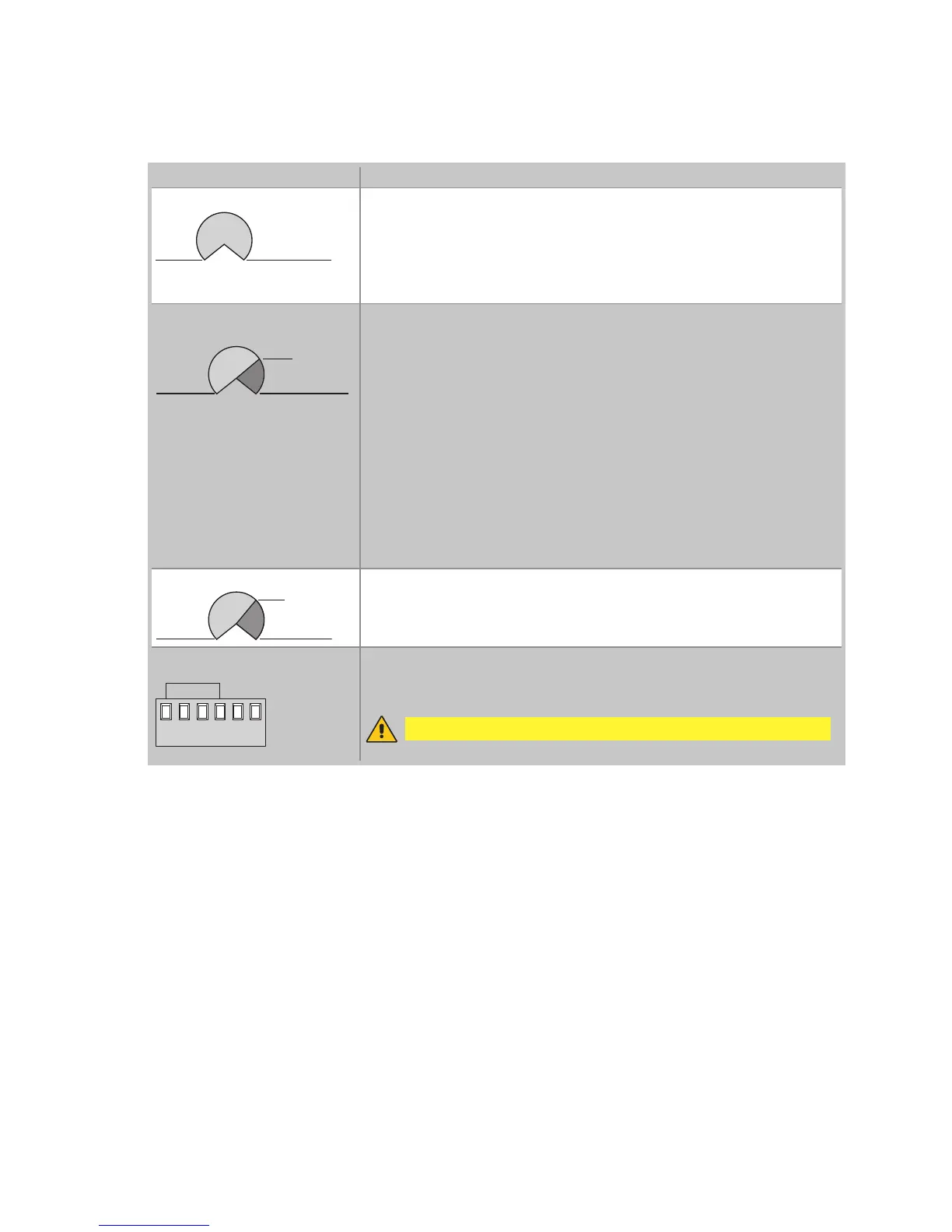
Trimmer Description
R1
MAX=disabled
MIN
Setting obstacle thrust.
The control panel is equipped with a safety system that stops motion if an
obstacle is encountered during an opening operation and either stops or
reverses motion during a closing operation.
R1=MIN gives maximum obstacle sensitivity (minimum thrust).
R1=MAX disables detection (maximum thrust).
TC
MIN=0 s MAX=disabled
120 s
Setting automatic closing time.
From 0 to 120 s.
With TC=MAX, the automatic closing is disactivated.
The count begins from the blocking of the automation, for the time set by
the TC.
With DIP3=OFF, once a safety switch has been activated, the counter starts
as soon as the safety switch is released (for example, after passing through
the photocells), and lasts for a period of time set with TC (50%). Note: with
DIP3=OFF and 6→4=OFF, the automatic closing is immediate.
With DIP3=ON, the counter starts when automation is opened and lasts for
the entire duration set with TC (100%).
NOTE: after the activation of the stop command, once contact 1-9 has clo-
sed again, the automatic closing is only activated after a total or step-by-
step opening command.
TM
MIN=10 s MAX=120 s


 To Next Page