Operations Manual
7. CONTROL UNIT OPERATION — TYPE 1 AND
TYPE 2
Envirotainer RKN e1 Container
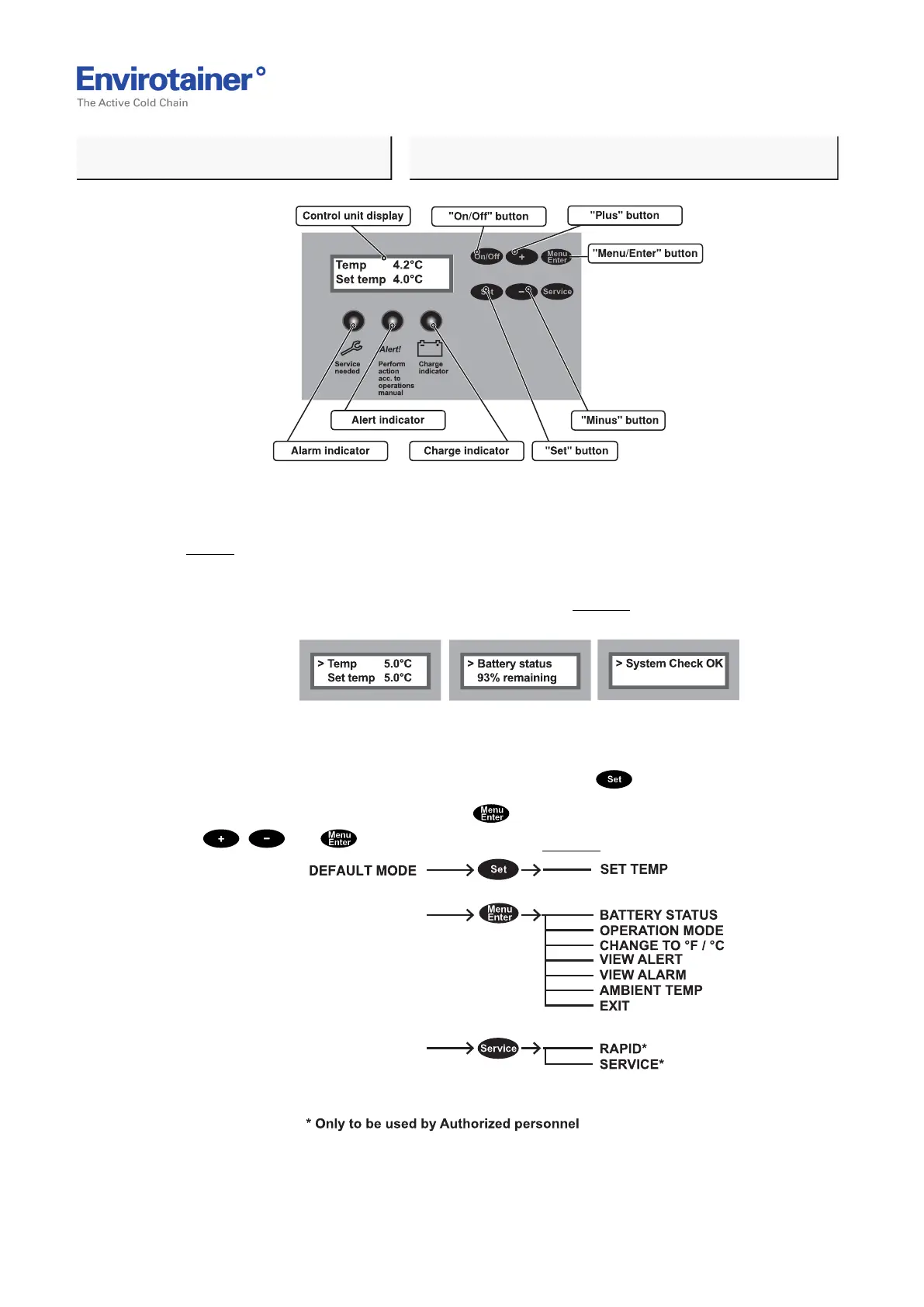
Fig. 9
2. Ensure the indicators are switched off and the default mode is visible on the display
(Fig. 9 ).
• The default mode toggles between showing "Temp X.X°C Set temp X.X°C", "Battery
status: XX% remaining" and "System Check OK" (Fig. 10 ) (provided that no alert or
alarm is active).
Fig. 10
• The control unit type 1 has three buttons for settings and information.
• The container set temperature mode is reached via the .
• The control unit menu is reached via and includes settings and information. Use
, and to navigate in the menu (Fig. 11 ).
Fig. 11
Doc No. MO-RKN-3009
Version 2.2: 2017-08-31 18 (42)



 To Next Page