Pulse oximeter MySign
®
S
6.7.1 Alarm limits
The alarm limits are the upper and lower limits for SpO2 and pulse such that an integrated signal device will
indicate an alarm if the values are outside of this range.
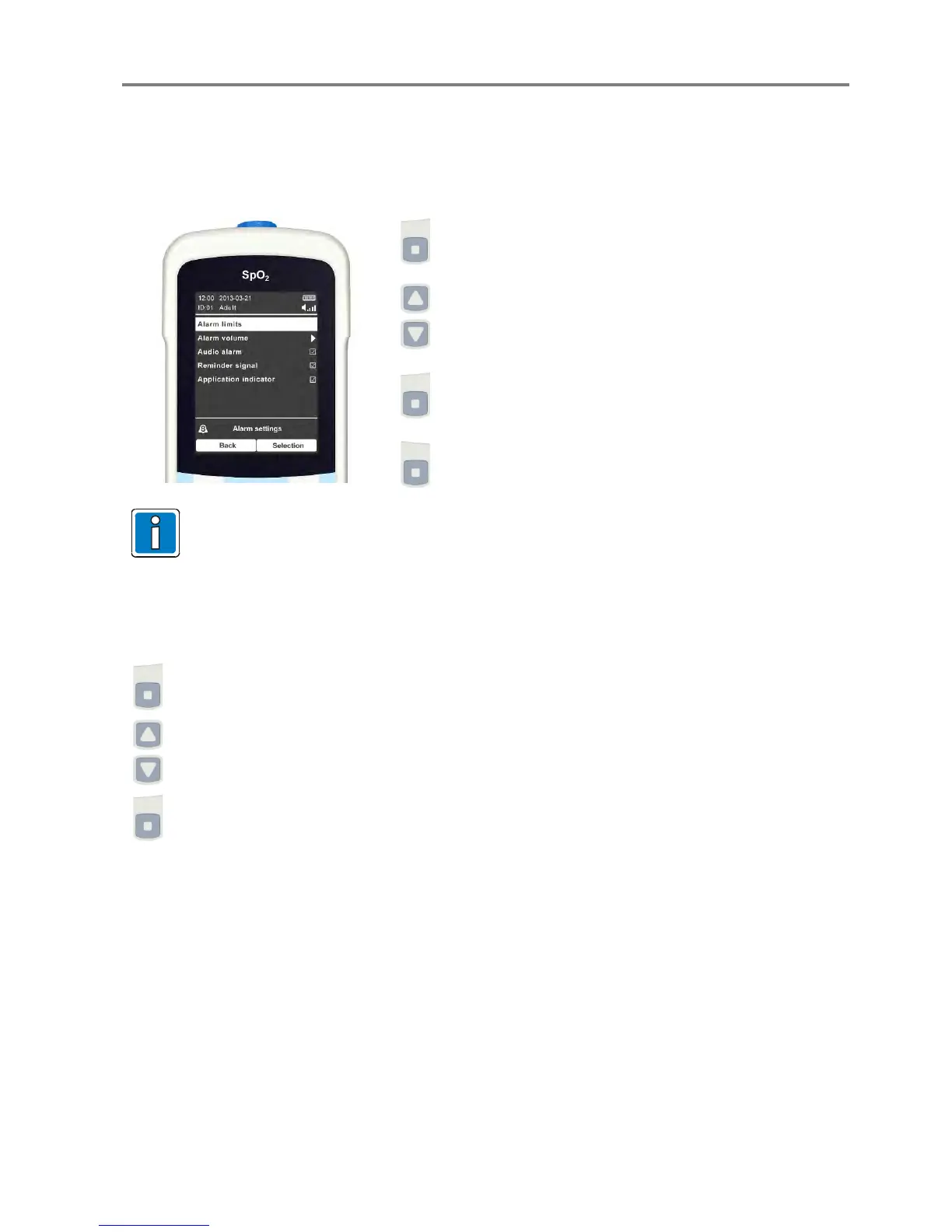
Select “Alarm limits” from the “Alarm settings” menu using
the select key.
The value can be changed by pressing the select key.
Switch to the next value by pressing the function key “Next”.
At the last value (lower pulse alarm limit), all changes are
confirmed and accepted with “OK”.
You can move back one step with the function key “Back”
until eventually leaving the alarm settings.
The alarm limits can also be changed with the function key 1 (left) “Alarm limits”.
6.7.2 Alarm volume
This function can be used to individually adjust the volume for the audio alarms and reminder signal.
Select “Alarm volume” from the “Alarm settings” menu.
Use the selection keys to adjust the alarm volume.
Then confirm by pressing the right function key.
066-07-1002197_GA_MySignS_FDA / 06.14 31


 To Next Page