EasyManua.ls Logo

Epever DR3210N-DDS - Page 25

Epever DR3210N-DDS
44 pages
Print Icon
To Next Page IconTo Next Page
To Previous Page IconTo Previous Page
Loading...
21
blink.
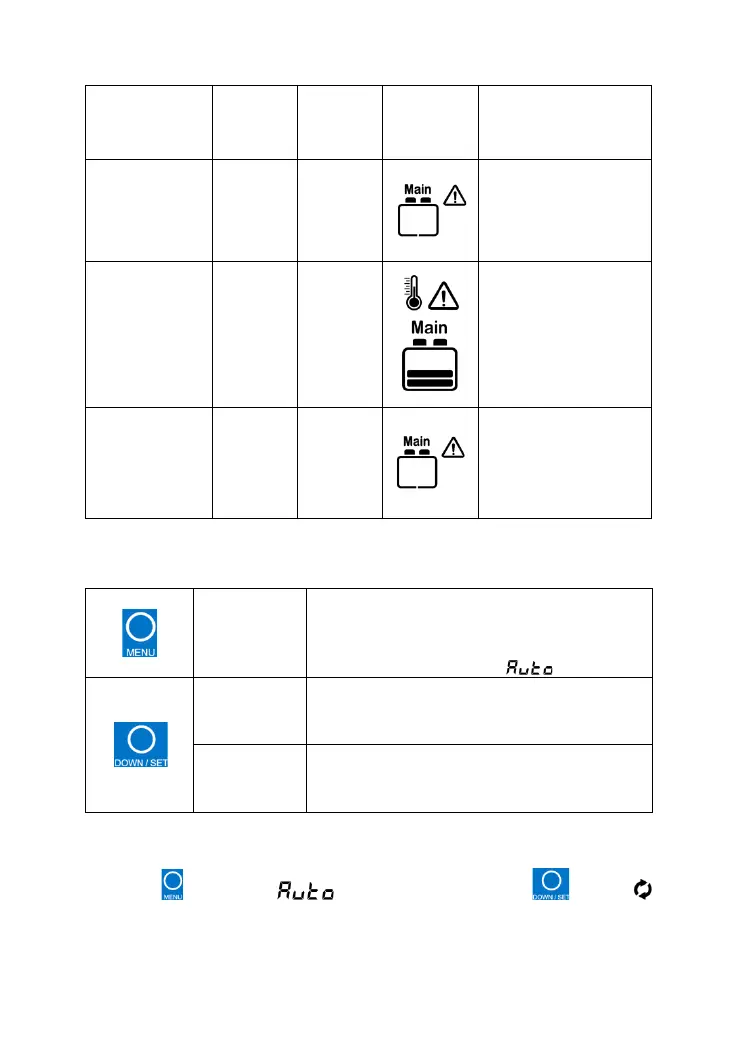
BATT1
over-discharge
d
——
——
Battery capacity
shows empty, battery
frame blink, fault icon
blink.
BATT1 over
temperature
Red
Fast
flashing
——
The battery frame,
fault icon, the
temperature icon, the
temperature value,
and the temperature
unit is blinking.
BATT1
system voltage
error
Red
Fast
flashing
Green
Fast
flashing
Battery capacity
shows empty, battery
frame blink.
Fault icon blinks, and
battery frame blink
No alarm for system voltage error when BATT1 is a lithium battery.
Buttons
Press the
button
Parameters of PV array
Parameters of BATT1
Parameters of BATT2
Auto global browsing mode( )
Press the
button
Browse the PV array parameters
Browse the BATT1 parameters
Browse the BATT2 parameters
Press the
button and
hold on 5s
Select the temperature unit
Select the battery type
(1) Auto global browsing mode
Operation:
Press the button until is appear. Then press the button,
appears. Now it is set as auto global browsing mode.

Related product manuals