8
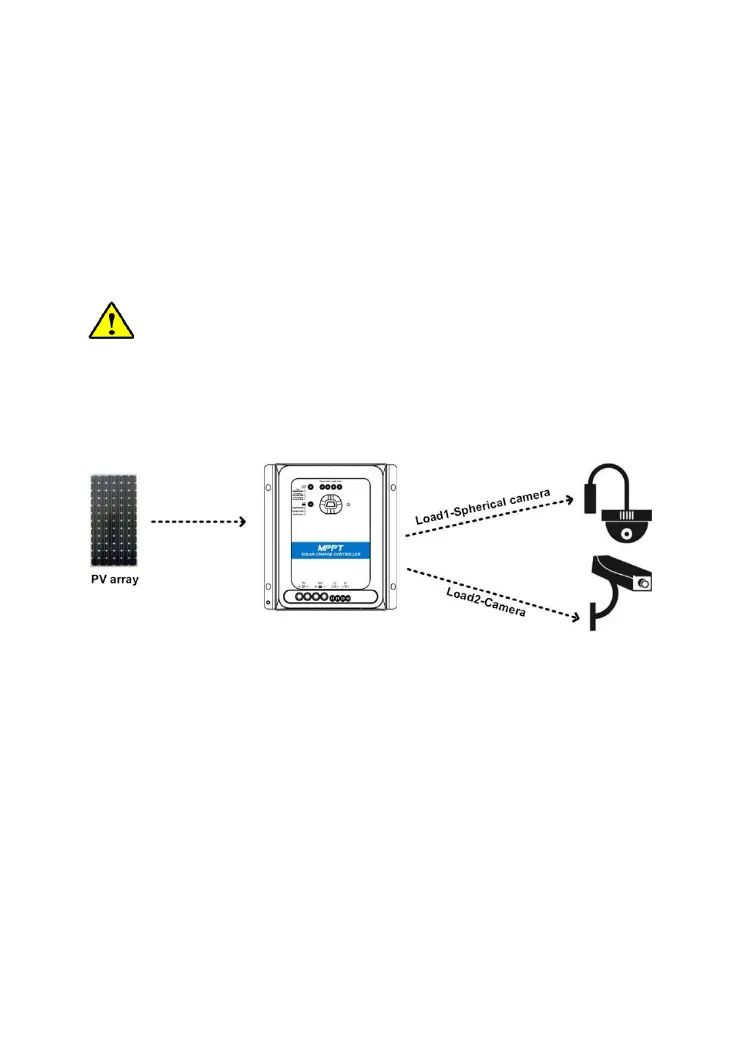
1.4.2 No-battery mode
Set the rated voltage level of the battery to auto recognition mode through the below
methods; the controller will work in no-battery mode (it also can work in battery
mode). In no-battery mode, the PV array will power the load directly.
1) In the [Control Parameter] interface of PC software, select "Self-recognition" for
[Rated Voltage Level] parameter.
2) Set the rated voltage level to [self] through the remote meter. Detail settings refer to
the MT92 user manual.
CAUTION:
1. Only when the power of the PV array is greater than the total power of the load
and the load power does not change drastically; the load will work normally.
2. In the condition of two-way load, when the power of the PV array is lower than the
total power of the loads but can meet the power of load 2, the output of load 2 is
given priority. Load 1 will be turned off and restarted every 30 minutes until it can
work normally.




 To Next Page