27
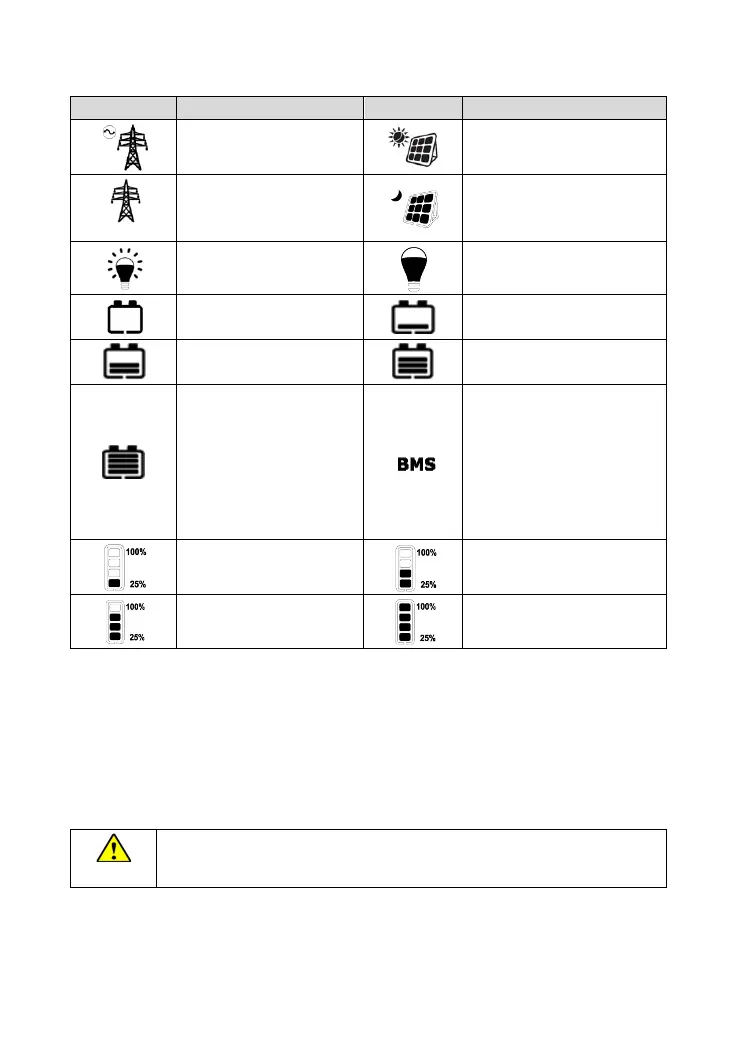
Symbol definition
Utility connected and
charging
PV connected and charging
2. Utility connected, but no
charge
2. PV connected, but the
voltage is low
Battery capacity
①
lower
than 15%
①
Battery capacity
①
40%~60%
Battery capacity
①
60%~80%
Battery capacity
①
80%~100%
Symbol ON: Battery with BMS
Symbol OFF: Battery without
BMS
Attention
:Please follow the
BMS control logic to set
parameters when the battery
with BMS.
① After the inverter/charger is powered on for the first time, the battery capacity displayed on the
LCD may be inaccurate. To display the available battery capacity accurately, the below process
of self-calibration and self-learning is necessary.
When the battery voltage reaches the low voltage disconnect voltage or reaches the float
charging voltage, the inverter/charger calibrates the battery capacity for the first time.
When the battery goes from the over-discharged state to the fully-charged state, the
inverter/charger calibrates the battery capacity again.
When the connected lithium battery (with BMS) is equipped with a battery capacity
display, the lithium battery capacity will be displayed as per the BMS.




 To Next Page